

3.6.04 MC_CamTableSelect
Last modified by xingzhi lin on 2025/12/04 18:51
Specify a cam table to use with MC_CamIn instruction.
Instruction format
| Instruction | MC_CamTableSelect(FB) | |
| Name | Cam table specified | |
| Graphical performance | ST performance | |
| MC_CamTableSelect( Master: =, Slave: =, CamTable =, Execute: =, Periodic: =, MasterAbsolute: =, SlaveAbsolute: =, Done=>, Busy=>, Error=>, ErrorID=>, CamTableID=>); | |
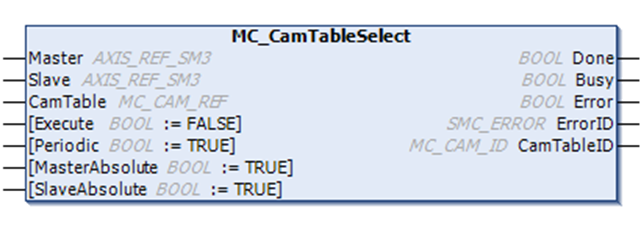
Related variables
| Input and output variables | Name | Data type | Effective range | Initial value | Description |
| Master | Master axis | AXIS_REF_SM3 | - | - | Map to a main axis, an instance of AXIS_REF_SM3 |
| Slave | Slave axis | AXIS_REF_SM3 | - | - | Map to a slave axis, an instance of AXIS_REF_SM3 |
| CamTable | Select table | MC_CAM_REF | - | - | Map to a CAM table description, i.e., an instance of MC_CAM_REF |
| Input variables | Name | Data type | Effective range | Initial value | Description |
| Execute | Execution | BOOL | [FALSE, TRUE] | FALSE | Rising edge signal, execute instruction |
| Periodic | Repetitive mode | BOOL | [FALSE, TRUE] | FALSE | Specify whether to execute the specified cam table repeatedly or only once. TRUE: Repeat, FALSE: Not repeated |
| MasterAbsolute | Master axis absolute mode | BOOL | [FALSE, TRUE] | FALSE | Specify how the master axis tracks distance coordinate system. 1: absolute position, 0: relative position |
| SlaveAbsolute | Slave axis absolute mode | BOOL | [FALSE, TRUE] | FALSE | Combined with StartMode in the MC_CamIn instruction, specify whether the current instruction position from the axis is absolute (cam table output value corresponding to the current master axis position) or relative (cam table output value from the axis position when the instruction starts superposition) 1: absolute position, 0: relative position |
| Output variables | Name | Data type | Effective range | Initial value | Description |
| Done | Completed | BOOL | [FALSE, TRUE] | FALSE | TRUE when selection complete |
| Busy | Execution flag | BOOL | [FALSE, TRUE] | FALSE | TRUE when the instruction is being executed |
| Error | Error | BOOL | [FALSE, TRUE] | FALSE | When an error occurs, set to TRUE |
| ErrorID | Error ID | SMC_ERROR | Refer to SMC_ERROR | 0 | When an error occurs, the error ID is output. |
| CamTableID | CAMID in effect | MC_CAM_ID | - | - | Select the active Cam_ID to use with the CamTableID in the MC_CamIn instruction |
Function description
- This instruction specifies the cam table required for electronic cam operation, so edit the cam table (cam editor or online) before using this instruction.
- When Execute meets rising edge, Execute the specified cam table, or refresh the specified cam table after the cam table is updated.
- When the Done signal output is TRUE, the output variable "CamTableID" is generated and takes effect.
- During instruction execution, the Busy signal outputs TRUE, the Done signal is TRUE, and the Busy signal is FALSE.
- For the specific functions of MasterAbsolute, SlaveAbsolute, and Periodic parameters, refer to MC_CamIn instruction details.
Error description
- The master axis and the slave axis cannot be specified as the same axis, otherwise there will be an error output;
- The editing of the cam table corresponding to the CamTable needs to be correct, otherwise the error will occur.