

12 Character String Instruction
LEN/Length detection of string
LEN(P)
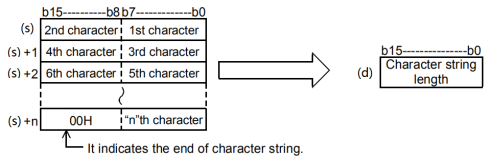
Detect the length of the string specified in (S), and store it after the device number specified in (d).
Data from the device number specified in (s) to the device number storing 00H is treated as a character string.
-[LEN (s) (d)]
Content, range and data type
| Parameter | Content | Range | Data type | Data type (label) | Custom variable type |
|---|---|---|---|---|---|
| (s) | String or start number of device that stores string | - | String | ANYSTRING_SINGLE | -- |
| (d) | Device number that stores the detected string length | - | Signed BIN16 bits | ANY16 | INT |
Device used
| Instruction | Parameter | Devices | Index modification | Pulse expansion | |||||||||||||||||||||||
|---|---|---|---|---|---|---|---|---|---|---|---|---|---|---|---|---|---|---|---|---|---|---|---|---|---|---|---|
| X | Y | M | S | SM | T(bit) | C(bit) | LC(bit) | HSC(bit) | D.b | KnX | KnY | KnM | KnS | T | C | D | R | SD | LC | HSC | K | H | E | [D] | XXP | ||
| LEN | Parameter 1 | ● | ● | ● | ● | ● | ● | ● | ● | ● | ● | ● | |||||||||||||||
| Parameter 2 | ● | ● | ● | ● | ● | ● | ● | ● | ● | ● | |||||||||||||||||
Function
Detect the length of the string specified in (S), and store it after the device number specified in (d).
Data from the device number specified in (s) to the device number storing 00H is treated as a character string.
Error code
| Error code | Content |
|---|---|
| 4085H | (s) read address exceeds the device range. |
| 408AH | The length of the read string of (s) exceeds the limit, and the continuous length of the string exceeds 400 characters. |
| 408BH | When (s) reading a character string, the maximum range of the device is read, but 00H is not found as the end. |
| 4086H | When using offset, the offset address of (d) exceeds the device range. |
Example
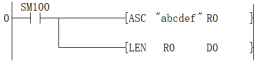
As shown in the above ladder program:
Use the asc command to write the string abcdef to the address starting from R0.
Then use LEN command to determine the length. At this point, D0 will display 6.
LEFT/Extracting from the left side of the string
LEFT(P)
For the character string data stored after device number specified in (s), ( n) Character data starting from the left side of the string (the start of the string) is stored after device number specified in (d).
-[LEFT (s) (d) (n)]
Content, range and data type
| Parameter | Content | Range | Data type | Data type (label) | Custom variable type |
|---|---|---|---|---|---|
| (s) | String or start number of device that stores string | - | String | ANYSTRING_SINGLE | -- |
| (d) | Store the start number of the device of the string of (n) character starting from the left side of (s) | - | String | ANYSTRING_SINGLE | -- |
| (n) | Number of characters extracted | 1 to 400 | Signed BIN16 bits | ANY16 | INT |
Device used
| Instruction | Parameter | Devices | Index modification | Pulse expansion | |||||||||||||||||||||||
|---|---|---|---|---|---|---|---|---|---|---|---|---|---|---|---|---|---|---|---|---|---|---|---|---|---|---|---|
| X | Y | M | S | SM | T(bit) | C(bit) | LC(bit) | HSC(bit) | D.b | KnX | KnY | KnM | KnS | T | C | D | R | SD | LC | HSC | K | H | E | [D] | XXP | ||
| LEFT | Parameter 1 | ● | ● | ● | ● | ● | ● | ● | ● | ● | ● | ● | |||||||||||||||
| Parameter 2 | ● | ● | ● | ● | ● | ● | ● | ● | ● | ● | |||||||||||||||||
| Parameter 3 | ● | ● | ● | ● | ● | ● | ● | ● | ● | ● | ● | ● | |||||||||||||||
Function
For the character string data stored after device number specified in (s), ( n) character data starting from the left side of the string (the start of the string) is stored after device number specified in (d).
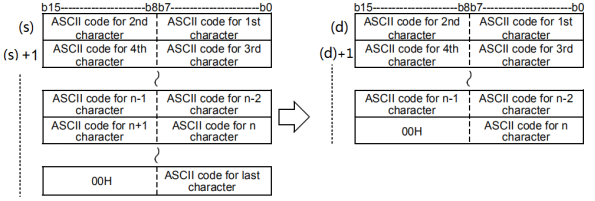
The string specified in (s) refers to the data in bytes from the specified device to the position where "00H" is first detected.
(N)=7:
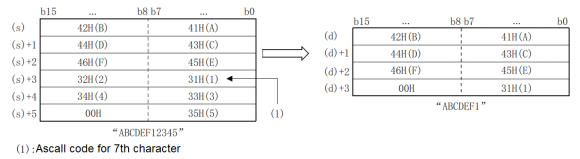
The final NULL code (00H) representing the string is automatically appended to the end of the string data.
If the number of extracted characters is odd, “00H” will be stored in the high byte of the device storing the final character. If the number of extracted characters is even, “0000H” will be stored in the low byte of the device storing the final character.
If the number of characters specified in (n) is 0, a NULL code (00H) is stored in (d).
Precautions
Attention shall be paid to the following points when handling the character codes other than ASCII code.
The number of characters is processed in bytes (8 bits). Therefore, like the shifted JIS code, the character code of 1 character is represented by 2 bytes and the number of characters of 1 character is “2”.
When extracting the string from the string for which the character code of 1 character is represented by 2 bytes like the shifted JIS code, the number of the characters extracted shall be determined by taking the character code of 1 character as the unit. Please note that if only 1 byte of a 2-byte character code is extracted, it will not be the desired character code.
Error code
| Error code | Content |
|---|---|
| 4085H | (s) read address exceeds the device range. |
| 408AH | The length of the read string of (s) exceeds the limit, and the continuous length of the string exceeds 400 characters. |
| 408BH | When (s) reading a character string, the maximum range of the device is read, but 00H is not found as the end. |
| 4084H | (n)<1 or (n)> string length |
| 4086H | (d) write address exceeds the device range. |
Example
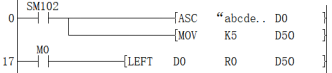
Take five characters from the left of “abcdef” starting from D0 into R0, and the string of R0 is “abcde”.

RIGHT/Extracting from the right side of the string
RIGHT(P)
For the character string data stored after device number specified in (s), ( n) character data starting from the right side of the string (the end of the string) is stored after device number specified in (d).
-[RIGHT (s) (d) (n)]
Content, range and data type
| Parameter | Content | Range | Data type | Data type (label) | Custom variable type |
|---|---|---|---|---|---|
| (s) | String or start number of device that stores string | - | String | ANYSTRING_SINGLE | -- |
| (d) | Store the start number of the device of the string of (n) character starting from the right side of (s) | - | String | ANYSTRING_SINGLE | -- |
| (n) | Number of characters extracted | 1 to 400 | Signed BIN16 bits | ANY16 | INT |
Device used
| Instruction | Parameter | Devices | Index modification | Pulse expansion | |||||||||||||||||||||||
|---|---|---|---|---|---|---|---|---|---|---|---|---|---|---|---|---|---|---|---|---|---|---|---|---|---|---|---|
| X | Y | M | S | SM | T(bit) | C(bit) | LC(bit) | HSC(bit) | D.b | KnX | KnY | KnM | KnS | T | C | D | R | SD | LC | HSC | K | H | E | [D] | XXP | ||
| RIGHT | Parameter 1 | ● | ● | ● | ● | ● | ● | ● | ● | ● | ● | ● | |||||||||||||||
| Parameter 2 | ● | ● | ● | ● | ● | ● | ● | ● | ● | ● | |||||||||||||||||
| Parameter 3 | ● | ● | ● | ● | ● | ● | ● | ● | ● | ● | ● | ● | |||||||||||||||
Function
For the character string data stored after device number specified in (s), ( n) character data starting from the right side of the string (the end of the string) is stored after device number specified in (d).
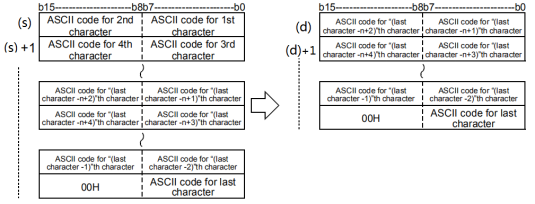
The string specified in (s) refers to the data in bytes from the specified device to the position where "00H" is first detected.
(n)=5:
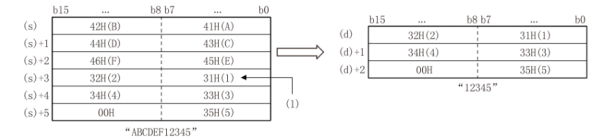
The final NULL code (00H) representing the string is automatically appended to the end of the string data.
If the number of extracted characters is odd, “00H” will be stored in the high byte of the device storing the final character. If the number of extracted characters is even, “0000H” will be stored in the device after the device storing the final character.
If the number of characters specified in (n) is 0, a NULL code (00H) is stored in (d).
Precautions
Attention shall be paid to the following points when handling the character codes other than ASCII code.
The number of characters is processed in bytes (8 bits). Therefore, like the shifted JIS code, the character code of 1 character is represented by 2 bytes and the number of characters of 1 character is “2”.
When extracting the string from the string for which the character code of 1 character is represented by 2 bytes like the shifted JIS code, the number of the characters extracted shall be determined by taking the character code of 1 character as the unit. Please note that if only 1 byte of a 2-byte character code is extracted, it will not be the desired character code.
Error code
| Error code | Content |
|---|---|
| 4085H | The read address of (s) and (n) exceeds the device range. |
| 408AH | The length of the read string of (s) exceeds the limit, and the continuous length of the string exceeds 400 characters. |
| 408BH | When (s) reading a character string, the maximum range of the device is read, but 00H is not found as the end. |
| 4084H | (n)<1 or (n)> string length |
| 4086H | (d) write address exceeds the device range. |
Example
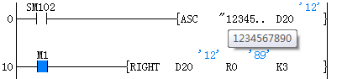
From the string “1234567890”, take three characters “890” from the right and store them into R0.

MIDR/arbitrary extraction in the string
MIDR(P)
Store the data at any position in the character string data to the device number specified in (d).
-[MIDR (s1) (d) (s2)]
Content, range and data type
| Parameter | Content | Range | Data type | Data type (label) | Custom variable type |
|---|---|---|---|---|---|
| (s1) | String or start number of device that stores string | - | String | ANYSTRING_SINGLE | -- |
| (d) | The start number of device that stores operation result string data | - | String | ANYSTRING_SINGLE | -- |
| (s2) | The start number of device that stores start character position and number of characters (s2)+0: The position of the start character, (s2) +1: the number of characters is signed | - | Signed BIN16 bits | ANY16_ARRAY | -- |
Device used
| Instruction | Parameter | Devices | Index modification | Pulse expansion | |||||||||||||||||||||||
|---|---|---|---|---|---|---|---|---|---|---|---|---|---|---|---|---|---|---|---|---|---|---|---|---|---|---|---|
| X | Y | M | S | SM | T(bit) | C(bit) | LC(bit) | HSC(bit) | D.b | KnX | KnY | KnM | KnS | T | C | D | R | SD | LC | HSC | K | H | E | [D] | XXP | ||
| MIDR | Parameter 1 | ● | ● | ● | ● | ● | ● | ● | ● | ● | ● | ● | |||||||||||||||
| Parameter 2 | ● | ● | ● | ● | ● | ● | ● | ● | ● | ● | |||||||||||||||||
| Parameter 3 | ● | ● | ● | ● | ● | ● | ● | ● | ● | ● | ● | ||||||||||||||||
Function
For the character string data stored after device number specified in (s1), character data designated in (s2)+1 starting from the designated position of (s2) is stored after device number specified in (d).
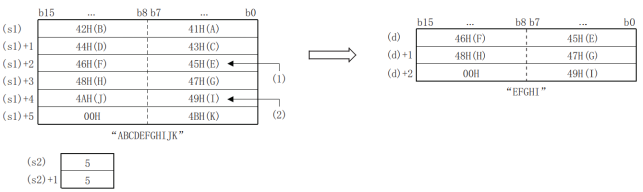
The string specified in (s1) refers to the data in bytes from the specified device to the position where “00H” is first detected.
The final NULL code (00H) representing the string is automatically appended to the end of the string data.
If the number of extracted characters “(s2)+1” is odd, “00H” will be stored in the high byte of the device storing the final character. If the number of extracted characters “(s2)+1” is even, “0000H” will be stored in the device after the device storing the final character.
When the number of characters specified in (s2)+1 is 0, no processing is performed.
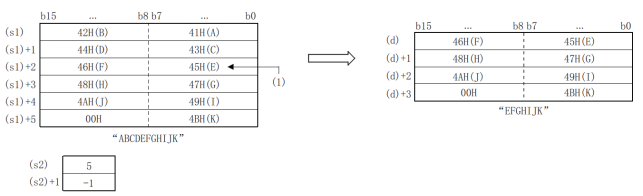
If the character designated in (s2)+1 is -1, the data ending at the position of the final character data designated in (s1) is stored after device number specified in (d).
Precautions
Attention shall be paid to the following points when handling the character codes other than ASCII code:
① The number of characters is processed in bytes (8 bits). Therefore, like the shifted JIS code, the character code of 1 character is represented by 2 bytes and the number of characters of 1 character is “2”.
② When extracting the string from the string for which the character code of 1 character is represented by 2 bytes like the shifted JIS code, the number of the characters extracted shall be determined by taking the character code of 1 character as the unit. Please note that if only 1 byte of a 2-byte character code is extracted, it will not be the desired character code.
Error code
| Error code | Content |
|---|---|
| 4085H | (s1) and (s2) read address exceeds range of the device. |
| 408AH | (s1) The length of the read string of (s) exceeds the limit, and the continuous length of the string exceeds 400 characters. |
| 408BH | When (s1) reading a character string, the maximum range of the device is read, but 00H is not found as the end. |
| 4084H | The value of (s2)+1 is less than -2 (including -2); The value of (s2) exceeds the number of characters of (s1); The value of (s2) is negative; The value of (s2)+1 exceeds the number of characters of (s1); The value obtained from the additive operation of (s2) and (s2)+1 exceeds the number of characters of (s1). |
| 4086H | (d) Write address exceeds the device range. |
Example
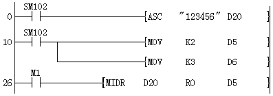
From the string “123456”, take three characters “234” from the second character and store them into R0.

$MOV/string transfer
$MOV(P)
Transfer the string data specified in (s) to the device number specified in (d).
-[$MOV (s) (d)]
Content, range and data type
| Parameter | Content | Range | Data type | Data type (label) | Custom variable type |
|---|---|---|---|---|---|
| (s) | The start number of device that transfers string (max. 255 characters) or that stores string | - | String | ANYSTRING_SINGLE | -- |
| (d) | The start number of device that stores and transfers the string | - | String | ANYSTRING_SINGLE | -- |
Device used
| Instruction | Parameter | Devices | Index modification | Pulse expansion | |||||||||||||||||||||||
| X | Y | M | S | SM | T(bit) | C(bit) | LC(bit) | HSC(bit) | D.b | KnX | KnY | KnM | KnS | T | C | D | R | SD | LC | HSC | K | H | E | [D] | XXP | ||
| $MOV | Parameter 1 | ● | ● | ● | ● | ● | ● | ● | ● | ● | ● | ● | |||||||||||||||
| Parameter 2 | ● | ● | ● | ● | ● | ● | ● | ● | ● | ● | |||||||||||||||||
Function
Transfer the string data specified in (s) to the device number specified in (d). In the transfer of a string, a string enclosed by “” (double quotation marks) specified in (s) or a string starting from the device number to the device number that stores 00H is transferred once.
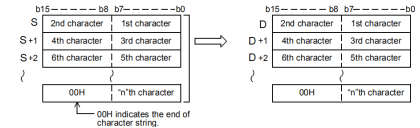
Even if the device range (s)~(s)+n that stores the transmitted string data repeates with the device range (d)~(d)+n that stores the string data after transmission , it can be processed normally. For example, when the string stored in D10~D13 is transmitted to D11~D14, the situation is shown as follows.
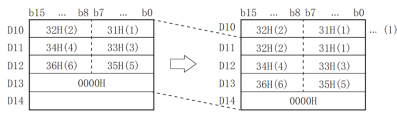
(1): Directly changed to the string before transmission.
If 00H is stored in the lower byte of (s) + n, 00H will be stored in both the higher byte and the lower byte of (d) + n.
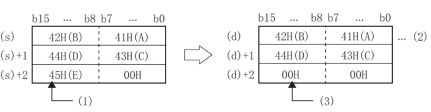
(1): High byte cannot be transmitted.
(2): Directly changed to the string before transmission.
(3): 00H is automatically stored in high bytes.
Error code
| Error code | Content |
|---|---|
| 4085H | (s) read address exceeds the device range. |
| 408AH | The length of the read string of (s) exceeds the limit, and the continuous length of the string exceeds 400 characters. |
| 408BH | When (s) reading a character string, the maximum range of the device is read, but 00H is not found as the end. |
| 4086H | (d) Write address exceeds the device range. |
Example
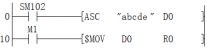
Copy the string “abcde” in the D0 to R0.

MIDW/arbitrary substitution in the string
MIDW(P)
For the string data stored after device number specified in (s1), store the data of the character specified in (s2)+1 to the position designated in (s2) of the string data stored after the device number designated in (d).
-[MIDW (s1) (d) (s2)]
Content, range and data type
| Parameter | Content | Range | Data type | Data type (label) | Custom variable type |
|---|---|---|---|---|---|
| (s1) | String or start number of device that stores string | - | String | ANYSTRING_SINGLE | -- |
| (d) | The start number of device that stores operation result string data | - | String | ANYSTRING_SINGLE | -- |
| (s2) | The start number of device that stores start character position and number of characters (s2)+0: The position of the start character, (s2) +1: The number of characters is signed | - | Signed BIN16 bits | ANY16_ARRAY | -- |
Device used
| Instruction | Parameter | Devices | Index modification | Pulse expansion | |||||||||||||||||||||||
|---|---|---|---|---|---|---|---|---|---|---|---|---|---|---|---|---|---|---|---|---|---|---|---|---|---|---|---|
| X | Y | M | S | SM | T(bit) | C(bit) | LC(bit) | HSC(bit) | D.b | KnX | KnY | KnM | KnS | T | C | D | R | SD | LC | HSC | K | H | E | [D] | XXP | ||
| MIDW | Parameter 1 | ● | ● | ● | ● | ● | ● | ● | ● | ● | ● | ● | |||||||||||||||
| Parameter 2 | ● | ● | ● | ● | ● | ● | ● | ● | ● | ● | |||||||||||||||||
| Parameter 3 | ● | ● | ● | ● | ● | ● | ● | ● | ● | ● | ● | ||||||||||||||||
Function
For the string data stored after device number specified in (s1), store the data of the character specified in (s2)+1 to the position designated in (s2) of the string data stored after the device number designated in (d).
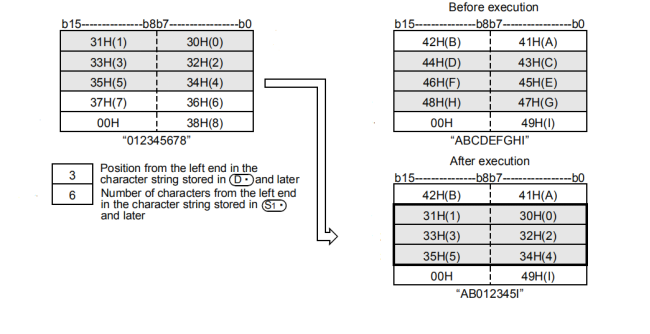
The string specified in (s1) or (d) refers to the data in bytes from the specified device to the position where “00H” is first detected.
The final NULL code (00H) representing the string is automatically appended to the end of the string data.
When the number of characters specified in (s2)+1 is 0, no processing is performed.
If the number of characters designated in (s2)+1 exceeds the final character of the string data designated in (d), the data ending with the final character of (d) is stored.
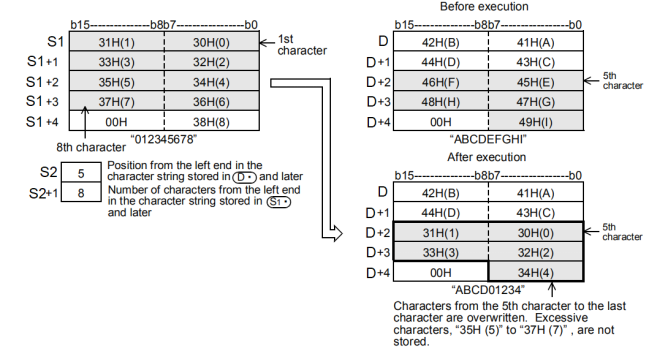
If the character designated in (s2)+1 is -1, the data ending at the position of the final character data designated in (s1) is stored after device number specified in (d).
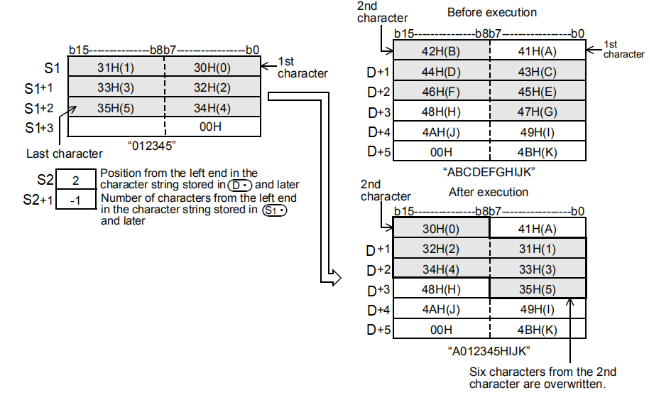
Precautions
Attention shall be paid to the following points when handling the character codes other than ASCII code.
The number of characters is processed in bytes (8 bits). Therefore, like the shifted JIS code, the character code of 1 character is represented by 2 bytes and the number of characters of 1 character is “2”.
When extracting the string from the string for which the character code of 1 character is represented by 2 bytes like the shifted JIS code, the number of the characters extracted shall be determined by taking the character code of 1 character as the unit. Please note that if only 1 byte of a 2-byte character code is extracted, it will not be the desired character code.
Error code
| Error code | Content |
|---|---|
| 4085H | (s1)(s2) (d) read address exceeds the range of the device. |
| 408AH | (s1) (d) The length of the read string exceeds the limit, and the continuous length of the string exceeds 400 characters. |
| 408BH | When (s1) (d) reading a character string, the maximum range of the device is read, but 00H is not found as the end. |
| 4084H | The value of (s2)+1 is less than -2 (including -2); The value of (s2) exceeds the number of characters of (d); The value of (s2) is negative; The value of (s2)+1 exceeds the number of characters of (s1). |
| 4086H | (d) Write address exceeds the device range. |
Example
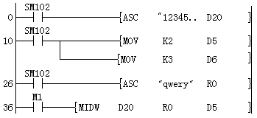
Replace the character with length of three characters starting from the second character in the string “qwery” stored in R0 with the first three characters in D20.
The result of R0 is “q123y”.

STR/BIN16-bit data→string conversion
STR(P)
The BIN16-bit data specified in (s2) is converted to a character string with a decimal point at the position specified in (s1) and stored after device number specified in (d).
-[STR (s1) (s2) (d)]
Content, range and data type
| Parameter | Content | Range | Data type | Data type (label) | Custom variable type |
|---|---|---|---|---|---|
| (s1) | The start number of device that stores the bits of the converted data | - | Signed BIN16 bits | ANY16_S_ARRAY | -- |
| (s2) | Converted BIN data | -32768~+32767 | Signed BIN16 bits | ANY16_S | INT |
| (d) | The start number of device that stores the converted string | - | String | ANYSTRING_SINGLE | -- |
Device used
| Instruction | Parameter | Devices | Index modification | Pulse expansion | |||||||||||||||||||||||
|---|---|---|---|---|---|---|---|---|---|---|---|---|---|---|---|---|---|---|---|---|---|---|---|---|---|---|---|
| X | Y | M | S | SM | T(bit) | C(bit) | LC(bit) | HSC(bit) | D.b | KnX | KnY | KnM | KnS | T | C | D | R | SD | LC | HSC | K | H | E | [D] | XXP | ||
| STR | Parameter 1 | ● | ● | ● | ● | ● | ● | ● | ● | ● | ● | ● | |||||||||||||||
| Parameter 2 | ● | ● | ● | ● | ● | ● | ● | ● | ● | ● | ● | ● | ● | ||||||||||||||
| Parameter 3 | ● | ● | ● | ● | ● | ● | ● | ||||||||||||||||||||
Function
The BIN16-bit data specified in (s2) is converted to a character string with a decimal point at the position specified in (s1) and stored after device number specified in (d).
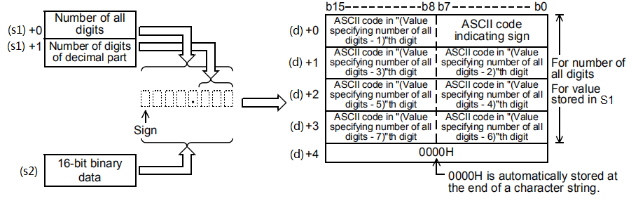
The total digits that can be specified in (s1) are 2~8 digits.
The number of the decimal parts that can be specified in (s1)+1 are 0~5 digits. However, the setting should meet the condition that the number of decimal parts ≤ (all digits-3).
The string data after conversion will be stored to the device number after (d) in following ways.
•In the symbol, when BIN16-bit data is positive, 20H (blank) is stored; and when it is negative, 2DH(-) is stored.
When the number of decimal places is set to any value other than 0, 2EH(.) is automatically stored in the number of specified decimal places+1 digit. . When the decimal place is 0, 2EH(.) is not stored. .
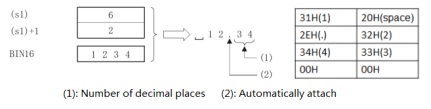
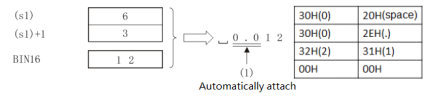
If the value of the number of decimal place is greater than the number of bits of BIN16-bit data, it will be automatically attached with 0 and then aligned to the right and converted to “0.***”.
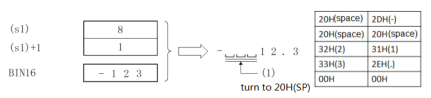
If the symbol is removed from the value of all bits and the value of the number of decimal place is greater than the number of bits of BIN16-bit data, 20H (blank) will be stored between the symbol and the value. If the number of bits of BIN 16-bit data is large, it will become an error state.
00H is automatically stored at the end of the converted character string.
•If the number of total digits is even, “0000H” will be stored in the device after the device storing the final character. If the number of total digits is odd, “00H” will be stored in the high byte (8 bits) of the device storing the final character.
Error code
| Error code | Content |
|---|---|
| 4085H | (s1) and (s2) read address exceeds the range of the device. |
| 4084H | (s1) or (s1+1) parameter setting value exceeds the range. For example: 1. The value of (s1) is not within the range of 2-8. 1. The value of (s1+1) is not within the range of 0-5. 3. The value of (s1+1) is greater than the value of (s1) minus 3. 4. When (s1+1) is 0, the number of bits specified in (s1) is less than the bit number of BIN16-bit data specified in (s2)+1. 4. When (s1+1) is not 0, the number of bits specified in (s1) is less than the bit number of BIN16-bit data specified in (s2)+2. (Number of digits of (s1))< number of bits of BIN 16-bit data without symbols of (s2) + the number of bits of symbols (+ or-) + the decimal point (.) Number of digits |
| 4086H | When using offset, the offset address of (d) exceeds the device range. |
Example
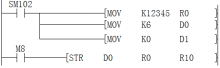
After M8 is set as ON, it is converted into a string “12345” (a space in front of 1) according to the setting of all digits (6 decimal places and 0 digit).

DSTR/BIN32-bit data→string conversion
DSTR(P)
The BIN32-bit data specified in (s2) is converted to a character string with a decimal point at the position specified in (s1) and stored after device number specified in (d).
-[DSTR (s1) (s2) (d)]
Content, range and data type
| Parameter | Content | Range | Data type | Data type (label) | Custom variable type |
|---|---|---|---|---|---|
| (s1) | The start number of device that stores the bits of the converted data | - | Signed BIN16 bits | ANY16_S_ARRAY | -- |
| (s2) | Converted BIN data | -2147483648 to 2147483647 | Signed BIN 32 bit | ANY32_S | DINT |
| (d) | The start number of device that stores the converted string | - | String | ANYSTRING_SINGLE | -- |
Device used
| Instruction | Parameter | Devices | Index modification | Pulse expansion | |||||||||||||||||||||||
|---|---|---|---|---|---|---|---|---|---|---|---|---|---|---|---|---|---|---|---|---|---|---|---|---|---|---|---|
| X | Y | M | S | SM | T(bit) | C(bit) | LC(bit) | HSC(bit) | D.b | KnX | KnY | KnM | KnS | T | C | D | R | SD | LC | HSC | K | H | E | [D] | XXP | ||
| DSTR | Parameter 1 | ● | ● | ● | ● | ● | ● | ● | ● | ● | ● | ● | |||||||||||||||
| Parameter 2 | ● | ● | ● | ● | ● | ● | ● | ● | ● | ● | ● | ● | ● | ● | ● | ||||||||||||
| Parameter 3 | ● | ● | ● | ● | ● | ● | ● | ||||||||||||||||||||
Function
The BIN32-bit data specified in (s2) is converted to a character string with a decimal point at the position specified in (s1) and stored after device number specified in (d).
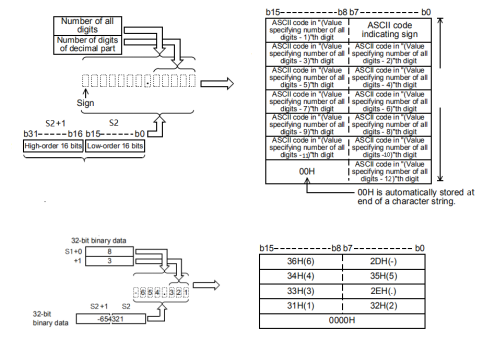
When -654.321 is specified in (s2):
The total digits that can be specified in (s1) are 2~13 digits.
The number of the decimal places that can be specified in (s1)+1 are 0~10 digits. However, the setting should meet the condition that the number of decimal parts ≤ (all digits-3).
The string data after conversion will be stored to the device number after (d) in following ways.
• In the symbol, when BIN32-bit data is positive, 20H (blank) is stored; and when it is negative, 20DH(-) is stored.
• When the number of decimal places is set to any value other than 0, 2EH(.) is automatically stored in the number of specified decimal places+1 digit. . When the decimal place is 0, 2EH(.) is not stored.
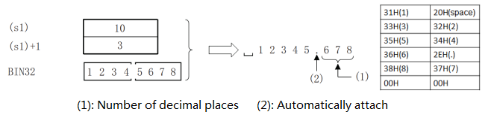
•If the value of the number of decimal place is greater than the number of bits of BIN32-bit data, it will be automatically attached with 0 and then aligned to the right and converted to “0.***”.
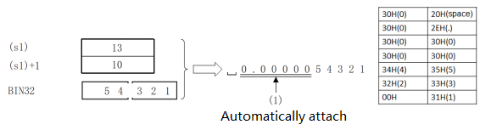
•If the symbol is removed from the value of all bits and the value of the number of decimal place is greater than the number of bits of BIN32-bit data, 20H (blank) will be stored between the symbol and the value. If the number of bits of BIN 16-bit data is large, it will become an error state.
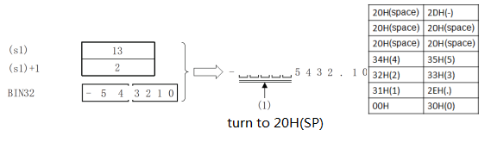
•00H is automatically stored at the end of the converted character string.
•If the number of total digits is even, “0000H” will be stored in the device after the device storing the final character. If the number of total digits is odd, “00H” will be stored in the high byte (8 bits) of the device storing the final character.
Error code
| Error code | Content |
|---|---|
| 4085H | (s1) and (s2) read address exceeds the range of the device. |
| 4084H | (s1) or (s1+1) parameter setting value exceeds the range. For example: 1. The value of (s1) is not within the range of 2-13. 2. The value of (s1+1) is not within the range of 0-10. 3. The value of (s1+1) is greater than the value of (S1) minus 3. 4. When (s1+1) is 0, the number of bits specified in (s1) is less than the bit number of BIN16-bit data specified in (s2)+1. 4. When (s1+1) is not 0, the number of bits specified in (s1) is less than the bit number of BIN16-bit data specified in (s2)+2. (Number of digits of (s1))< number of bits of BIN 16-bit data without symbols of (s2) + the number of bits of symbols (+ or-) + the decimal point (.) Number of digits |
| 4086H | When using offset, the offset address of (d) exceeds the device range. |
Example
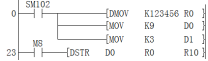
As shown in the example, we need to convert 123456 to a floating-point string with three digits after nine decimal places.
The result of the conversion should be: 123.456, and the preceding value will have two spaces to supplement the insufficient number.

$+/combination of string
$+(P)
Connect the string stored after the device number specified in (s2) to the string data stored after the device number specified in (s1), and store it after the device number specified in (d) .
-[$+ (s1) (s2) (d)]
Content, range and data type
| Parameter | Content | Range | Data type | Data type (label) | Custom variable type |
|---|---|---|---|---|---|
| (s1) | Connect data or the device start number storing the data or the string specified directly | - | String | ANYSTRING_SINGLE | -- |
| (s2) | Connected data or the start number of device that stores the connected data or the string specified directly | - | String | ANYSTRING_SINGLE | -- |
| (d) | The start number of device that stores the connection result | - | String | ANYSTRING_SINGLE | -- |
Device used
| Instruction | Parameter | Devices | Index modification | Pulse expansion | |||||||||||||||||||||||
|---|---|---|---|---|---|---|---|---|---|---|---|---|---|---|---|---|---|---|---|---|---|---|---|---|---|---|---|
| X | Y | M | S | SM | T(bit) | C(bit) | LC(bit) | HSC(bit) | D.b | KnX | KnY | KnM | KnS | T | C | D | R | SD | LC | HSC | K | H | E | [D] | XXP | ||
| $+ | Parameter 1 | ● | ● | ● | ● | ● | ● | ● | ● | ● | ● | ● | |||||||||||||||
| Parameter 2 | ● | ● | ● | ● | ● | ● | ● | ● | ● | ● | ● | ||||||||||||||||
| Parameter 3 | ● | ● | ● | ● | ● | ● | ● | ● | ● | ● | |||||||||||||||||
Function
Connect the string stored after the device number specified in (s2) to the string data stored after the device number specified in (s1), and store it after the device number specified in (d) .
The string of (s1) and (s2) starts from the designated device number and ends at the device number that stores 00H.
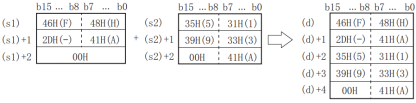
When strings are merged, 00H representing the end of the string specified in (s1) is ignored, and the string specified in (s2) is connected at the final character of (s1).
If strings are merged, 00H will be automatically attached at the end. If the number of connected characters is odd, “00H” will be stored in the high byte of the device storing the final character. If the number of extracted characters is even, “0000H” will be stored in the device after the device storing the final character.
Error code
| Error code | Content |
|---|---|
| 4085H | The read address of (s1) or (s2) exceeds the device range. |
| 408AH | The length of the read string of (s1) or (s2) exceeds the limit, and the continuous length of the string exceeds 400 characters. |
| 408BH | When (s1) or (s2) reading string, the maximum range of device is read, but 00H is not found as the end. |
| 4086H | (d) Write address exceeds the device range. |
Example
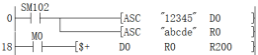
After the string “12345” and string “abcde” are merged, the result is “12345abcde”.

INSTR/string search
$+(P)
Start from the left (s3) character of the string data stored after device number specified in (s2), search the string data stored after the device number designated in (s1) and store the searched result in the device designated in (d).
-[ INSTR (s1) (s2) (d) (s3)]
Content, range and data type
| Parameter | Content | Range | Data type | Data type (label) | Custom variable type |
|---|---|---|---|---|---|
| (s1) | Search string or the start number of device that stores the search string | - | String | ANYSTRING_SINGLE | -- |
| (s2) | Searched string or the start number of device that stores the searched string | - | String | ANYSTRING_SINGLE | -- |
| (d) | The start number of device that stores the search result | - | Signed BIN16 bits | ANY16 | -- |
| (s3) | Search start position | 1 to 400 | Signed BIN16 bits | ANY16 | INT |
Device used
| Instruction | Parameter | Devices | Index modification | Pulse expansion | |||||||||||||||||||||||
|---|---|---|---|---|---|---|---|---|---|---|---|---|---|---|---|---|---|---|---|---|---|---|---|---|---|---|---|
| X | Y | M | S | SM | T(bit) | C(bit) | LC(bit) | HSC(bit) | D.b | KnX | KnY | KnM | KnS | T | C | D | R | SD | LC | HSC | K | H | E | [D] | XXP | ||
| INSTR | Parameter 1 | ● | ● | ● | ● | ● | ● | ● | |||||||||||||||||||
| Parameter 2 | ● | ● | ● | ● | ● | ● | ● | ||||||||||||||||||||
| Parameter 3 | ● | ● | ● | ● | ● | ● | ● | ● | ● | ● | ● | ||||||||||||||||
| Parameter 4 | ● | ● | ● | ● | ● | ● | ● | ● | ● | ● | ● | ● | ● | ||||||||||||||
Function
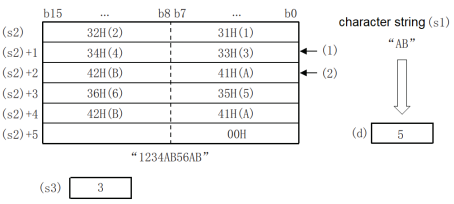
Start from the left (s3) character of the string data stored after device number specified in (s2), search the string data stored after the device number designated in (s1) and store the searched result in the device designated in (d). The search result will store the first xx character of the start character of the string data specified in (s2).
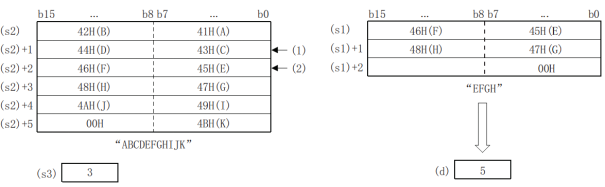
If there is no consistent string data, 0 will be stored in (d).
When the search start position (s3) is “0”, no processing is performed. The searched string (s1) can directly designate the string.
Error code
| Error code | Content |
|---|---|
| 4085H | The write address in (s1), (s2) and (s3) exceeds the device range. |
| 408AH | The length of the read string of (s1) and (s2) exceeds the limit, and the continuous length of the string exceeds 400 characters. |
| 408BH | When (s1) and (s2) reading the string, the maximum range of device is read, but 00H is not found as the end. |
| 4086H | (d) Write address exceeds the device range. |
| 4084H | (s3) <0 or (s3)>= string length |
Example
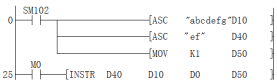
When searching “ef” string from the continuous string “abcdefg”, start searching from the first character and locate it at the 5th place.
ASC/ASCII data input
ASC
Instruction used to convert half-width/English numeric strings into ASCII codes. Used to select multiple messages for display in an external display.
-[ASC(s)|(d)]
Content, range and data type
| Parameter | Content | Range | Data type | Data type (label) | Custom variable type |
|---|---|---|---|---|---|
| (s) | 32-character half-width English numerals input by the computer | - | String (only ASCI code) | ANY_ASC | -- |
| (d) | Start character device number that saves ASCII data | - | BIN16 bit | ANY16_S | -- |
Device used
| Instruction | Parameter | Devices | Index modification | Pulse expansion | |||||||||||||||||||||||
|---|---|---|---|---|---|---|---|---|---|---|---|---|---|---|---|---|---|---|---|---|---|---|---|---|---|---|---|
| X | Y | M | S | SM | T(bit) | C(bit) | LC(bit) | HSC(bit) | D.b | KnX | KnY | KnM | KnS | T | C | D | R | SD | LC | HSC | K | H | E | [D] | XXP | ||
| ASC | Parameter 1 | ||||||||||||||||||||||||||
| Parameter 2 | ● | ● | ● | ● | ● | ● | |||||||||||||||||||||
Function
1. 16-bit operation (ASC)
•Convert half-width, English and numeric strings specified in (S) into ASCII codes and transmit them to (D).
(1) In (S), half-width characters of A ~ Z, 0 ~ 9 and symbols are processed. (Full-width strings are not processed.) When programming with a programming tool, enter a string.
(2) The converted ASCII code is stored in (D) every 2 charters/1 byte in the order of lower 8 bits and higher 8 bits.
2. Extended function
•After SM162 is set as ON, the extended function becomes valid; then convert half-width, English and numeric strings specified in (S) into ASCII codes and transmit them to the lower 8 bits of (D) (1 byte) in proper order.
Precautions
1.Occupied places of the device
(1) When the extended function is OFF, the number of characters occupied by D÷ 2 places (when it is not divisible, the decimal place is carried.)
(2) When the extended function is ON, the places occupied by D are the same as the number of characters occupied.
2. When using commands such as ASC, ASCI, BCC, CCD and CRC, the extended function sign bit SM161 is the sign bit commonly used for other commands.
When using the above commands and ASC commands, please note that the program SM161 ON or OFF is written in front of the ASC commands so as to avoid adverse impact.
Error code
| Error code | Content |
|---|---|
| 4085H | The output result of the read application command (s) exceeds the device range. |
| 4086H | The output result of the write application command (d) exceeds the device range. |
Example
 As shown in the following figure, the high byte of each variable is filled with 0 (hexadecimal):
| D• | S | ||
|---|---|---|---|
| (High 8 bits) | (Low 8 bits) | String | |
 | 00 | 41 | A |
| +1 | 00 | 42 | B |
| +2 | 00 | 43 | C |
| +3 | 00 | 44 | D |
| +4 | 00 | 45 | E |
| +5 | 00 | 46 | F |
| +6 | 00 | 47 | G |
| +7 | 00 | 48 | H |
When X20=ON, the assignment of D200~D203 is shown as follows:
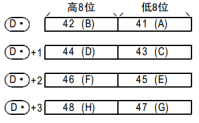
When the special register SM161 is set as ON,
each ASCII character occupies one 16-bit variable after conversion.