

13 Ethernet Communication
Overview of Ethernet
IP Address Concept
IP addresses consist of network addresses and host addresses, which are distinguished by subnet masks. If a programming device (such as a PC) needs to be connected to a factory LAN via a network card, the programming device and the PLC must be in the same subnet. The IP address is combined with a subnet mask to specify the subnet of the device.
| No. | Network equipment 1 | Network equipment 2 | Network connection | ||||
|---|---|---|---|---|---|---|---|
| IP | Subnet mask | Network address | IP | Subnet mask | Network address | ||
| 1 | 192.168.0.1 | 255.255.255.0 | 192.168.0.0 | 192.168.0.10 | 255.255.255.0 | 192.168.0.0 | Yes |
| 2 | 192.168.0.1 | 255.255.255.0 | 192.168.0.0 | 192.168.1.10 | 255.255.255.0 | 192.168.1.0 | No |
| 3 | 192.168.0.1 | 255.255.255.1 | 192.168.0.1 | 192.168.0.10 | 255.255.255.1 | 192.168.0.0 | No |
When logical operation of IP address and subnet mask is performed, the network address can be calculated. If the addresses are in the same network, it means that communication can be carried out. For instance:
Setting PC Network Address
1.Open the control panel->Network and Internet->Network and sharing center;
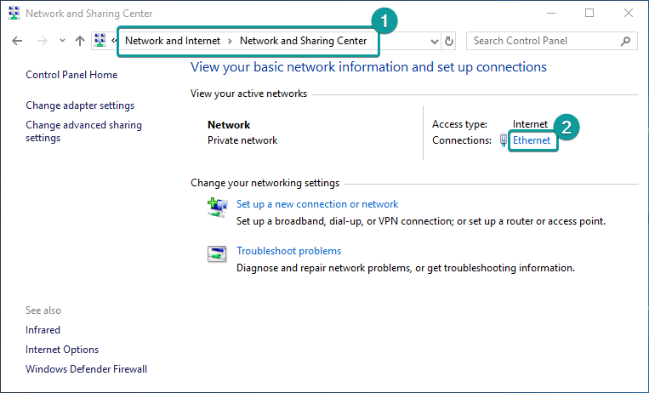
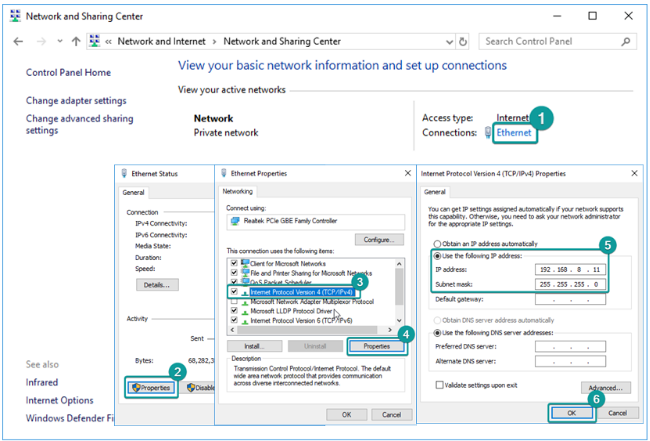
2.Click on the local link->Attributes->Internet Protocol Version 4;
3.Set the IP address and subnet mask that are within the same network address as PLC. Note that IP addresses that have been used in LAN cannot be set. If the IP of PLC is 192.168. 8.8 and the subnet mask is 255.255. 255.0, the IP address as shown in the following figure can be set to connect the PC to PLC.
Testing Network Connection Status
Test the connection status of PC and PLC via ping command.
1.win+R key, input cmd;
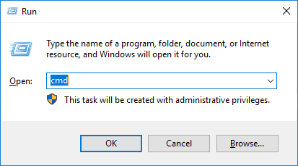
2.If PLC’s IP address is 192.168.8.8;
(1)Enter ping 192.168. 8.8 command and press Enter. If 100% missing is displayed, it means that it cannot be connected with PLC.
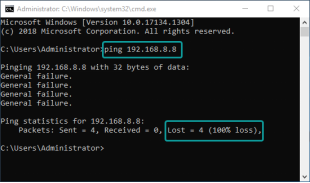
(2)Enter ping 192.168. 8.8 command and press Enter. If 0% missing is displayed, it means that it can be connected with PLC.
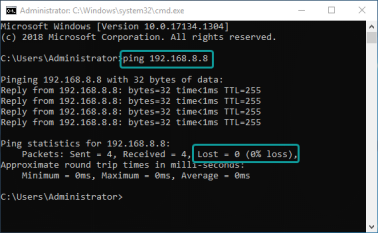
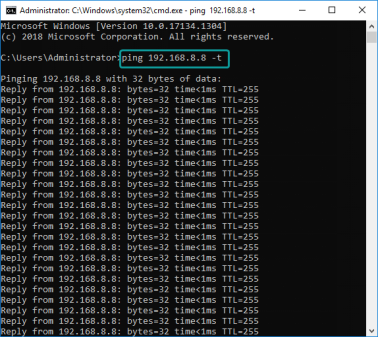
(3)“ping network equipment ip”command can only be used for four times . If it needs to further perform ping , please use the command “ping network equipmentip -t”, as shown in following figure:
Ethernet connection between PLC Editor2 and PLC
1. Transmission settings->Ethernet configuration->Input the IP address of PLC; (note: the address of the network card should be in the same network segment with PLC)
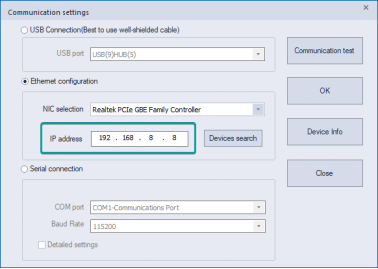
2.Click the communication test to confirm the communication;
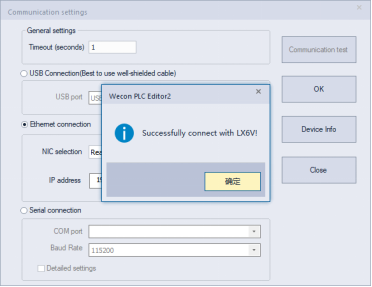
3.After successful connection, click “select” to operate PLC.
Ethernet Search Function of PLC Editor 2
1. Transmission settings->Network card selection->Equipment search (note: the address of the network card should be in the same network segment with PLC), select “connect PLC” at 1 or the network card that is within the same network segment with PLC, and click 2 to search PLC equipment in LAN.
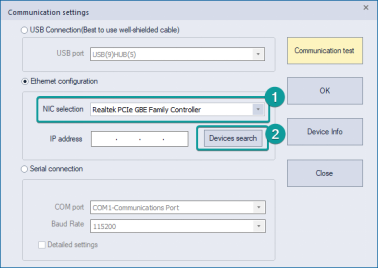
2.Search interface is shown as follows. Click search to display the PLC equipment in the LAN, select the corresponding equipment and click OK to communicate.
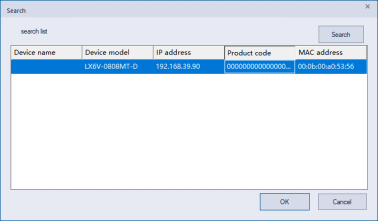
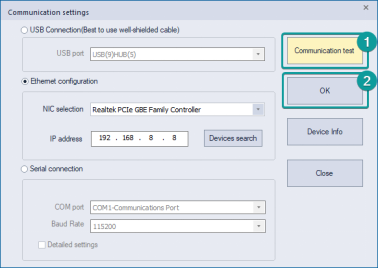
3.IP address at 1 is automatically filled in. Click the communication test to test whether the communication is normal. if it is normal, click “select” button to complete the connection configuration.
Ethernet Configuration
IP Address Setting
(1) Setting via programming software
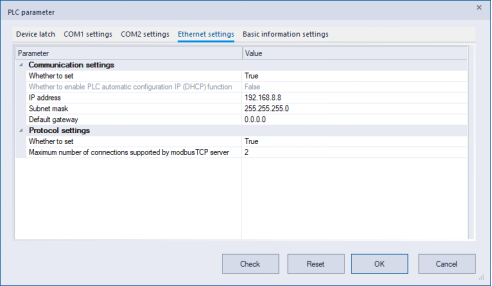
Project management->parameters->PLC parameter->Ethernet configuration.
After modification, check the parameter items through PLC download; after download, click STOP->RUN to complete.
(2) Setting via special device
Write IP address, subnet mask and default gateway in SD2680~SD2691;
When SM2680 is set as ON, open static IP function;
When SM2683 is set as ON, the sign IP can be modified;
STOP->RUN or the new IP address takes effect after power-on again.
| SM sign | Name | Content | R/W | SD label | Name |
|---|---|---|---|---|---|
| SM2680 | Statically set IP switch | ON: static setting OFF: The IP address is automatically configured by router DHCP, and the IP cannot be modified STOP->RUN | R/W | SD2680 | The first byte of the IP address |
| SM2681 | Display current network information | Refresh the current IP gateway subnet mask after being set as ON. OFF after refresh is completed. | R/W | SD2681 | The second byte of the ip address |
| SM2682 | Display current MAC information (reserved) | Refresh the current MAC after being set as ON. OFF after refresh is completed. | R/W | SM2682 | The third byte of the ip address |
| SM2683 | IP, subnet mask, gateway modification sign | ON: can be modified OFF: cannot be modified (When being set as ON, STOP->RUN; it can be automatically changed to OFF after modification) | R/W | SD2683 | The fourth byte of the ip address |
| SM2684 | SD2684 | The first byte of subnet mask | |||
| SM2685 | SD2685 | The second byte of subnet mask | |||
| SM2686 | SD2686 | The third byte of subnet mask | |||
| SM2687 | SD2687 | The fourth byte of subnet mask | |||
| SM2688 | SD2688 | Default gateway first byte | |||
| SM2689 | SD2689 | Default gateway second byte | |||
| SM2690 | SD2690 | Default gateway third byte | |||
| SM2691 | SD2691 | Default gateway fourth byte |
TCP Protocol Concept
TCP protocol is a Transport Control Protocol, which is a connection-oriented and reliable transport layer protocol. Connection-oriented means that a normal TCP transmission needs to be completed by establishing a specific virtual circuit connection between TCP client and TCP server. To transmit data over TCP, a connection must be established between hosts at both ends.
List of Ethernet-related Special Devices
| SM sign | Name | Content | R/W | Power-down save |
|---|---|---|---|---|
| SM2681 | Display current network information | Refresh the current IP, subnet mask and default gateway after being set as ON; and then being set as OFF upon completion of refresh | R/W | × |
| SM2682 | Display current MAC information | Refresh the current MAC after being set as ON. OFF after refresh is completed. | R/W | × |
| SM2683 | IP, subnet mask, gateway modification sign | ON: can be modified OFF: cannot be modified (When being set as ON, STOP->RUN; it can be automatically changed to OFF after modification) | R/W | √ |
| SM2684 | Network card connection status | ON: network connected OFF: network not connected; check if the network cable is connected | R | √ |
| SM2692 | MAC address modification sign | ON: can be modified OFF: cannot be modified (When being set as ON, STOP->RUN; it can be automatically changed to OFF after modification) | R/W | √ |
| SM2700 | Modbus TCP keep-alive mechanism | ON: Open OFF: Close (default) | R/W | √ |
| SM2701 | Forced shutdown of Modbus TCP server | ON: Open OFF: Close (default) (after being enabled, it will be automatically changed into OFF after shutdown) | R/W | × |
| SM2710 | Ethernet error sign | ON: there is an Ethernet error, please check SD2710 and SD2711 OFF: there is no Ethernet error | R | × |
| SM2740 | ModbusTCP server connection status 1 | ON: Client side has been connected OFF: Client side hasn’t been connected | R | × |
| SM2760 | ModbusTCP server connection status 2 | ON: Client side has been connected OFF: Client side hasn’t been connected | R | × |
| SM2780 | ModbusTCP server connection status 3 | ON: Client side has been connected OFF: Client side hasn’t been connected | R | × |
| SM2800 | ModbusTCP server connection status 4 | ON: Client side has been connected OFF: Client side hasn’t been connected | R | × |
| SM2820 | ModbusTCP server connection status 5 | ON: Client side has been connected OFF: Client side hasn’t been connected | R | × |
| SM2840 | ModbusTCP server connection status 6 | ON: Client side has been connected OFF: Client side hasn’t been connected | R | × |
| SM2860 | ModbusTCP server connection status 7 | ON: Client side has been connected OFF: Client side hasn’t been connected | R | × |
| SM2880 | ModbusTCP server connection status 8 | ON: Client side has been connected OFF: Client side hasn’t been connected | R | × |
| SD label | Name | Content | R/W | Power-down save |
|---|---|---|---|---|
| SD2680 | The first byte of the IP address | Local IP address | R/W | √ |
| SD2681 | The second byte of the ip address | R/W | √ | |
| SM2682 | The third byte of the ip address | R/W | √ | |
| SD2683 | The fourth byte of the ip address | R/W | √ | |
| SD2684 | The first byte of subnet mask | Local subnet mask | R/W | √ |
| SD2685 | The second byte of subnet mask | R/W | √ | |
| SD2686 | The third byte of subnet mask | R/W | √ | |
| SD2687 | The fourth byte of subnet mask | R/W | √ | |
| SD2688 | Default gateway first byte | Local default gateway | R/W | √ |
| SD2689 | Default gateway second byte | R/W | √ | |
| SD2690 | Default gateway third byte | R/W | √ | |
| SD2691 | Default gateway fourth byte | R/W | √ | |
| SD2692 | The first byte of MAC address | Local MAC address | R/W | √ |
| SD2693 | The second byte of MAC address | R/W | √ | |
| SD2694 | The third byte of MAC address | R/W | √ | |
| SD2695 | The fourth byte of MAC address | R/W | √ | |
| SD2696 | The fifth byte of MAC address | R/W | √ | |
| SD2697 | The sixth byte of MAC address | R/W | √ | |
| SD2700 | Communication speed display | 0: 100Mbps/half duplex 1: 100Mbps/full duplex 2: 10Mbps/half duplex 3: 10Mbps/full duplex | R | × |
| SD2702 | The modbusTCP server supports the maximum number of connections | Local modbusTCP server supports the maximum number of clients to make connections at the same time | R/W | × |
| SD2703 | Modbus TCP connections | Local Modbus TCP connections | R | × |
| SD2710 | Error code | Ethernet error code | R | × |
| SD2711 | Socket ID of the error | -1: system default Modbus TCP server 0~5: Customer custom socket error | R | × |
| SD2720 | Input the low bit of the number of ping request | External input ping command count | R | × |
| SD2721 | Input the high bit of the number of ping request | R | × | |
| SD2722 | Input the low bit of the number of ping response | Number of replies after receiving external ping command | R | × |
| SD2723 | Input the high bit of the number of ping response | R | × | |
| SD2724 | Output the low bit of the number of ping request | Send ping command count | R | × |
| SD2725 | Output the high bit of the number of ping request | R | × | |
| SD2726 | Output the low order of the number of ping response | Number of replies after receiving sent ping command | R | × |
| SD2727 | Output the high bit of the number of ping response | R | × | |
| SD2728 | Number of arp packets sent | Count of number of arp packets sent | R | × |
| SD2729 | Number of arp packets received | Count of number of arp packets received | R | × |
| SD2730 | Number of ip packets sent | Count of number of ip packets sent | R | × |
| SD2731 | Number of ip packets received | Count of number of arp packets received | R | × |
| SD2732 | Number of tcp packets sent | Count of number of tcp packets sent | R | × |
| SD2733 | The number of tcp packets received | Count of number of tcp packets received | R | × |
| SD2734 | Number of udp packets sent | Count of number of udp packets sent | R | × |
| SD2735 | Number of udp packets received | Count of number of udp packets received | R | × |
SD2740 | Connection 1 local port number | Connection information and error information about the first Modbus TCP client’s connection to the PLC. | R | × |
| SD2741 | Connection 1 IP address first byte | R | × | |
| SD2742 | Connection 1 IP address second byte | R | × | |
| SD2743 | Connection 1 IP address third byte | R | × | |
| SD2744 | Connection 1 IP address fourth byte | R | × | |
| SD2745 | Connection 1 peer port number | R | × | |
| SD2746 | Reserved | R | × | |
| SD2747 | Reserved | |||
| SD2748 | Connection 1 error code | R | × | |
| SD2749 | Connection 1 error communication times low word | R | × | |
| SD2750 | Connection 1 error communication times high word | R | × | |
| SD2760 | Connection 2 local port number | Connection information and error information about the second Modbus TCP client’s connection to the PLC. | R | × |
| SD2761 | Connection 2 IP address first byte | R | × | |
| SD2762 | Connection 2 IP address second byte | R | × | |
| SD2763 | Connection 2 IP address third byte | R | × | |
| SD2764 | Connection 2 IP address fourth byte | R | × | |
| SD2765 | Connection 2 peer port number | R | × | |
| SD2766 | Reserved | R | × | |
| SD2767 | Reserved | |||
| SD2768 | Connection 2 error code | R | × | |
| SD2769 | Connection 2 error communication times low word | R | × | |
| SD2770 | Connection 2 error communication times high word | R | × | |
| SD2780 | Connection 3 local port number | Connection information and error information about the third Modbus TCP client’s connection to the PLC. | R | × |
| SD2781 | Connection 3 IP address first byte | R | × | |
| SD2782 | Connection 3 IP address second byte | R | × | |
| SD2783 | Connection 3 IP address third byte | R | × | |
| SD2784 | Connection 3 IP address fourth byte | R | × | |
| SD2785 | Connection 3 peer port number | R | × | |
| SD2786 | Reserved | R | × | |
| SD2787 | Reserved | |||
| SD2788 | Connection 3 error code | R | × | |
| SD2789 | Connection 3 error communication times low word | R | × | |
| SD2780 | Connection 3 error communication times high word | R | × | |
| SD2800 | Connection 4 local port number | Connection information and error information about the fourth Modbus TCP client’s connection to the PLC. | R | × |
| SD2801 | Connection 4 IP address first byte | R | × | |
| SD2802 | Connection 4 IP address second byte | R | × | |
| SD2803 | Connection 4 IP address third byte | R | × | |
| SD2804 | Connection 4 IP address fourth byte | R | × | |
| SD2805 | Connection 4 peer port number | R | × | |
| SD2806 | Reserved | R | × | |
| SD2807 | Reserved | |||
SD2808 | Connection 4 error code | Error information about the fourth Modbus TCP client’s connection to the PLC. | R | × |
| SD2809 | Connection 4 error communication times low word | R | × | |
| SD2810 | Connection 4 error communication times high word | R | × | |
| SD2820 | Connection 5 local port number | Connection information and error information about the fifth Modbus TCP client’s connection to the PLC. | R | × |
| SD2821 | Connection 5 IP address first byte | R | × | |
| SD2822 | Connection 5 IP address second byte | R | × | |
| SD2823 | Connection 5 IP address third byte | R | × | |
| SD2824 | Connection 5 IP address fourth byte | R | × | |
| SD2825 | Connection 5 peer port number | R | × | |
| SD2826 | Reserved | R | × | |
| SD2827 | Reserved | |||
| SD2828 | Connection 5 error code | R | × | |
| SD2829 | Connection 5 error communication times low word | R | × | |
| SD2830 | Connection 5 error communication times high word | R | × | |
| SD2840 | Connection 6 local port number | Connection information and error information about the sixth Modbus TCP client’s connection to the PLC. | R | × |
| SD2841 | Connection 6 IP address first byte | R | × | |
| SD2842 | Connection 6 IP address second byte | R | × | |
| SD2843 | Connection 6 IP address third byte | R | × | |
| SD2844 | Connection 6 IP address fourth byte | R | × | |
| SD2845 | Connection 6 peer port number | R | × | |
| SD2846 | Reserved | R | × | |
| SD2847 | Reserved | |||
| SD2848 | Connection 6 error code | R | × | |
| SD2849 | Connection 6 error communication times low word | R | × | |
| SD2850 | Connection 6 error communication times high word | R | × | |
| SD2860 | Connection 7 local port number | Connection information and error information about the seventh Modbus TCP client’s connection to the PLC. | R | × |
| SD2861 | Connection 7 IP address first byte | R | × | |
| SD2862 | Connection 7 IP address second byte | R | × | |
| SD2863 | Connection 7 IP address third byte | R | × | |
| SD2864 | Connection 7 IP address fourth byte | R | × | |
| SD2865 | Connection 7 peer port number | R | × | |
| SD2866 | Reserved | R | × | |
| SD2867 | Reserved | |||
| SD2868 | Connection 7 error code | R | × | |
| SD2869 | Connection 7 error communication times low word | R | × | |
| SD2870 | Connection 7 error communication times high word | R | × | |
| SD2880 | Connection 8 local port number | Connection information and error information about the eighth Modbus TCP client’s connection to the PLC. | R | × |
| SD2881 | Connection 8 IP address first byte | R | × | |
| SD2882 | Connection 8 IP address second byte | R | × | |
| SD2883 | Connection 8 IP address third byte | R | × | |
| SD2884 | Connection 8 IP address fourth byte | R | × | |
| SD2885 | Connection 8 peer port number | R | × | |
SD2866 | Reserved | Connection information and error information about the eighth Modbus TCP client’s connection to the PLC. | ||
| SD2867 | Reserved | R | × | |
| SD2888 | Connection 8 error code | R | × | |
| SD2889 | Connection 8 error communication times low word | R | × | |
| SD2890 | Connection 8 error communication times high word | R | × |
List of Ethernet Operation Error Codes
| Error code | Description | Action | Processing approach | Test time |
|---|---|---|---|---|
| 3680 | Ethernet data reception error | Continue to run | Check whether there is any interference in the environment | When the command is executed |
| 3681 | Ethernet data reception timeout | Continue to run | Check if the network cable is loosened 1. Check whether the network peer is faulty, which results in failure in sending data. Check whether the network peer does not respond in time, which results in any delay in data. Under such circumstance, the reception timeout in the socket configuration can be increased. | When the command is executed |
| 3684 | Modbus TCP station number configuration error | Continue to run | Check slave station number setting. Check whether there is any problem with the receiving and sending mechanism of slave station. | When the command is executed |
| 3685 | Modbus TCP send buffer overflow | Continue to run | If this error message appears, please contact technical personnel | When the command is executed |
| 3686 | Modbus TCP function code error | Continue to run | Check whether the set function code is a function code supported by PLC | When the command is executed |
| 3687 | Modbus TCP address error | Continue to run | Check whether the slave station has this address. (Please refer to Modbus exception 02). | When the command is executed |
| 3688 | Modbus TCP length error | Continue to run | Check whether the communication length exceeds the Modbus range | When the command is executed |
| 3689 | Modbus TCP data error | Continue to run | Check whether parameters of the command are wrong. Check whether the set value is supported by the slave station. (Please refer to Modbus exception 03). | When the command is executed |
| 368A | Modbus TCP slave is busy | Continue to run | Message returned from slave station: Slave station is busy. (Please refer to Modbus exception 06). | When the command is executed |
| 368B | Modbus TCP slave station does not support function code | Continue to run | Check whether this function code is supported by the slave station. (Please refer to Modbus exception 01). | When the command is executed |
| 368C | Modbus TCP slave failure | Continue to run | Message returned from slave station: Slave station failed, please check whether slave station failed. (Please refer to Modbus exception 04). | When the command is executed |
| 368D | Modbus TCP slave confirmation | Continue to run | Message returned from slave station: slave station confirmation. (Please refer to Modbus exception 05). | When the command is executed |
| 368E | The current protocol of Modbus TCP does not support this command Instruction | Continue to run | The RS command cannot be used when the slave protocol is set, please change the protocol or close the contact before the RS command | When the command is executed |
| 368F | Network port send timeout | Continue to run | If this error message appears, please contact technical personnel | When the command is executed |
| 3690 | Receive buffer overflow | Continue to run | Check if the other device is sending data all the time | When the command is executed |
| 36A0 | Unavailable gateway for Modbus TCP | Continue to run | Message returned from the slave station: no available gateway. (Please refer to Modbus exception 0A). | When the command is executed |
| 36A1 | Modbus TCP indicates that no response was obtained from the target device. It usually means the device is not on the network. | Continue to run | Message returned from the slave station: The device is not in the network. (Please refer to Modbus exception 0B) | When the command is executed |
| 36C0 | ModbusTCP transaction identifier error | Continue to run | Check if there is network congestion and data can not be received in time. | When the command is executed |
| 36C1 | Modbus TCP server available links are full | Continue to run | Check if SD2702 and SD2703 have too many clients to link | When the command is executed |
| 36C8 | Insufficient space in the Ethernet stack | Continue to run | If this error message appears, please contact technical personnel | When the command is executed |
| 36C9 | Number of connections exceeds the limit | Continue to run | Confirm whether the total number of connections exceeds the limit | When the command is executed |
| 36CA | The last send is not completed | Continue to run | Use the sending completion sign to determine that the current sending is completed, and then send the next one | When the command is executed |
| 36CB | TCP write exception | Continue to run | Use the sign bit device to judge whether the current connection status is normal. If it is not normal, no data transmission will be performed. For example, after the closing sign is set, data transmission will not be performed. | When the command is executed |
| 36CC | TCP output exception | Continue to run | If this error message appears, please contact technical personnel | When the command is executed |
| 36CD | IP address is used | Continue to run | Please check if a connection exists with the same address information | When the command is executed |
| 36CE | Error in server’s acceptance of connection | Continue to run | If this error message appears, please contact technical personnel | When the command is executed |
| 36CF | TCP receive buffer overflow | Continue to run | If this error message appears, please contact technical personnel | When the command is executed |
| 36D0 | TCP link failed | Continue to run | It may be caused by opening the TCP client when the network cable is not connected. | When the command is executed |
| 36D1 | Exception when actively closing the connection | Continue to run | If this error message appears, please contact technical personnel | When the command is executed |
| 36D2 | Abnormal shutdown occurred inside the protocol stack | Continue to run | May be shut down due to no answering for a long time. Check whether the peer is online and can ping. | When the command is executed |
| 36D3 | The peer initiates an RST link | Continue to run | 1. Check whether the peer initiates abnormal shutdown. 2. As a client, the number of peer connections is full, or the peer port is not open. | When the command is executed |
| 36D4 | The protocol stack has a single-ended shutdown | Continue to run | If this error message appears, please contact technical personnel | When the command is executed |
| 36D5 | There is an IP address conflict | Continue to run | The same IP device exists in the LAN, please change the IP address | When the command is executed |
| 36D6 | There is a MAC address conflict | Continue to run | The same MAC device exists in the LAN, please change the MAC address | When the command is executed |
| 36D7 | TCP send buffer overflow | Continue to run | If this error message appears, please contact technical personnel | When the command is executed |
| 36D8 | UDP connection exception | Continue to run | IP address or port number may has been used. | When the command is executed |
| 36D9 | UDP send buffer overflow | Continue to run | If this error message appears, please contact technical personnel | When the command is executed |
| 36DA | Insufficient memory space when sending UDP | Continue to run | If this error message appears, please contact technical personnel | When the command is executed |
| 36DB | UDP send failed | Continue to run | If this error message appears, please contact technical personnel | When the command is executed |
| 36DC | UDP memory release failed | Continue to run | If this error message appears, please contact technical personnel | When the command is executed |
| 36DD | UDP receive buffer overflow | Continue to run | The length of the data received by UDP exceeds the limit value of 512. | When the command is executed |
| 4084 | Data beyond the specified range is entered in the application command (for example, parameter 1 is specified as 0~1, setting 2) | Continue to run | Modify application command parameters | When the application command is executed |
| 4085 | The output result of the read application command exceeds the device range. (For example, the maximum output of the D device is D7999, but D8000 is used) | Continue to run | Modify application command parameters | When the application command is executed |
| 4086 | The output result of the write application command exceeds the device range. (For example, the maximum output of the D device is D7999, but D8000 is used) | Continue to run | Modify application command parameters | When the application command is executed |
| 5080 | The Ethernet socket has been linked and cannot be opened repeatedly. | Continue to run | Check if SOCOPEN command is executed repeatedly | When the application command is executed |
| 5081 | Ethernet socket is not open, which results in the failure in operation | Continue to run | Check whether set ON the connected sign bit of the SOCOPEN command (d2) parameter | When the application command is executed |
| 5082 | Socket ID input by Ethernet command is out of range. | Continue to run | Modify application command parameters | When the application command is executed |
| 5083 | Failed to create TCP server | Continue to run | Check if the connection is full | When the application command is executed |
| 5084 | Failed to create link | Continue to run | Check if the connection is full | When the application command is executed |
| 5086 | The socket ID used by the Ethernet command is not configured by the upper computer or is not enabled after configuration. | Continue to run | Check the Ethernet configuration of upper computer | When the application command is executed |
| 5087 | SOCRECV command reception timeout | Continue to run | 1. Check if the network connection is normal. 2. Check whether there is data sent by the network peer. | When the application command is executed |
| 5088 | The SOCMTCP command specifies that the socket uses the configuration mode of a non-TCP client | Continue to run | Check the Ethernet configuration of upper computer | When the application command is executed |
| 5089 | When configuring the TCP server for the Ethernet socket, specify the local port as 502 | Continue to run | Port 502 has been occupied internally, please modify the local port. | When the application command is executed |
| 508A | The UDP port is specified as 1092 | Continue to run | UDP port: 1092 is occupied by the system and cannot be used, please modify the local port number. | When the application command is executed |
| 5090 | Network cable connection exception | Continue to run | Check if the network cable is connected | When the application command is executed |