

05 Data operation
ZRST instruction
Instruction description
| Name | Function | Bits | Pulse type | Instruction format | Step |
| ZRST | Reset a range of like devices in one operation | 16 | No | ZRST D1 D2 | 5 |
| ZRSTP | 16 | Yes | 5 |
The range of devices, including those specified as the two destinations are reset, D1 and D2 could be word or bit(Y, M or S). D1 and D2 must be the same kind device.
The number of D1 should be smaller than D2. If D1 is 32bit counter, then D2 must be 32bit counter too.
| Operand | Bit device | Word device | ||||||||||||||
| X | Y | M | S | K | H | E | KnX | KnY | KnM | KnS | T | C | D | V | Z | |
| D1 | √ | √ | √ | √ | √ | √ | √ | |||||||||
| D2 | √ | √ | √ | √ | √ | √ | √ | |||||||||
Program example
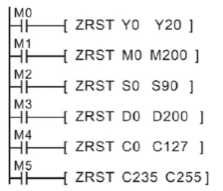
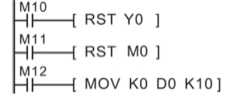
Bit device( Y, M, S) and word device(T, C, D) could be set by RST; KnY, KnM and KnS and T, C , D could also be clear by FMOV, e.g
DECO instruction
Instruction description
| Name | Function | Bits | Pulse type | Instruction format | Step |
| DECO | Source data value Q identifies the Qth bit of the destination device which will be turned ON | 16 | No | DECO S D n | 7 |
| DECOP | 16 | Yes | 7 |
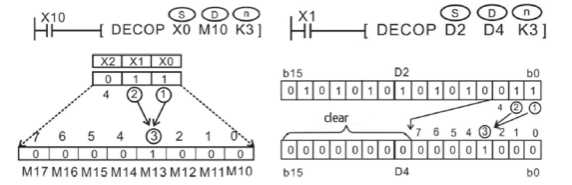
The lower n bits (n ≤ 4) of the source address are decoded to the destination address. When n ≤ 3, the high bit of the destination address will be 0.
- If n=0, the instruction is not executed, if n is not equal to 0~8, then an error will occur.
- When n=8 and the D1, D2 are bit devices, means the points are 256.
- When the drive input is OFF, the instruction is not executed and the decoded output of the action is not changed.
- When the D parameter is a word device, the range of n is 1 ~ 4
Generally, DECOP is used in the real application.
| Operand | Bit device | Word device | ||||||||||||||
| X | Y | M | S | K | H | E | KnX | KnY | KnM | KnS | T | C | D | V | Z | |
| S | √ | √ | √ | √ | √ | √ | √ | √ | √ | √ | ||||||
| D | √ | √ | √ | √ | √ | √ | ||||||||||
| n | Constant, n=1~8, if n=0, the instruction is not executed, if n is not equal to 0~8, then an error will occur. | |||||||||||||||
Program example
ENCO instruction
Instruction description
| Name | Function | Bit | Pulse type | Instruction format | Step |
| ENCO | Encode | 16 | No | ENCO S D n | 7 |
| ENCOP | 16 | Yes | 7 |
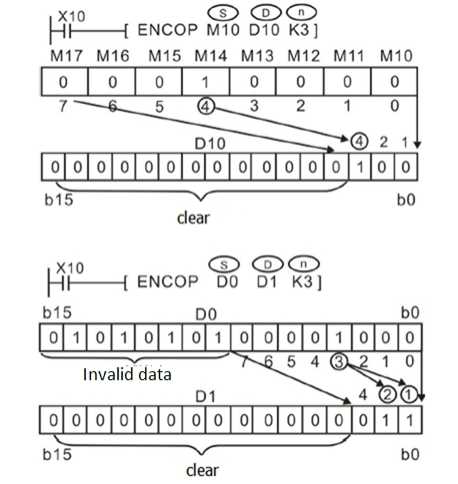
The highest active bit within the readable range has its location noted as a numbered offset from the source head address (S). This is stored in the destination register (D).
| Operand | Bit device | Word device | ||||||||||||||
| X | Y | M | S | K | H | E | KnX | KnY | KnM | KnS | T | C | D | V | Z | |
| S | √ | √ | √ | √ | √ | √ | √ | √ | √ | √ | √ | |||||
| D | √ | √ | √ | √ | √ | √ | ||||||||||
| n | Constant, n=1~8, if n=0, the instruction is not executed | |||||||||||||||
Points to note
- The readable range is defined by the largest number storable in a binary format within the number of destination storage bits specified by n, i.e. if n was equal to 4 bits a maximum number within the range 0 to 15 could be written to the destination device. Hence, if bit devices were being used as the source data, 16-bit devices would be used, i.e. the head bit device and 15 further, consecutive devices.
- If the stored destination number is 0 (zero) then the source head address bit is ON, i.e. The active bit has a 0 (zero) offset from the head address. However, if NO bits are ON within the source area, 0 (zero) is written to the destination device and an error is generated.
- When the source device is a data or word device n must be taken from the range 1 to 4 as there are only 16 source bits available within a single data word.
- When the D parameter is a word device, the range of n is 1 ~ 4
Program example
SUM instruction
Instruction description
| Name | Function | Bit | Pulse type | Instruction format | Step |
| SUM | The number (quantity) of active bits in the source data is stored in the destination device | 16 | No | SUM S D | 5 |
| SUMP | 16 | Yes | 5 | ||
| DSUM | 32 | No | 9 | ||
| DSUMP | 32 | Yes | 9 |
The numbers of active (ON) bits within the source device (S), i.e. bits which have a value of “1" are counted. The count is stored in the destination register (D). If a double word format is used, both the source and destination devices use 32-bit, double registers. The destination device will always have its upper 16-bit set to 0 (zero) as the counted value could never be more than 32.
| Operand | Bit device | Word device | ||||||||||||||
| X | Y | M | S | K | H | E | KnX | KnY | KnM | KnS | T | C | D | V | Z | |
| S | √ | √ | √ | √ | √ | √ | √ | √ | √ | |||||||
| D | √ | √ | √ | √ | √ | √ | √ | √ | ||||||||
Program example

BON instruction
Instruction description
| Name | Function | Bit | Pulse type | Instruction format | Step |
| BON | The status of the specified bit in the source device is indicated at the destination | 16 | No | BON S D n | 7 |
| BONP | 16 | Yes | 7 | ||
| DBON | 32 | No | 13 | ||
| DBONP | 32 | Yes | 13 |
Determine the nth bit state of S and save the value to D.
| Operand | Bit device | Word device | ||||||||||||||
| X | Y | M | S | K | H | E | KnX | KnY | KnM | KnS | T | C | D | V | Z | |
| S | √ | √ | √ | √ | √ | √ | √ | √ | √ | √ | √ | |||||
| D | √ | √ | √ | |||||||||||||
| n | N=0~15 (16-bit); n=0~31(32bit) | |||||||||||||||
Program example
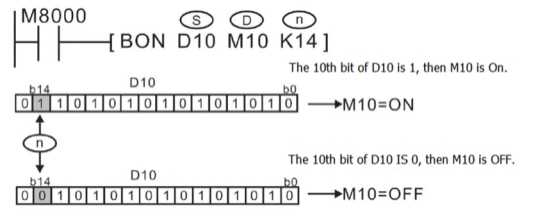
When M10 turns from On to OFF, M10 keeps the initial value.
MEAN instruction
Instruction description
| Name | Function | Bits(bits) | Pulse type | Instruction format | Step |
| MEAN | Calculates the mean of a range of devices | 16 | No | MEAN S D n | 7 |
| MEANP | 16 | Yes | 7 | ||
| DMEAN | 32 | No | 13 | ||
| DMEANP | 32 | Yes | 13 |
The range of source data is defined by operands S and n. S is the head address of the source data and n specifies the number of consecutive source devices used.
The value of all the devices within the source range is summed and then divided by the number of devices summed, i.e. n. This generates an integer mean value which is stored in the destination device (D). The remainder of the calculated mean is ignored.
| Operand | Bit device | Word device | ||||||||||||||
| X | Y | M | S | K | H | E | KnX | KnY | KnM | KnS | T | C | D | V | Z | |
| S | √ | √ | √ | √ | √ | √ | √ | |||||||||
| D | √ | √ | √ | √ | √ | √ | √ | √ | ||||||||
| n | Constant, n=1~64 | |||||||||||||||
Program example

(D10+D11+D12+D13)/4=D20
For example, D10=K5,D11=K5,D12=K15,D13=D52 , then D20=K19,the remainder 1 is ignored.
ANS instruction
Instruction description
| Name | Function | Bits | Pulse type | Instruction format | Step |
| ANS | (Timed) Annunciator Set | 16 | No | ANS S m D | 7 |
This instruction, when energized, starts a timer (S) for n, 100 ms. when the timer completes its cycle the assigned annunciator (D) is set ON.
If the instruction is switched OFF during or after completion of the timing cycle the timer is automatically reset. However, the current status of the annunciator coil remains unchanged.
| Operand | Bit device | Word device | ||||||||||||||
| X | Y | M | S | K | H | E | KnX | KnY | KnM | KnS | T | C | D | V | Z | |
| S | √ | |||||||||||||||
| D | √ | |||||||||||||||
| m | Constant, n=1~32767 (unit: 1000ms) | |||||||||||||||
Program example

If X1 and X2 are set for more than 1 second, S900 is set ON. After that, S900 will keep ON, even if X1 or X2 is reset (but T10 will be reset). If X1 and X2 are connected for less than 1 second, X1 or X2 becomes OFF. Then the timer will reset.
If M8049 (signal alarm is available) is set, the lowest number of S900~S999 that is set ON will be saved at D8049 (The lowest S number with the ON state). when any signal in S900~S999 is ON then M8048 is ON.
ANR instruction
Instruction description
| Name | Function | Bits(bits) | Pulse type | Instruction format | Step |
| ANR | The lowest active annunciator is reset on every operation of this instruction | 16 | No | ANR | 1 |
| ANRP | 32 | Yes | 1 |
ANR is used for reset the alarm signal, e.g.
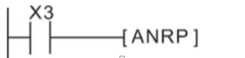
If X3 is ON, then the alarm signal from S900 to S999 will be reset. If there are more than one alarm signal, then the alarm signal with the smallest number will be reset.
If X3 is ON again, then the next alarm signal from S900 to S999 will be reset. Generally, we will use ANRP instruction.
Program example

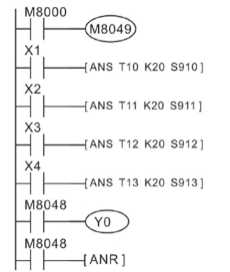
If S910, S911 and S912 all are ON, then when X5 turns from OFF to ON, S910 will be reset, when X5 turns from OFF to ON for the next time, S911 will be reset and the like.
SQR instruction
Instruction description
| Name | Function | Bits | Pulse type | Instruction format | Step |
| SQR | Performs a mathematical square root | 16 | No | SQR S D | 5 |
| SQRP | 16 | Yes | 5 | ||
| DSQR | 32 | No | 9 | ||
| DSQRP | 32 | Yes | 9 |
This instruction performs a square root operation on source data (S) and stores the result at destination device (D). The operation is conducted entirely in whole integers rendering the square root answer rounded to the lowest whole number. For example, if (S) = 154, then (D) is calculated as being 12. M8020 is set ON when the square root operation result is equal to zero. Answers with rounded values will activate M8021.
| Operand | Bit device | Word device | ||||||||||||||
| X | Y | M | S | K | H | E | KnX | KnY | KnM | KnS | T | C | D | V | Z | |
| S | √ | |||||||||||||||
| D | √ | |||||||||||||||
Program example
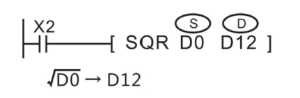
If D0=K100, then when X2 is ON, D12=K10;
If D0=K110, then when X2 is ON, D12=K10, decimal is ignored.
FLT instruction
Instruction description
| Name | Function | Bit | Pulse type | Instruction format | Step |
| FLT | Used to convert data to floating point format | 16 | No | FLT S D | 5 |
| FLTP | 16 | Yes | 5 | ||
| DFLT | 32 | No | 9 | ||
| DFLTP | 32 | Yes | 9 |
The instruction coverts the decimal data S to floating digits, and saves the result in D and D+1. Please note that two consecutive devices (D and D+1) will be used to store the converted float number. This is true regardless of the size of the source data (S), i.e. whether (S) is a single device (16-bit) or a double device (32-bit) has no effect on the number of destination devices (D) used to store the floating point number. (The instruction INT: Convert floating point value to decimal value)
| Operand | Bit device | Word device | ||||||||||||||
| X | Y | M | S | K | H | E | KnX | KnY | KnM | KnS | T | C | D | V | Z | |
| S | √ | |||||||||||||||
| D | √ | |||||||||||||||
Program example
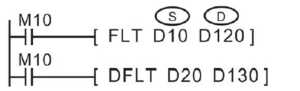
When M8=ON, D10 (16bit BIN) will be converted to binary floating number and saved in D120 and D121.
When M10=ON, D20 (32bit BIN) will be converted to binary floating number and saved in D130 and D131.
SWAP instruction
Instruction description
| Name | Function | Bit | Pulse type | Instruction format | Step |
| SWAP | The high and low byte of the designated devices are exchanged | 16 | No | SWAP S | 3 |
| SWAPP | 16 | Yes | 3 | ||
| DSWAP | 32 | No | 5 | ||
| DSWAPP | 32 | Yes | 5 |
In single word (16-bit) operation the upper and lower byte of the source device are exchanged.
In double word (32-bit) operation the upper and lower byte of each or the two 16-bit devices are exchanged.
| Operand | Bit device | Word device | ||||||||||||||
| X | Y | M | S | K | H | E | KnX | KnY | KnM | KnS | T | C | D | V | Z | |
| S | √ | √ | √ | √ | √ | √ | √ | √ | √ | |||||||
Program example
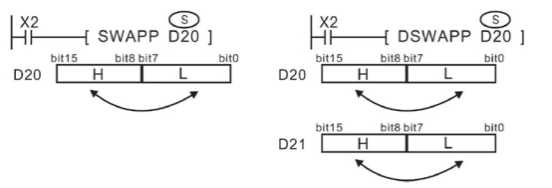
In the left demo, the upper and lower byte of D20 is exchanged.
In the right demo, the upper and lower byte of D20 and D21 are exchanged.