

6.8.1 REF instruction
Instruction description
| Name | Function | Bit | Pulse type | Instruction format | Step |
| REF | Forces an immediate update of inputs or outputs as specified | 16 | No | REF D n | 5 |
| REFP | 16 | Yes | 5 |
Refresh n devices immediately stating from D.
- D must be the device like X0, X10, Y0 or Y10… i.e the unit’s digit need to be zero.
- The value of n must be the multiple of 8(n=8~256)
| Operand | Bit device | Word device | ||||||||||||||
| X | Y | M | S | K | H | E | KnX | KnY | KnM | KnS | T | C | D | V | Z | |
| D | √ | √ | ||||||||||||||
| n | ||||||||||||||||
Standard PLC operation processes output and input status between the END instruction of one program scould and step 0 of the following program scould. If an immediate update of the I/O device status is required, the REF instruction is used.
REF could be used between the instruction FOR~ NEXT or CJ.
REF could be used in the interrupt subprogram to refresh the input information and the output result.
The delay of the input port state depends on the filter time of the input device. X0 to X7 have the digital filter function, the filter time is between 0 and 60 ms, the other IO ports are hardware filter that the filter time is 10 ms. The specific parameter you need to refer to the PLC manual.
The delay of the output port state change depends on the response time of the output element, such as relay. The output contact will not act until the response time of the relay or transistor is over.
The response latency of the relay output type plc is about 10 ms (max :20ms),the high speed output port of the transistor plc is about 10 us, for the common output port of the transistor plc is about 0.5 ms. The specific parameter you need to refer to the PLC manual.
Program example
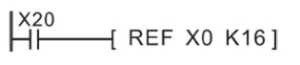
During the operation, once X20 is ON, the state of the input port X0 to X17 will be read immediately, the input signal will be refreshed and there is no input delay.
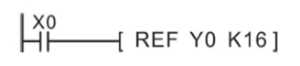
During the operation, once X20 is ON, the state of the output port Y0 to Y17 will be read immediately, the output signal will be refreshed immediately rather than until the END instruction.
6.8.2 REFF instruction
Instruction description
| Name | Function | Bit(bits) | Pulse type | Instruction format | Step |
| REFF | Inputs are refreshed, and their input filters are reset to the newly designated value | 16 | No | REFF n | 7 |
| REFFP | 16 | No | 7 |
n is the filter time for X0 ~ X7 input port.
X0~X7 use digital filters, the default filter time is set by the D8020. D8020 could be changed to 0 ~ 60ms by REFF instruction. The remaining X ports only have hardware RC filter that the filter time is about 10ms and couldn’t be changed.
When using the interrupts or high speed counting, the filter time of the related port reduce to minimum automatically. The unrelated ports stay as it was.
User could also use MOV instruction to change the value of D8020.
| Operand | Bit device | Word device | ||||||||||||||
| X | Y | M | S | K | H | E | KnX | KnY | KnM | KnS | T | C | D | V | Z | |
| n | Constant, n=0~60, the unit is ms | |||||||||||||||
Program example
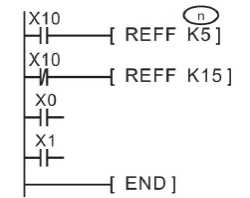
When X10 is triggered, the filter time of X0~X7 is 5ms, when X10 is OFF, The filter time of X0~ X7 is 15 ms.
6.8.3 MTR instruction
Instruction description
| Name | Function | Bit(bits) | Pulse type | Instruction format | Step |
| MTR | Multiplexes a bank of inputs into a number of sets of devices. Could only be used once. | 16 | No | MTR S D1 D2 n | 9 |
This instruction is only for transistor plc. This instruction allows a selection of 8 consecutive input devices (head address S) to be used multiple times, i.e. each physical input has more than one, separate and quite different (D1) signal being processed. The result is stored in a matrix-table (head address D2). “n” is the number of scouldning column in matrix.
| Operand | Bit device | Word device | ||||||||||||||
| X | Y | M | S | K | H | E | KnX | KnY | KnM | KnS | T | C | D | V | Z | |
| S | √ | |||||||||||||||
| D1 | √ | |||||||||||||||
| D2 | √ | √ | √ | |||||||||||||
| n | Constant, n=2~8 | |||||||||||||||
Program example

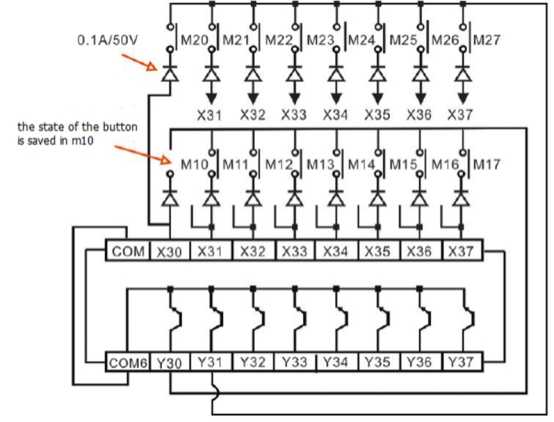
The wiring:
When output Y30 is ON only those inputs in the first bank are read. These results are then stored; in this example, auxiliary coils M10 to M17. The second step involves Y30 going OFF and Y31coming ON. This time only inputs in the second bank are read. These results are stored in devices M20 to M27. The last step of this example has Y31 going OFF and Y32 coming ON. This then allows all of the inputs in the second bank to be read and stored in devices M20 to M27. The processing of this instruction example would take 20 × 2 = 40 msec.
A scouldning input with a maximum of 64 points could be achieved using 8-point X output and 8-point transistor Y output. But it is not suitable for high speed input operations because it needs a time of 20 ms,8 line= 160 ms to read each input. Therefore, the ports after X20 are typically used as the scouldning inputs. This instruction is allowed to be used only once in the program.
6.8.4 DHSCR instruction
Instruction description
| Name | Function | Bit | Pulse type | Instruction format | Step |
| DHSCR | Resets the selected output when the specified high speed counter equals the test value | 32 | No | DHSCR S1 S2 D | 13 |
The HSCR compares the current value of the selected high speed counter (S2) against a selected value (S1). When the counters current value changes to a value equal to S1, the device specified as the destination (D) is reset.
| Operand | Bit device | Word device | ||||||||||||||
| X | Y | M | S | K | H | E | KnX | KnY | KnM | KnS | T | C | D | V | Z | |
| S1 | √ | √ | √ | √ | √ | √ | √ | √ | √ | √ | √ | |||||
| S2 | √ | |||||||||||||||
| D | √ | √ | √ | |||||||||||||
Program example
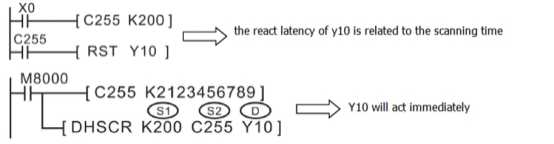
In the example above, Y10 would be reset only when C255’s value stepped from 199 to 200 or from 201 to 200. If the current value of C255 was forced to equal 200 by test techniques, output Y10 would NOT reset.
The operation principle of the HSCR command is similar to that of the HSCS instruction, except that the HSCR output action is just opposite to the HSCS instruction, i.e., when the counter value is equal, the specified output will be reset.
6.8.5 DHSCS instruction
Instruction description
| Name | Function | Bit | Pulse type | Instruction format | Step |
| DHSCS | Sets the selected output when the specified high speed counter value equals the test value | 32 | No | DHSCS S1 S2 D | 13 |
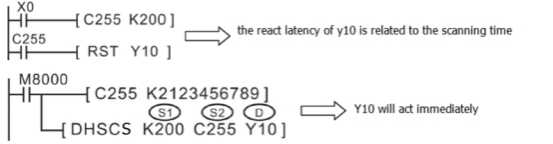
The HSCS set, compares the current value of the selected high speed counter (S2) against a selected value (S1). When the counters current value changes to a value equal to S1 the device specified as the destination (D) is set ON.
It is recommended that the drive input used for the high speed counter functions; HSCS, HSCR, HSCZ is the special auxiliary RUN contact M8000.
If more than one high speed counters function is used for a single counter the selected flag devices (D) should be kept within 1 group of 8 devices, i.e. Y0-7, M10-17.
All high speed counter functions use an interrupt process; hence, all destination devices (D) are updated immediately.
| Operand | Bit device | Word device | ||||||||||||||
| X | Y | M | S | K | H | E | KnX | KnY | KnM | KnS | T | C | D | V | Z | |
| S1 | √ | √ | √ | √ | √ | √ | √ | √ | √ | √ | √ | |||||
| S2 | √ | |||||||||||||||
| D | √ | √ | √ | |||||||||||||
Program example
Example 1:
Example 2:
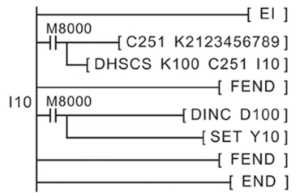
LX3V could use interrupt pointers I010 through I060 (6 points) as destination devices (D). This enables interrupt routines to be triggered directly when the value of the specified high speed counter reaches the value in the HSCS instruction. When (D) is between I010~I060, the subprogram for interrupting 0~5 in the high-speed counter needs to be initiated.
6.8.6 DHSZ instruction
Instruction description
| Name | Function | Bit | Pulse type | Instruction format | Step |
| DHSZ | The current value of a high speed counter is checked against a specified range | 32 | No | DHSZ S1 S2 S D | 17 |
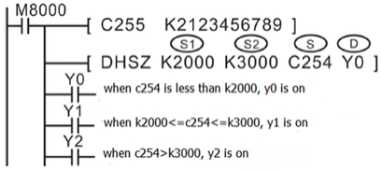
This instruction works in exactly the same way as the standard ZCP. The only difference is that the device being compared is a high speed counter (specified as S). Also, all of the outputs (D) are updated immediately due to the interrupt operation of the DHSZ. It should be remembered that when a device is specified in operand D it is in fact a head address for 3 consecutive devices. Each one is used to represent the status of the current comparison.
- S1 is the lower limit; S1 must be equal to or less than S2.
- S2 is the upper limit.
- S must be C235~C255, because C235~C255 are 32bit counter, so user must use DHSZ not HSZ.
- D is for storing comparison result. When it is Y0~Y17 or M or S, there is no latency. For other output port, the output will not be executed until program END.
| Operand | Bit device | Word device | ||||||||||||||
| X | Y | M | S | K | H | E | KnX | KnY | KnM | KnS | T | C | D | V | Z | |
| S1 | √ | √ | √ | √ | √ | √ | √ | √ | √ | √ | √ | |||||
| S2 | √ | √ | √ | √ | √ | √ | √ | √ | √ | √ | √ | |||||
| S | √ | |||||||||||||||
| D | √ | √ | √ | |||||||||||||
Program example
6.8.6 SPD instruction
Instruction description
| Name | Function | Bit | Pulse type | Instruction format | Step |
| SPD | Detects the number of ‘encoder’ pulses in a given time frame. Results could be used to calculate speed | 16 | No | SPD S1 S2 D | 7 |
The number of pulses received at S1 are counted and stored in D+1; this is the current count value. The counting takes place over a set time frame specified by S2 in msec. The time remaining on the current ‘timed count’, is displayed in device D+2.
The number of counted pulses (of S1) from the last timed count is stored in D.
| Operand | Bit device | Word device | ||||||||||||||
| X | Y | M | S | K | H | E | KnX | KnY | KnM | KnS | T | C | D | V | Z | |
| S1 | √ | |||||||||||||||
| S2 | √ | √ | √ | √ | √ | √ | √ | √ | √ | √ | √ | |||||
| D | √ | √ | √ | √ | √ | |||||||||||
Program example

X0 is the pulse input port.
D0 defines the set time frame.
Current count value, device D10
Accumulated/ last count value, device D11
Current time remaining in msec, device D12
6.8.8 PLSY instruction
Instruction description
| Name | Function | Bit | Pulse type | Instruction format | Step |
| PLSY | Outputs a specified number of pulses at a set frequency | 16 | No | PLSY S1 S2 D | 7 |
| DPLSY | 32 | Yes | 13 |
A specified quantity (S2) of pulses is output through device D at a specified frequency S1. This instruction is used in situations where the quantity of outputs is of primary concern.
For PLSY, S1’s range is 1~32767 Hz, for DPLSY, S1’s range is 1~200000 Hz.
For PLSY, S2’s range is 1~32767, for DPLSY, S1’s range is 1~2147483647. If S2 is 0, it means there is no limitation for the output pulse quantity.
For LX3V/3VP/3VE, D could be Y0~Y3. For LX3V (1s) type, D could only be Y0 or Y1.
| Operand | Bit device | Word device | ||||||||||||||
| X | Y | M | S | K | H | E | KnX | KnY | KnM | KnS | T | C | D | V | Z | |
| S1 | √ | √ | √ | √ | √ | √ | √ | √ | √ | |||||||
| S2 | √ | √ | √ | √ | √ | √ | √ | √ | √ | |||||||
| D | √ | |||||||||||||||
Program example

In the example, when X0 is OFF, the output becomes 0 too, when X0 becomes ON again it will react initially.
A single pulse is described as having a 50% duty cycle. This means it is ON for 50% of the pulse and OFF for the 50% of the pulse. The actual is controlled by interrupt handling, i.e. the output cycle is not affected by the scould time of the program.
The pulse completion flag (M8029) is set when the PLSY instruction is done.
The related variable in the PLSY:
- D8141 (high byte), D8140 (low byte): Y000 the count of output pulse, when the direction is reverse, Y000 decrease. (32-bits)
- D8143 (high byte), D8142 (low byte): Y001 the count of output pulse, when the direction is reverse, Y000 decrease. (32-bits)
- D8151 (high byte), D8150 (low byte): Y002 the count of output pulse, when the direction is reverse, Y000 decrease.(32-bit)
- D8153 (high byte), D8152 (low byte): Y003 the count of output pulse, when the direction is reverse, Y000 decrease.(32-bit)
- M8145: Y000 stop output pulse (immediately)
- M8146: Y001 stop output pulse (immediately)
- M8152: Y002 stop output pulse (immediately)
- M8153: Y003 stop output pulse (immediately)
- M8147: Y000 monitor in the output pulse(BUSY/READY)
- M8148: Y001 monitor in the output pulse(BUSY/READY)
- M8149: Y002 monitor in the output pulse(BUSY/READY)
- M8150: Y003 monitor in the output pulse(BUSY/READY)
6.8.9 PWM instruction
Instruction description
| Name | Function | Bit | Pulse type | Instruction format | Step |
| PWM | Generates a pulse train with defined pulse characteristics | 16 | No | PWM S1 S2 D | 7 |
Only transistor type PLC could support PWM instruction. S1 defines the width of the pulse, S2 defines the pulse period, and D defines the output port. For LX3V (1S firmware), the output port could be Y0 or Y1, for LX3V (2N firmware), the output port could be Y0~Y3.
The output port couldn’t be the same with PLSY or PLSR instruction.
S1 <= S2, the setting range of S1 is 0~32767 ms. S2 ranges from 1 to 32767ms.
| Operand | Bit device | Word device | ||||||||||||||
| X | Y | M | S | K | H | E | KnX | KnY | KnM | KnS | T | C | D | V | Z | |
| S1 | √ | √ | √ | √ | √ | √ | √ | √ | √ | √ | √ | |||||
| S2 | √ | √ | √ | √ | √ | √ | √ | √ | √ | √ | √ | |||||
| D | √ | |||||||||||||||
Program example
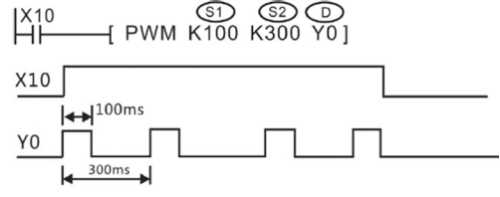
Thousand-ratio pattern
The thousand-ratio pattern: the thousand-ratio pattern is to divide the periodic parameters evenly equal to 1000. The user sets correspond to the control bit ON for thousand-ratio pattern as follows:
| Outputs | Y0 | Y1 | Y2 | Y3 |
| Control bits | M8134 | M8135 | M8136 | M8137 |
[Example]
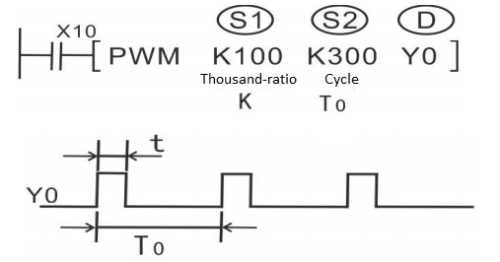
Cycle set to 100ms, duty ratio if set to 500, then output to high level is 50ms, low level is 50ms; duty ratio if set to 100, then output to high level is 10ms, low level is 90ms; duty ratio if set to 900, then output high level is 90ms, low level is 10ms;
Calculation formula: t (ms) =T0 (ms) *K/1000
High level time (ms) = cycle time (ms) * duty ratio/1000
Low level time (ms) = cycle time (ms) – high level time (ms)
6.8.10 PLSR instruction
Instruction description
| Name | Function | Bit | Pulse type | Instruction format | Step |
| PLSY | Outputs a specified number of pulses at a set frequency | 16 | No | PLSY S1 S2 S3 D | 7 |
| DPLSY | 32 | Yes | 17 |
Because of the nature of the high speed output, transistor output units should be used with this instruction. Relay outputs will suffer from a greatly reduced life and will cause false outputs to occur due to the mechanical ‘bounce’ of the contacts.
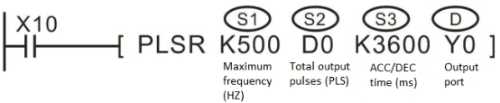
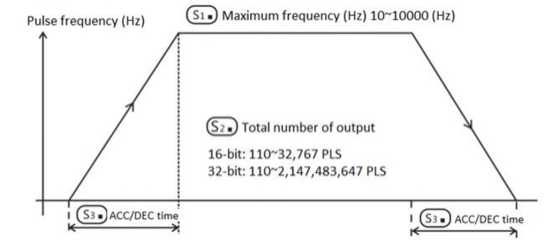
- S1: The maximum frequency, the range is 10~100,000Hz
- S2: A specified quantity of output pulses, 16-bit operation: 110 to 32,767 pulses, 32-bit operation: 110 to 2,147,483,647 pulses. If it was less than 110, PLC couldn’t output pulse;
- S3: The acceleration time, the range is 10~32,000 (ms).
- D: output port, for LX3V/3VP/3VE, D could be Y0~Y3, for LX3V (1s) type, D could only be Y0 or Y1.
| Operand | Bit device | Word device | ||||||||||||||
| X | Y | M | S | K | H | E | KnX | KnY | KnM | KnS | T | C | D | V | Z | |
| S1 | √ | √ | √ | √ | √ | √ | √ | √ | √ | √ | √ | |||||
| S2 | √ | √ | √ | √ | √ | √ | √ | √ | √ | √ | √ | |||||
| S3 | √ | √ | √ | √ | √ | √ | √ | √ | √ | √ | √ | |||||
| D | √ | |||||||||||||||
Program example
The special registers corresponding to each output port are listed as follow:
| Register | Definition | Remarks | |
| D8140 | Low byte | Number of total pulses output to Y0 port set in the PLSY or PLSR instruction | Applicable instructions: use DMOV K0 D81xx to perform clear operation |
| D8140 | High byte | ||
| D8142 | Low byte | Number of total pulses output to Y1 port set in the PLSY or PLSR instruction | |
| D8143 | High byte | ||
| D8150 | Low byte | Number of total pulses output to Y2 port set in the PLSY or PLSR instruction | |
| D8151 | High byte | ||
| D8152 | Low byte | Number of total pulses output to Y3 port set in the PLSY or PLSR instruction | |
| D8153 | High byte | ||
| D8136 | Low byte | Accumulative value of the number of the pulses already output to Y0 and Y1 | |
| D8137 | High byte | ||
The output frequency range of this instruction is 10 ~ 100, 000Hz. When it is out of range, it will be automatically converted into the range and then executed. However, the actual output frequency depends on the following formula.
Output frequency=

The frequency of the initial and final stages of acceleration should not be lower than the result of the above formula.
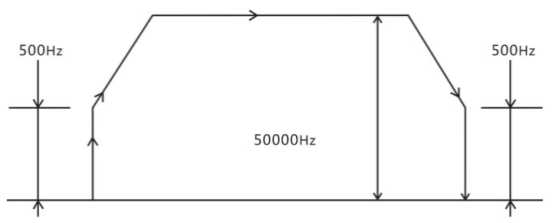
Example: Maximum speed is 50,000, acceleration /deceleration time is 100ms.
 = 500 (Hz)
When maximum frequency S1 is specified to 50000Hz, the actual output frequency at the early stage of acceleration and at the late stage of deceleration is 500Hz.
- Note for use
- The instruction is executed in an interruption way; therefore, it will not be influenced by the scouldning cycle;
- When the instruction power flow is OFF, the deceleration stop is active; when the power flow is changed from OFF→ON, the pulse output process starts over again.
- During the pulse output process, changing the operand has no effect on this output, and the modified content will take effect when the instruction is executed next time.
- Special auxiliary coil M8029 is turned ON when the specified number of pulses has been completed. The pulse count and completion flag (M8029) are reset when the PLSY instruction is de-energized. If “0" (zero) is specified, the PLSY instruction will continue generating pulses for as long as the instruction is energized.
- The process couldn’t be repeated with the output port number of the PWM instruction.
6.8.11 PLSR2 instruction
1) Instruction description
| Name | Function | Bit | Pulse type | Instruction format | Step |
| PLSR2 | Multi-speed pulse output | 16 | No | PLSR2 S1D1D2 | 7 |
| Operand | Bit device | Word device | ||||||||||||||
| X | Y | M | S | K | H | E | KnX | KnY | KnM | KnS | T | C | D | V | Z | |
| S 1 | v | |||||||||||||||
| D1 | v | |||||||||||||||
| D2 | v | v | v | |||||||||||||
This instruction is only valid for LX3VP series PLC.
PLSR2 instruction sets parameters on table list, and generates relative/ absolute position pulse according specified port, frequency, direction and ramp time. so that servo actuator gives the offset on the motion based on the current position. Only transistor output PLC supports this instruction.
S1: Register parameter, Dn is the start register of the specified register segment;
D1 Pulse output port, designated Y0-Y3;
D2: The direction or position variable output port, ON: indicates the operating forward; otherwise, run in reverse.

S1 Register offset | Content | Description |
| S1+0 | Table flag | Retention |
| S1+1 | Table version | Retention |
| S1+2 | Pulse total number of segments | 1-12 |
| S1+3 | Acceleration and deceleration mode | 0: First acceleration mode; 1: Later acceleration mode |
| S1+4 | Acceleration time | 50-32000ms |
| S1+5 | Deceleration time | 50-32000ms |
| S1+6 | Default frequency | 10HZ-200KHZ |
| S1+7 | ||
| S1+8 | Relative / absolute mode | 0: relative; 1: Absolute |
| S1+ 9- S1+19 | Retention | Retention |
| S1+20 | First segment pulse frequency | 10HZ-200KHZ |
| S1+21 | ||
| S1+22 | First segment total number of pulses | No |
| S1+23 | ||
| S1+24 | First segment wait condition | 0: pulse transmission is completed; 1: waiting time; 2: wait signal; 3: Trigger signal. (With [waiting condition] and [Pending Register] with use) |
| S1+25 | First segment Wait register type | Waiting condition register type and relationship: Pulse transmission completion: None Waiting time: = 0: D register; = 1: constant; Wait signal: = 0: X register; = 1: M bit register; Trigger: = 0: X register; = 1: M bit register. |
| S1+26 | First segment constant value / standby register number | No |
| S1+27 | ||
| S1+28 | Retention | Retention |
| S1+29 | Retention | Retention |
| ... | ... | ... |
| S1+ 10 + n * 10 | The N-th pulse frequency | 10HZ - 200KHZ |
2) Programming example
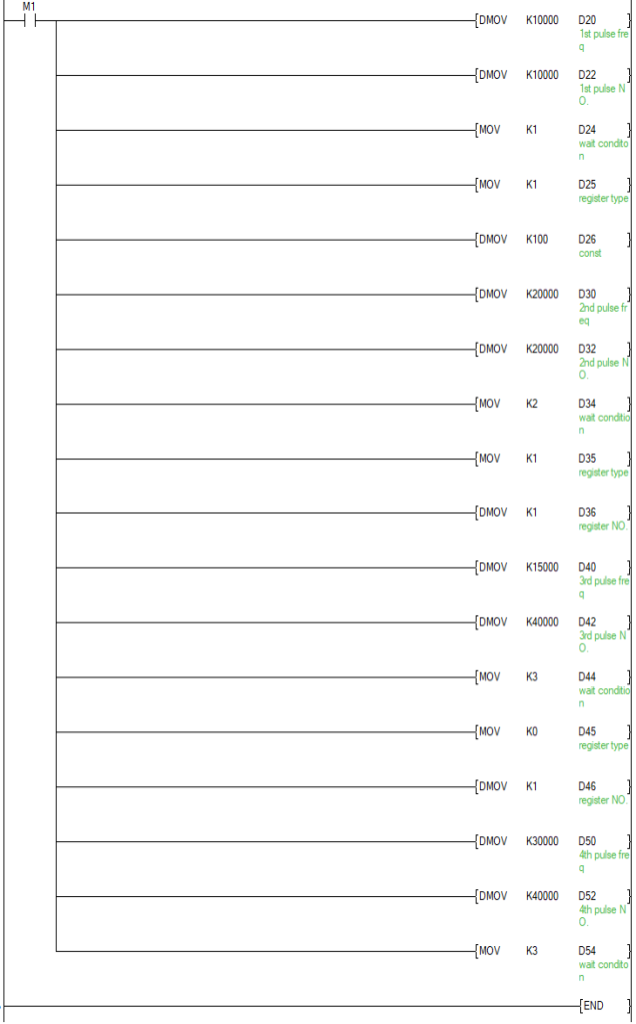
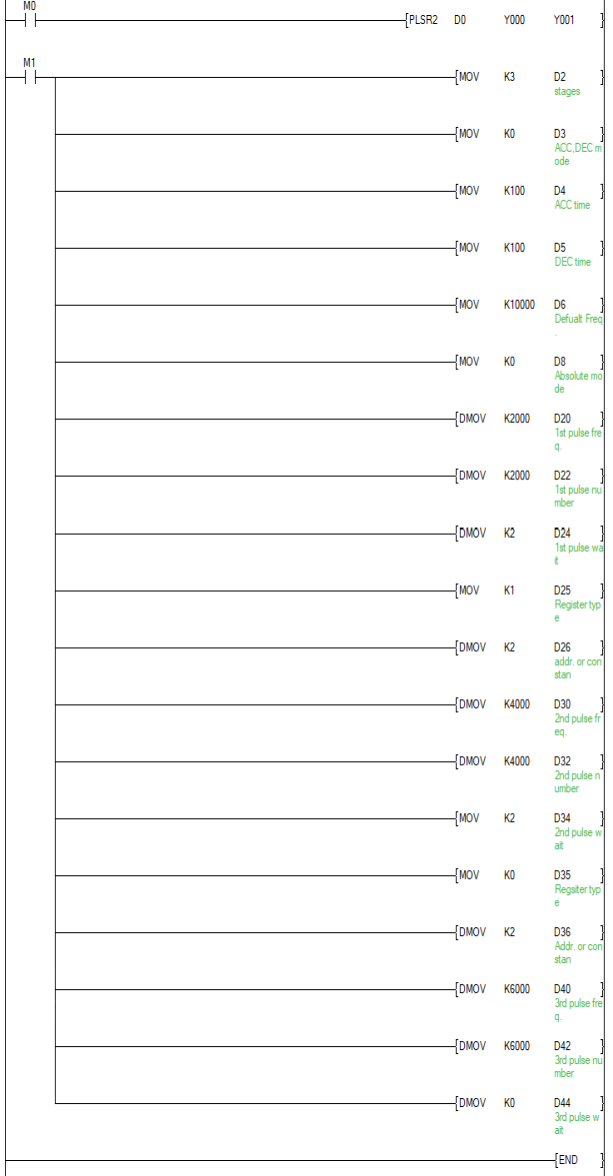
The demonstration shown below is parameters settings for 4 segments pulse starting with D0, the acceleration time is 100 ms from lowest frequency to the default frequency(100,000Hz), the deceleration time is 100 ms, it is in absolute mode.
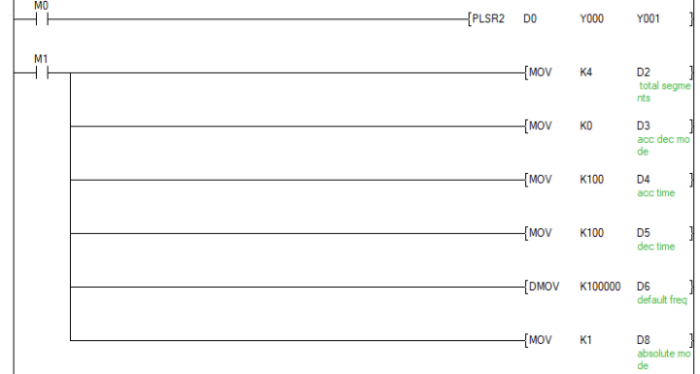
The number of pulses of the frequency of each segment and the wait condition as follows:
| Stage | Frequency | Pulses | Mode | Condition |
| 1 | 10,000 | 10,000 | waiting time | K100 |
| 2 | 20,000 | 20,000 | Waiting for the signal | M1 |
| 3 | 15,000 | 40,000 | Trigger | X1 |
| 4 | 30,000 | 60,000 | No wait condition | K0 |
Configured in accordance with parameters:
3) Parameter Description
1) S1+2: pulse for setting the number of stages (word), a data range 1-12, it means support 1-12 segments;
2) Acceleration and deceleration modes
S1+3: to set the acceleration and deceleration patterns (words), is set to 0 before the addition mode is set to 1 after addition mode, wherein:
a) Early acceleration mode: When a multi-stage pulse is applied and the first stage pulse finished according to first stage frequency, the next stage frequency has been accelerated in advance.
b) Later acceleration mode: When a multi-stage pulse is applied and the first stage pulse finished according to first stage frequency, the next stage frequency just begin to accelerate.
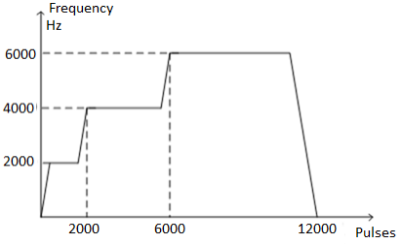
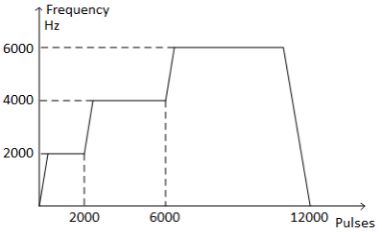
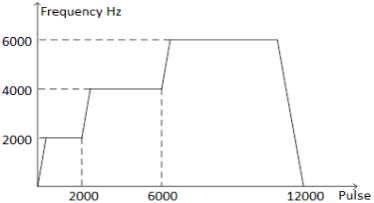
For example, now need three stages of pulse, the first pulse frequency is 2000Hz, the number of pulse is 2000, the second pulse frequency is 4000Hz, the number of pulse is 4000, and the third pulse frequency is 6000Hz, the number of pulse is 6000.
Early acceleration mode as below:
Later acceleration mode as below:
(3) Acceleration time, deceleration time and default frequency
S1+14 (single word) is the acceleration time;
S1+5 (single word) deceleration time;
S1+6 (double word) default frequency;
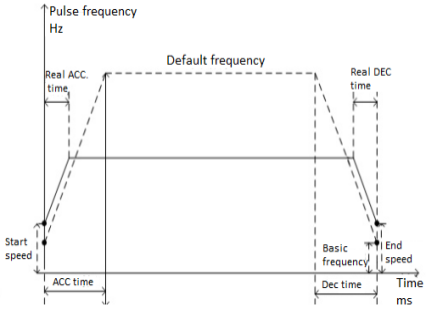
The output frequency range of this instruction is 10 ~ 200, 000Hz. When the maximum speed(acceleration and deceleration) beyond this range,PLC will automatically convert (up or down) to the able range and perform.
The acceleration time refers to the time from the base frequency to the default frequency, and the deceleration time refers to the time from the default frequency to the base frequency.
(4) Relative, absolute mode
S1+8 (single word) is used in setting the parameters of pulse configuration for relative mode or absolute mode. When it is set to (relative mode), that means the pulse number and current value register is relative position. Set to 1 (absolute mode), that means pulse number and current value register is absolute position.
The corresponding relationship between the output port and the current pulse value register is as follows:
l [Y000] output, the current pulse value register is [D8141 (high byte), D8140 (low byte)] (32 bits)
l [Y001] output, the current pulse value register is [D8143 (high bytes), D8142 (low bytes)] (32 bits)
l [Y002] output, the current pulse value register is [D8151 (high bytes), D8150 (low bytes)] (32 bits)
l [Y003] output, the current pulse value register is [D8153 (high bytes), D8152 (low bytes)] (32 bits)
For example
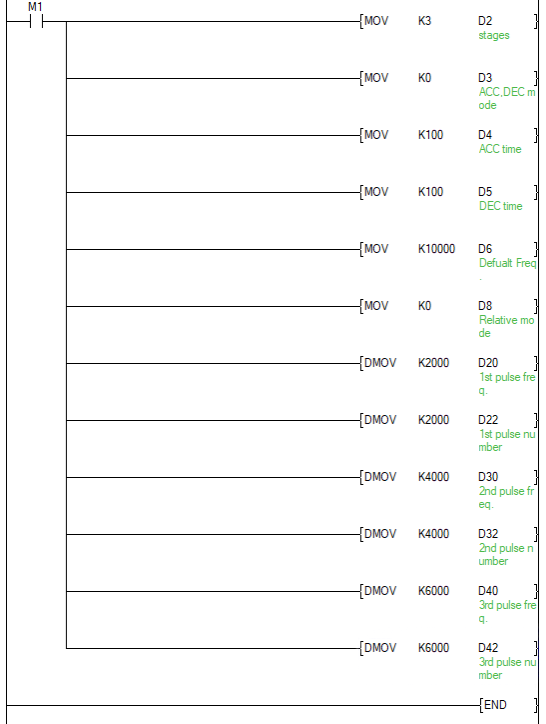
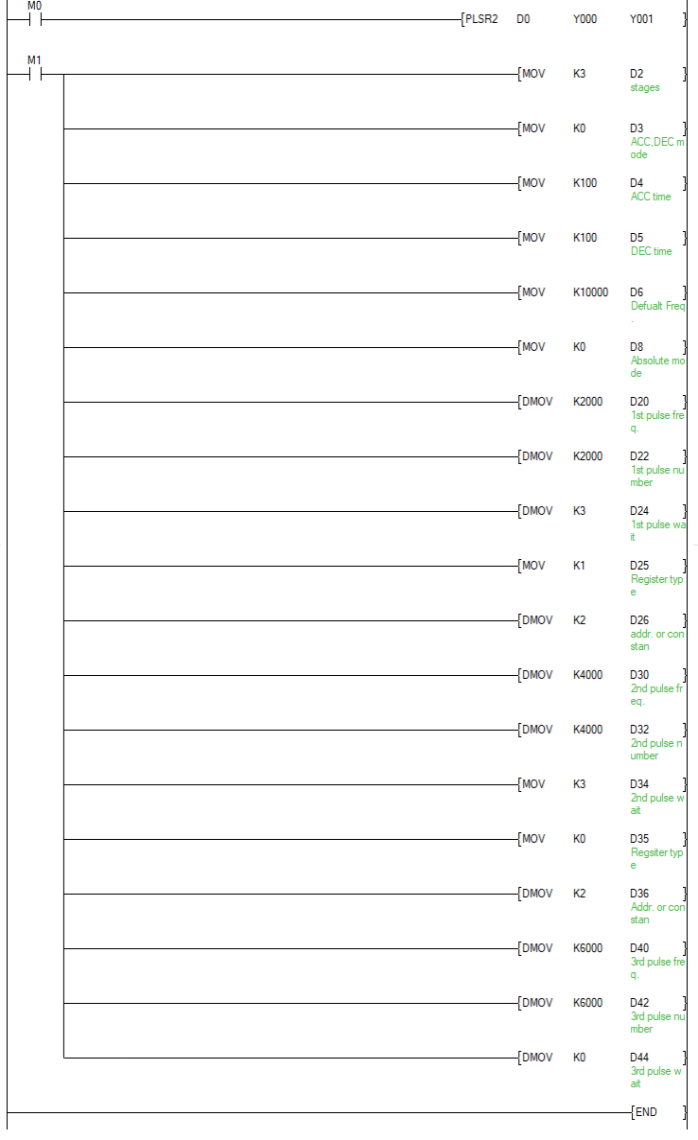
Now need three stages of pulse, the first pulse frequency is 2000Hz, the number of pulse is 2000, the second pulse frequency is 4000Hz, the number of pulse is 4000, and the third pulse frequency is 6000Hz, the number of pulse is 6000Hz.
The corresponding mode settings are as follows:
| Stage | Frequency | Pulses | Mode | Condition |
| 1 | 2000 | 2000 | No waiting condition | K0 |
| 2 | 4000 | 4000 | No waiting condition | K0 |
| 3 | 6000 | 6000 | No waiting condition | K0 |
PLC ladder setting as below:
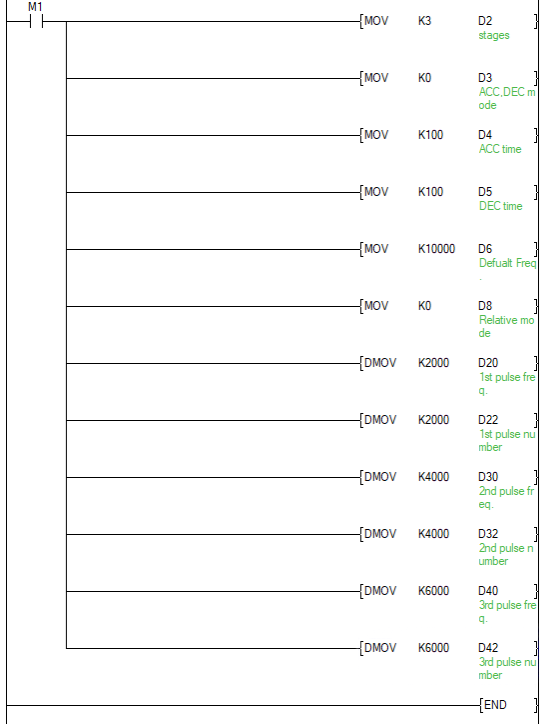
Absolute mode setting as below:
| Stage | Frequency | Pulses | Mode | Condition |
| 1 | 2000 | 2000 | No waiting condition | K0 |
| 2 | 4000 | 4000 | No waiting condition | K0 |
| 3 | 6000 | 6000 | No waiting condition | K0 |
PLC ladder setting as below:
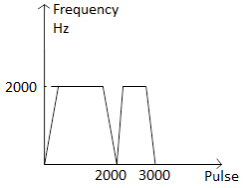
✎Note: absolute mode, if the current position of the same segment with the next paragraph, it is considered the next paragraph does not exist, at some speed will drop to zero.
The following table shows the absolute mode, the first segment a second segment of the same pulse position where:
| Stage | Frequency | Pulses | Mode | Condition |
| 1 | 2000 | 2000 | No waiting condition | K0 |
| 2 | 3000 | 2000 | No waiting condition | K0 |
| 3 | 2000 | 3000 | No waiting condition | K0 |
Pulse waveform:
(5) Wait condition
S1+ 14 + 10 * N (word) is the wait condition paragraph N, S1+ 15 + 10 * N (word) register type waiting, S1+ 16 + 10 * N (double word) waiting ID register / constant value. Wait condition = 0 is no wait condition, when latency = 1, 2 = wait for signals, the trigger signal = 3.
Wait condition and waiting and waiting for the register number register / constant value used in conjunction.
a) No wait condition:
S1+ 14 + 10 * N (word) = 0 is no wait condition. After performing the set pulse number of this paragraph, immediately jump to a specified later burst.
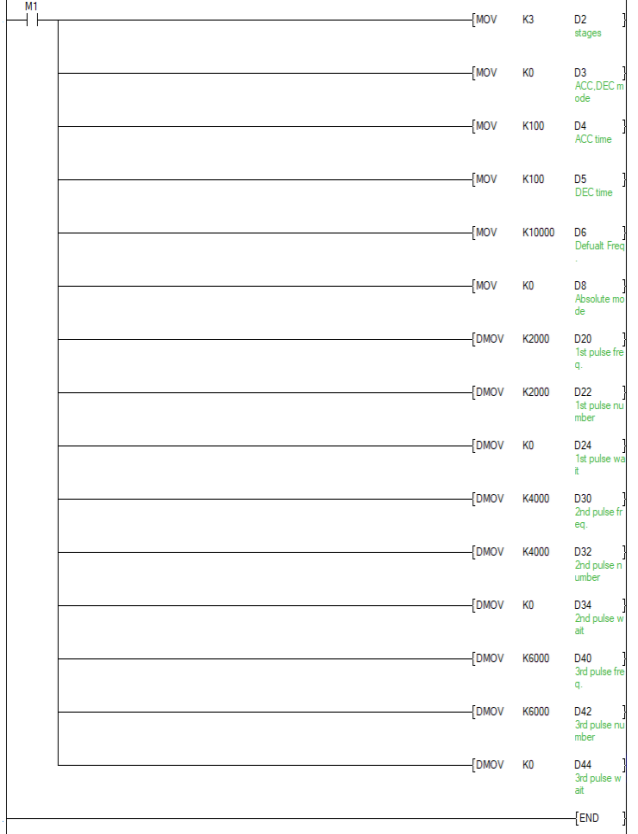
Example: current pulse, the three sections, the first section of 2000Hz pulse frequency, pulse number of 2000; the second segment pulse frequency of 4000Hz, the pulse number of 4000; the third paragraph of the pulse frequency is 6000Hz, number of pulses is 6000, no wait condition.
| Stage | Frequency | Pulses | Mode | Condition |
| 1 | 2000 | 2000 | No waiting condition | K0 |
| 2 | 4000 | 4000 | No waiting condition | K0 |
| 3 | 6000 | 6000 | No waiting condition | K0 |
PLC ladder setting as below:
Pulse waveform:
b) Wait time
S1 + 14 + 10 * N (word) = 1, the waiting time. S1 + 15 + 10 * N (word) = 0, D is waiting registers, wait = 1 is constant.
After the completion of the current segment pulse output start time, when the timer time in place, immediately jump to a specified pulse period; measured time may be a constant or a register designated D, Unit: ms (range 1-65535ms).
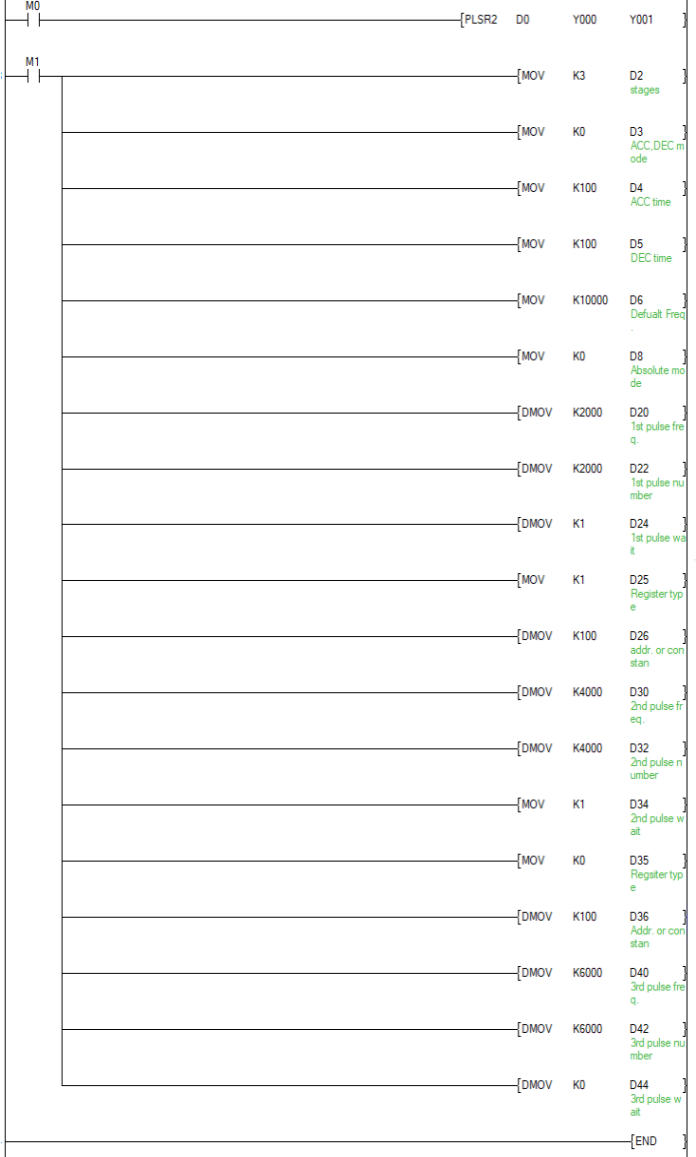
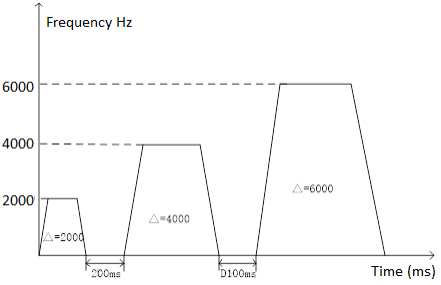
Example: current pulse, the three sections, the first stage pulse frequency is 2000Hz, number of pulses is 2000, the waiting time K100 (Unit: MS); second stage pulse frequency of 4000Hz, the number of 4000 pulses, DlOO waiting time; first three sections pulse frequency of 6000Hz, number of pulses is 6000, no wait condition.
| Stage | Frequency | Pulses | Mode | Condition |
| 1 | 2000 | 2000 | Waiting time | K100 |
| 2 | 4000 | 4000 | Waiting time | D100 |
| 3 | 6000 | 6000 | No waiting condition | K0 |
PLC ladder setting as below:
Pulse waveform:
c) Wait signal:
S1+ 14 + 10 * N (word) = 2 is waiting for a signal. S1 + 15 + 10 * N (word) = 0, the wait signal X, M = 1 is waiting for a signal.
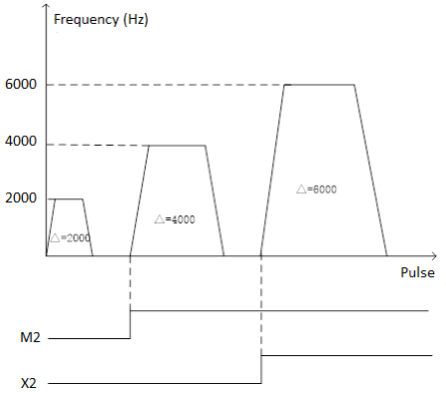
After the completion of the current transmission burst, begins waiting 'waiting condition "in the signal, when the signal is ON, the transmission of the next burst starts. Signal can be X, M-bit registers.
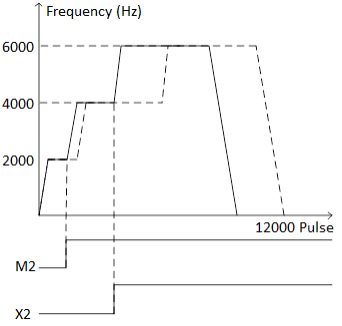
Example: current pulse, the three sections, the first stage pulse frequency is 2000Hz, number of pulses is 2000, waiting for the signal to M2; second stage pulse frequency of 4000Hz, number of pulses is 4000, the wait signal is an X2; third segment pulse frequency of 6000Hz, number of pulses is 6000, no wait condition.
| Stage | Frequency | Pulses | Mode | Condition |
| 1 | 2000 | 2000 | Waiting for the signal | M2 |
| 2 | 4000 | 4000 | Waiting for the signal | X2 |
| 3 | 6000 | 6000 | No waiting condition | K0 |
PLC ladder setting as below:
Pulse waveform:
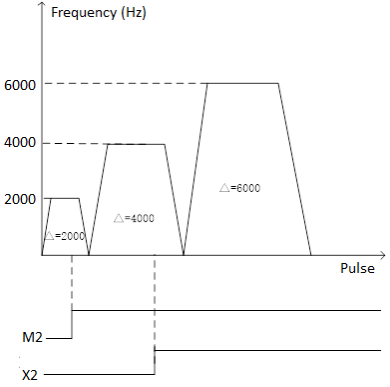
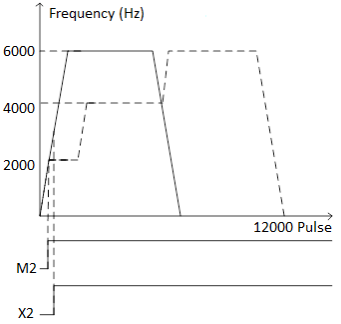
If the signal is received before sending the next segment immediately after the end of the current period.
Pulse waveform is as follows:
d) Trigger signal:
S1 + 14 + 10 * N (word) = 3 when a trigger signal. S1 + 15 + 10 * N (word) = 0 when the trigger signal X, M = 1 when the trigger signal.
After the burst transmission start pulse current, if the current number of pulses before transmitting end, the outer portion of the trigger signal operation (ON state), the pulse immediately transmits the next segment. At the end of the current pulse is sent segment, if no trigger signal (OFF state), it will continue to send the next segment pulse (i.e., pulse period will be configured represents a no-wait mode pulsing conditions, but pulse current segment transmission a trigger signal received during will directly deceleration pulse to the next paragraph).
Example: current pulse, the three sections, the first stage pulse frequency is 2000Hz, number of pulses is 2000, the trigger signal is M2; second stage pulse frequency of 4000Hz, number of pulses is 4000, an X2 is a trigger signal; a third segment pulse frequency of 6000Hz, number of pulses is 6000, no wait condition.
| Stage | Frequency | Pulses | Mode | Condition |
| 1 | 2000 | 2000 | Waiting for the signal | M2 |
| 2 | 4000 | 4000 | Waiting for the signal | X2 |
| 3 | 6000 | 6000 | No waiting condition | K0 |
PLC ladder setting as below:
Pulse waveform:
If the received signal in the received signal in advance or the acceleration section, the acceleration in the current segment to the next segment pulse frequency directly.
Pulse waveform:
✎Note: in response to a trigger signal to trigger interrupt.
(6) The number of pulses is not enough to accelerate to the instruction frequency
a) Single-stage pulse:
If the number of pulses is not enough to accelerate to the instruction frequency, pulse waveform is triangular.
| Stage | Frequency | Pulses | Mode | Condition |
| 1 | 6000 | 400 | No waiting condition | K0 |
Pulse waveform:
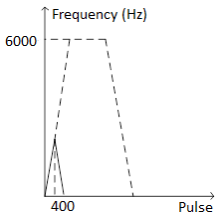
b) Multi-pulse:
Before the addition mode, the number of the current segment if the pulse is transmitted, the pulse frequency setting section does not reach the frequency, the pulse frequency "hop" occurs, i.e. a direct jump to the next section of the frequency.
| Stage | Frequency | Pulses | Mode | Condition |
| 1 | 2000 | 200 | No waiting condition | K0 |
| 2 | 4000 | 4000 | No waiting condition | K0 |
| 3 | 6000 | 6000 | No waiting condition | K0 |
Pulse waveform:
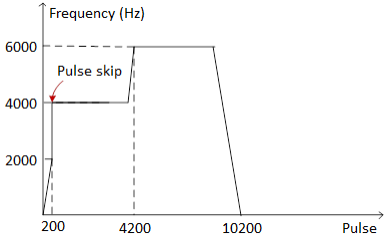
After the addition mode, the number of the current segment if the pulse transmission is completed, the pulse frequency does not reach the set frequency segment, it will continue at the current frequency of the transmission pulse period, up until the end of transmission of the pulse.
| Stage | Frequency | Pulses | Mode | Condition |
| 1 | 2000 | 200 | No waiting condition | K0 |
| 2 | 4000 | 4000 | No waiting condition | K0 |
| 3 | 6000 | 200 | No waiting condition | K0 |
Pulse waveform:
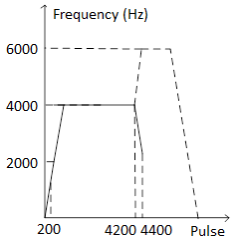
✎Note:
1) During the execution of instructions, even changing the contents of the operation cannot be manifested in the current run, the only effective when the next instruction is executed.
2) If during instruction execution, the instruction driven contacts becomes OFF, and the deceleration stop completion flag M8029 performed at this time does not operate;
3) Positioning instruction (ZRN / PLSV / DRVI / DRVA / PLSR2) may be used more than once in the program, but not to the same output port at the same time the output operations.
4) When the trigger current of the instruction is OFF, when it is triggered again, it must be after the operation bit (Y000:[M8147]; Y001:[M8148]; Y002:[M8149]; Y003:[M8150]) , can trigger again.
5) When the positioning instruction is triggered again, it must have an OFF time of one cycle or more. If the re-trigger is executed within a shorter time than the above conditions, [Operation Error] will occur when the first instruction is executed (calculated).
6) A sufficient number of pulses set for acceleration and deceleration.
6.8.12 PTO instruction
Instruction description
| Name | Function | Bit | Pulse type | Instruction format | Step |
| PTO | Pulse envelope output instruction | 16 | No | PTO S1 S2 | 5 |
| DPTO | 32 | No | 9 |
| Operand | Bit device | Word device | ||||||||||||||
| X | Y | M | S | K | H | E | KnX | KnY | KnM | KnS | T | C | D | V | Z | |
| S1 | √ | |||||||||||||||
| S2 | √ | |||||||||||||||
Take operator S1 as the starting address, then the data table is as below:
| ADDRESS OFFSET | SECTION | DESCRIPTION |
| 0 | Number of segments: 1 to 255 (0 means no output) | |
| 1 | Record the number currently being | |
| 2 | The number of executions of the Envelope table (-1: doesn’t execute 0: always execute ) ( Restart to take effect) | |
| ..... | Reserved | |
| 10 | #1 | Initial frequency (range of frequencies) (0~200,000) |
| 11 | Frequency increment (signed: -20,000~20,000) | |
| 12 | Pulse number(1-4,294,967,295) | |
| 13 | #2 | Initial frequency(range of frequencies) (0~200,000) |
| 14 | Frequency increment (signed: -20,000~20,000) | |
| 15 | Pulse number (1-4,294,967,295) | |
| (continuous) | #3 | (continuous) |
When using the 32-bit instruction DPTO, the address offset is 2.
Program example
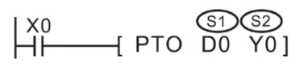
Use the PTO to control a stepper motor to achieve a simple acceleration, constant speed and deceleration or a complex process consisting of up to 255 pulses, and every waveform is acceleration, constant speed or deceleration operation. Starting and final pulse frequency is 2KHZ, the maximum pulse frequency is 10KHZ, and it requires 4000 pulses to achieve the desired number of revolutions of the motor.
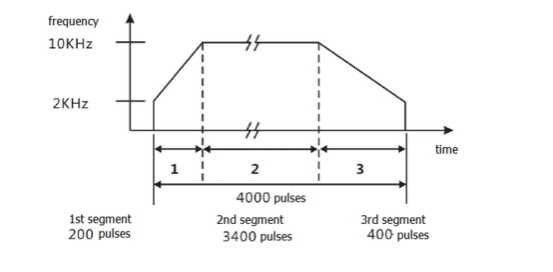
The example above required to produce a output signal contained three sections:
- Acceleration (section 1);
- Constant speed (section 2);
- Deceleration (section 3);
Frequency increment of each section:
- Sec 1(acceleration) frequency increment=40
- Sec 2(constant speed) frequency increment=0
- Sec 3(deceleration) frequency increment= -20
The corresponding envelope table is as below:
| Segment | Register address | Value | Description |
| Parameter setting | D0 | 3 | Total segments |
| D1 | 0 | Record the number currently being executed | |
| D2 | 0 | Number of executions of envelope table | |
| #1 | D10 | 2khz | Initial frequency |
| D11 | 40 | Frequency increment | |
| D12 | 200 | Pulse number | |
| #2 | D13 | 10khz | Initial frequency |
| D14 | 0 | Frequency increment | |
| D15 | 3400 | Pulse number | |
| #3 | D16 | 10khz | Initial frequency |
| D17 | -20 | Frequency increment | |
| D18 | 400 | Pulse number |
Note for use:
- Take the frequency as the standard, run the command during the operation.
- The range of frequency:0 to 100 kHz
- If the envelope table is beyond the effective range of the device, no pulse will be sent out.
- Frequency increment formula:
- Frequency increment= (final frequency - initial frequency)/ the number of pulse
- The frequency interval of pulse (including inter-segment and segment) couldnot exceed 2000Hz, otherwise it will go wrong (the wrong number is 6780) and the instruction will not be executed.
- If the frequency interval of pulse (including inter-segment and segment) exceeds 2000Hz, then PTO will not be executed:
- Cyclic transmission mode: the last pulse of the last segment and the first pulse of the first segment are regarded as the neighboring pulse.
- Single transmission mode: the last pulse of the last segment and the first pulse of the first segment are not regarded as the neighboring pulse.