

How to use VPN passthrough when the v-box uses 4G or WIFI networking?
Last modified by Devin Chen on 2026/03/20 13:55
VPN passthrough is based on the network port, so an ip address must be set. Otherwise the passthrough will not succeed. Need to pay attention to the following points:
1. LAN ip is valid only if WAN ip is set.
2. WAN ip, LAN ip and 4G/WIFI ip cannot be in the same network segment.
3. PC ip, network port ip, and device ip need to be in the same network segment for VPN passthrough.
4. Ensure all configured IP addresses are not conflict with any other devices in the same segment.
For example:
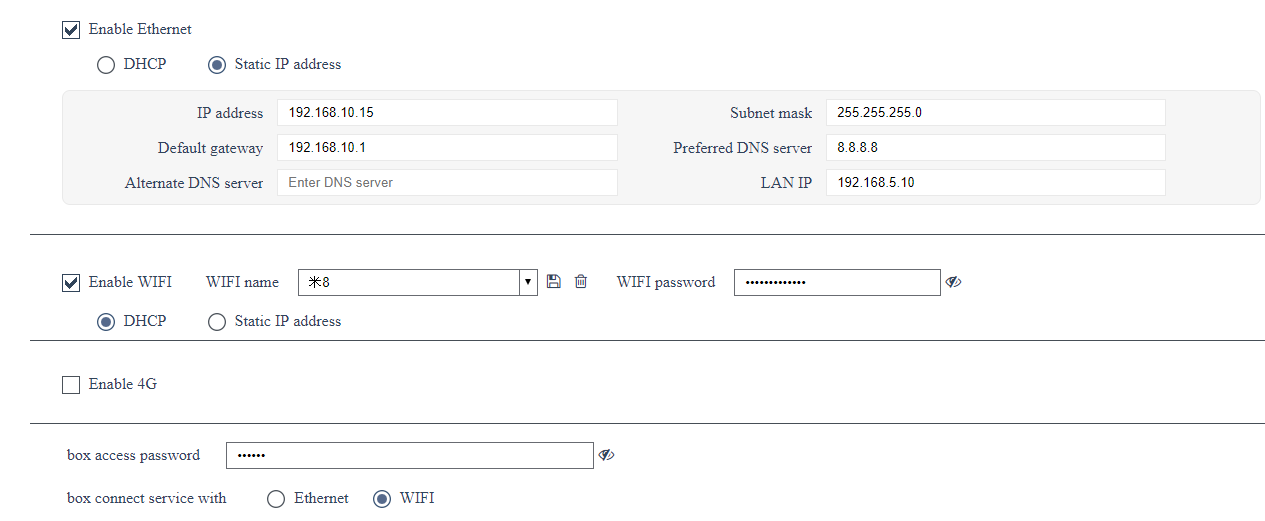
Now we can set the ip of the device and PC to 192.168.10.xx(such as, device: 192.168.10.10, PC: 192.168.10.20)
or set ip of device and PC to 192.168.5.xx(such as, device: 192.168.5.5, PC: 192.168.5.15)