

10 Floating point
CHKFLT/Single precision real number check command
CHKFLT(P)
Check whether the data specified in (s) is a real number and store the result in the start soft component specified in (d)
PLC Editor2 version that supports this command: 2.3.1 and above
-[CHKFLT (s) (d)]
Content, range and data type
| Parameter | Content | Range | Data type | Data type (label) |
| (s) | Checked data or the starting device number that store the checked data | - | Single precision real number | ANYREAL_32 |
| (d) | Start bit device number of output check result (occupies 4 points) | - | Bit | ANYBIT_ARRAY |
Device used
| Instruction | Parameter | Devices | Offset modification | Dword extension | Pulse extension | |||||||||||||||||||||||
| X | Y | M | S | SM | T(bit) | C(bit) | LC(bit) | HSC(bit) | D.b | KnX | KnY | KnM | KnS | T | C | D | R | SD | LC | HSC | K | H | E | [D] | DXX | XXP | ||
| CHKFLT | Parameter 1 | ● | ● | ● | ● | ● | ● | |||||||||||||||||||||
| Parameter 2 | ● | ● | ● | ● | ● | |||||||||||||||||||||||
Features
Check the data stored in (s) and determine whether it is a standard number, non-numeric, infinite, or non-standard number, corresponding to the states of (d), (d+1), (d+2), and (d+3).
Descriptions
Numbers expressed as floating point numbers
The following types of floating-point numbers are available
| mantissa(f) | Index (e) | ||
| 0 | Non-zero and non-all-1 | All 1 (255) | |
| 0 | 0 | Standard figures | Infinity |
| Non-0 | Non-standard figures | NaN | |
Standard figures
Standard numbers represent real numbers. The sign bit 0 for positive numbers and 1 for negative numbers.
Exponent (e) will be represented from 1 to 254, and the actual exponent will be less than 127, i.e. -126 to 127.
The mantissa (f) is expressed from 0 to 223-1, in the actual mantissa, the bit 223 is 1 and the binary decimal point follows it immediately.
Standard figures are shown as below:

For example: 
sign: -
Index: 128-127=1
mantissa: 
value: 
Non-standard figures
A non-standard figure represents a real number with a very small absolute value. The sign bit is 0 for a positive number and 1 for a negative number.
The exponent (e) is 0 and the actual exponent is -126.
The mantissa (f) is represented from 0 to 223-1, in the actual mantissa, bit 223 is 0, and the binary decimal point immediately follows it.
Non-standard figure are shown as below:
For example:
sign:-
Index:-126
mantissa:
Value: 
Zero
+0.0 and -0.0 values can be represented by setting signs, 0 for positive numbers and 1 for negative numbers. Both the exponent and the mantissa are 0. +0.0 and -0.0 are both equal to 0.0.
Infinity
+∞ and -∞ values can be represented by setting signs, 0 for positive numbers and 1 for negative numbers. The exponent is 255 (28-1) and the mantissa is 0.
NaN
NaN (not a number) is generated when calculations such as 0.0/0.0, ∞/∞, or ∞-∞ result in a value other than a number or infinity. The exponent is 255 (28-1), and the mantissa is non-zero.
Error code
| Error code | Content |
| 4085H | The write address in (s) exceeds the device range |
| 4086H | The write address in (d) exceeds the device range |
Example
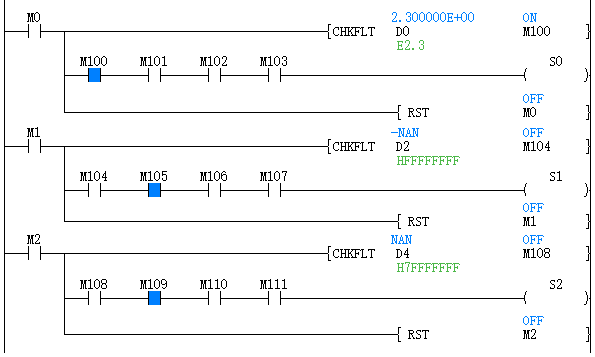
M0 is ON, if D0 is a standard number (in the range of single-precision real numbers), then M100 is ON.
M2 is ON, if D4 is a non-numeric value (NAN), then M109 is ON.
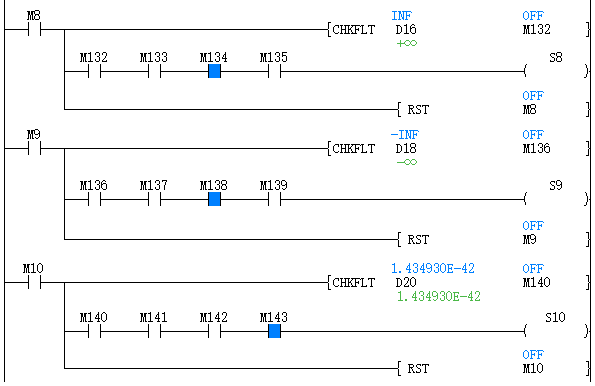
M9 set ON, if infinity in D18, then M138 set ON.
M10 is set to ON, and if D20 is a non-standard number, M143 is set to ON.
DACOS/Single precision real number COS-1 operation
DACOS(P)
After calculating the COS -1 (arc cosine) value of the angle specified in (s), the calculation result is stored in the device number specified in (d).
-[DACOS (s) (d)]
Content, range and data type
| Parameter | Content | Range | Data type | Data type (label) |
| (s) | The angle data for COS -1 (arc cosine) calculation or the start device number that stores the angle data | 0, 2-126 ≤|(s)|<1 | Single precision real number | ANYREAL_32 |
| (d) | The start device number that stores operation result | 0 to π | Single precision real number | ANYREAL_32 |
Device used
| Instruction | Parameter | Devices | Offset modification | Pulse extension | |||||||
| T | C | D | R | SD | LC | HSC | E | [D] | XXP | ||
| DACOS | Parameter 1 | ● | ● | ● | ● | ● | ● | ● | ● | ● | ● |
| Parameter 2 | ● | ● | ● | ● | ● | ● | ● | ● | ● | ||
Features
After calculating the COS -1 (arc cosine) value of the angle specified in (s), the calculation result is stored in the device number specified in (d).

The COS value specified in (s) can be set within the range of -1.0 to 1.0.
The angle (calculation result) stored in (d) stores the value from 0 to π in radians.
Related device are as follows:
| Devices | Name | Content | |
| Condition | Operation | ||
| SM153 | Zero | The operation result is zero | The zero flag (SM153) turns ON. |
| SM152 | Borrow | The absolutevalue of operation result<2 -126 | The value of (d) becomes the minimum value of 32-bit real numbers (2 -126), and the borrow flag (SM152) turns ON. |
Error code
| Error code | Content |
| 4085H | The write address in (s) exceeds the device range |
| 4086H | The write address in (d) exceeds the device range |
| 4084H | When the content of the device specified by (s) is an irregular number, a non-number, ±∞ and exceeds -1.0 to 1.0 |
Example

Calculate the arc cosine value of 0.4 and the result is 1.159279.

DASIN/Single precision real number SIN-1 operation
DASIN(P)
After calculating the SIN -1 (arc sine) value of the angle specified in (s), the calculation result is stored in the device number specified in (d).
-[DASIN (s) (d)]
Content, range and data type
| Parameter | Content | Range | Data type | Data type (label) |
| (s) | The angle data for SIN -1 (arcsine) calculation or the start device number that stores the angle data | 0, 2-126 ≤|(s)|<1 | Single precision real number | ANYREAL_32 |
| (d) | The start device number that stores operation result | -π/2 to π/2 | Single precision real number | ANYREAL_32 |
Device used
| Instruction | Parameter | Devices | Offset modification | Pulse extension | |||||||
| T | C | D | R | SD | LC | HSC | E | [D] | XXP | ||
| DASIN | Parameter 1 | ● | ● | ● | ● | ● | ● | ● | ● | ● | ● |
| Parameter 2 | ● | ● | ● | ● | ● | ● | ● | ● | ● | ||
Features
• After calculating the SIN-1 (arc sine) value of the angle specified in (s), the calculation result is stored in the device number specified in (d).

The SIN-1 value specified in (s) can be set within the range of -1.0 to 1.0.
The angle (calculation result) stored in (d) is stored in the unit of radians (-π/2) to (π/2).
• The related devices are as follows.
| Devices | Name | Content | |
| Condition | Operation | ||
| SM153 | Zero | The operation result is zero | The zero flag (SM153) turns ON. |
| SM152 | Borrow | The absolute value of operation result<2 -126 | The value of (d) becomes the minimum value of 32-bit real numbers (2 -126), and the borrow flag (SM152) turns ON. |
Error code
| Error code | Content |
| 4085H | The write address in (s) exceeds the device range |
| 4086H | The write address in (d) exceeds the device range |
| 4084H | When the content of the device specified by (s) is an irregular number, a non-number, ±∞ and exceeds -1.0 to 1.0 |
Example

Calculate the arc sine of 0.4 and the result is 0.4115168.

DATAN/Single precision real number TAN-1 operation
DATAN(P)
After calculating the TAN -1 (arctangent) value of the angle specified in (s), the calculation result is stored in the device number specified in (d).
-[DATAN (s) (d)]
Content, range and data type
| Parameter | Content | Range | Data type | Data type (label) |
| (s) | The angle data for TAN -1 (arctangent) calculation or the start device number that stores the angle data | 0, 2 -126 ≤|(s)|< 2 128 | Single precision real number | ANYREAL_32 |
| (d) | The start device number that stores operation result | -π/2 to π/2 | Single precision real number | ANYREAL_32 |
Device use
| Instruction | Parameter | Devices | Offset modification | Pulse extension | |||||||
| T | C | D | R | SD | LC | HSC | E | [D] | XXP | ||
| DATAN | Parameter 1 | ● | ● | ● | ● | ● | ● | ● | ● | ● | ● |
| Parameter 2 | ● | ● | ● | ● | ● | ● | ● | ● | ● | ||
Features
Calculate the TAN -1 ((arctangent) value of the angle specified in (s), and store the calculation result in the device number specified in (d).

The angle (calculation result) stored in (d) is stored in the unit of radians (-π/2) to (π/2).
• The related devices are as follows.
| Devices | Name | Content | |
| Condition | Operation | ||
| SM153 | Zero | The operation result is zero | The zero flag (SM153) turns ON. |
| SM152 | Borrow | The absolute value of operation result<2 -126 | The value of (d) becomes the minimum value of 32-bit real numbers (2 -126), and the borrow flag (SM152) turns ON. |
Error code
| Error code | Content |
| 4085H | The write address in (s) exceeds the device range |
| 4086H | The write address in (d) exceeds the device range |
| 4084H | When the content of the device specified by (s) is an irregular number, a non-number and ±∞ |
Example

Calculate the arctangent value of 4.6 and the result is 1.356736

DCOS/Single precision real number COS operation
DCOS (P)
After calculating the COS (cosine) value of the angle specified in (s), the calculation result is stored in the device number specified in (d).
-[DCOS (s) (d)]
Content, range and data type
| Parameter | Content | Range | Data type | Data type (label) |
| (s) | The angle data for COS (cosine) calculation or the start device number that stores the angle data | 0, 2-126 ≤|(s)|< 2128 | Single precision real number | ANYREAL_32 |
| (d) | The start device number that stores operation result | - | Single precision real number | ANYREAL_32 |
Device used
| Instruction | Parameter | Devices | Offset modification | Pulse extension | |||||||
| T | C | D | R | SD | LC | HSC | E | [D] | XXP | ||
| DCOS | Parameter 1 | ● | ● | ● | ● | ● | ● | ● | ● | ● | ● |
| Parameter 2 | ● | ● | ● | ● | ● | ● | ● | ● | ● | ||
Features
After calculating the COS (cosine) value of the angle specified in (s), store the calculation result in the device number specified in (d).

For the angle specified in (s), set it in radians (angle×π÷180).
• The related devices are as follows.
| Devices | Name | Content | |
| Condition | Operation | ||
| SM153 | zero | The operation result is zero | The zero flag (SM153) turns ON. |
| SM152 | Borrow | The absolute value of operation result<2-126 | The value of (d) becomes the minimum value of 32-bit real numbers (2-126), and the borrow flag (SM152) turns ON. |
Error code
| Error code | Content |
| 4085H | The write address in (s) exceeds the device range |
| 4086H | The write address in (d) exceeds the device range |
| 4084H | When the content of the device specified by (s) is an irregular number, a non-number and ±∞ |
Example

Calculate the cosine value of 1.3 and the result is 2.674989E-1

DCOSH/Single precision real number COSH operation
DCOSH(P)
After calculating the DCOSH (hyperbolic cosine) value of the angle specified in (s), the calculation result is stored in the device number specified in (d).
-[DCOSH (s) (d)]
Content, range and data type
| Parameter | Content | Range | Data type | Data type (label) |
| (s) | The angle data for DCOSH (hyperbolic cosine) calculation or the device start number that stores the angle data | 0, 2-126 ≤|(s)|< 2128 | Single precision real number | ANYREAL_32 |
| (d) | The start device number that stores operation result | - | Single precision real number | ANYREAL_32 |
Device used
| Instruction | Parameter | Devices | Offset modification | Pulse extension | |||||||
| T | C | D | R | SD | LC | HSC | E | [D] | XXP | ||
| DCOSH | Parameter 1 | ● | ● | ● | ● | ● | ● | ● | ● | ● | ● |
| Parameter 2 | ● | ● | ● | ● | ● | ● | ● | ● | ● | ||
Features
• After calculating the DCOSH (hyperbolic cosine) value of the angle specified in (s), the calculation result is stored in the device number specified in (d).

This instruction is to take the COSH value of a binary floating point number. The calculation formula is cosh value=(e s +e -s )/2.
• The related devices are as follows.
| Devices | Name | Content | |
| Condition | Operation | ||
| SM151 | carry | The absolute value of the operation result>2128 | The value of (d) becomes the maximum value of 32-bit real numbers (2128 ), and the carry flag (SM151) turns on. |
Error code
| Error code | Content |
| 4085H | The write address in (s) exceeds the device range |
| 4086H | The write address in (d) exceeds the device range |
| 4084H | When the content of the device specified by (s) is an irregular number, a non-number and ±∞ |
Example

Calculate the hyperbolic cosine value of 2.5, and the result is 6.132289

DSIN/Single precision real number SIN operation
DSIN(P)
After calculating the SIN (sine) value of the angle specified in (s), the calculation result is stored in the device number specified in (d).
-[DSIN (s) (d)]
Content, range and data type
| Parameter | Content | Range | Data type | Data type (label) |
| (s) | The angle data for SIN (sine) calculation or the device start number that stores the angle data | 0, 2-126 ≤|(s)|< 2128 | Single precision real number | ANYREAL_32 |
| (d) | The start device number that stores operation result | - | Single precision real number | ANYREAL_32 |
Device used
| Instruction | Parameter | Devices | Offset modification | Pulse extension | |||||||
| T | C | D | R | SD | LC | HSC | E | [D] | XXP | ||
| DSIN | Parameter 1 | ● | ● | ● | ● | ● | ● | ● | ● | ● | ● |
| Parameter 2 | ● | ● | ● | ● | ● | ● | ● | ● | ● | ||
Features
After calculating the SIN (sine) value of the angle specified in (s), the calculation result is stored in the device number specified in (d).

For the angle specified in (s), set it in radians (angle×π÷180).
• The related devices are as follows.
| Devices | Name | Content | |
| Condition | Operation | ||
| SM153 | Zero | The operation result is zero | The zero flag (SM153) turns ON. |
| SM152 | Borrow | The absolute value of operation result <2 -126 | The value of (d) becomes the minimum value of a 32-bit real number (2 -126), and the borrow flag (SM152) turns on. |
Error code
| Error code | Content |
| 4085H | The write address in (s) exceeds the device range |
| 4086H | The write address in (d) exceeds the device range |
| 4084H | When the content of the device specified by (s) is an irregular number, a non-number and ±∞ |
Example

Calculate the sine of 1.4 and the result is 0.9854497

DSINH/Single precision real number SINH operation
DSINH(P)
After calculating the SINH (hyperbolic sine) value of the angle specified in (s), the calculation result is stored in the device number specified in (d).
-[DSINH (s) (d)]
Content, range and data type
| Parameter | Content | Range | Data type | Data type (label) |
| (s) | The angle data for SINH (hyperbolic sine) calculation or the device start number that stores the angle data | 0, 2-126 ≤|(s)|< 2128 | Single precision real number | ANYREAL_32 |
| (d) | The start device number that stores operation result | - | Single precision real number | ANYREAL_32 |
Device used
| Instruction | Parameter | Devices | Offset modification | Pulse extension | |||||||
| T | C | D | R | SD | LC | HSC | E | [D] | XXP | ||
| DSINH | Parameter 1 | ● | ● | ● | ● | ● | ● | ● | ● | ● | ● |
| Parameter 2 | ● | ● | ● | ● | ● | ● | ● | ● | ● | ||
Features
After calculating the SINH (hyperbolic sine) value of the angle specified in (s), the calculation result is stored in the device number specified in (d).

The instruction is to take the SINH value from a binary floating point number. The calculation formula is sinh value = (e s -e -s )/2.
The related devices are shown below.
| Devices | Name | Content | |
| Condition | Operation | ||
| SM153 | Zero | The operation result is zero | The zero flag (SM153) turns ON. |
| SM152 | Borrow | The absolute value of operation result <2-126 | The value of (d) becomes the minimum value of a 32-bit real number (2-126), and the borrow flag (SM152) turns on. |
| SM151 | Carry | The absolute value of operation result > 2128 | The value of (d) becomes the maximum value of 32-bit real numbers (2128), and the carry flag (SM151) turns on. |
Error code
| Error code | Content |
| 4085H | The write address in (s) exceeds the device range |
| 4086H | The write address in (d) exceeds the device range |
| 4084H | When the content of the device specified by (s) is an irregular number, a non-number and ±∞ |
Example

Calculate the hyperbolic sine value of 3.2 and the result is 12.24588

DTAN/Single precision real number TAN operation
DTAN(P)
After calculating the TAN (tangent) value of the angle specified in (s), the calculation result is stored in the device number specified in (d).
-[DTAN (s) (d)]
Content, range and data type
| Parameter | Content | Range | Data type | Data type (label) |
| (s) | The angle data for TAN (tangent) calculation or the device start number that stores the angle data | 0, 2-126 ≤|(s)|< 2128 | Single precision real number | ANYREAL_32 |
| (d) | The start device number that stores operation result | - | Single precision real number | ANYREAL_32 |
Device used
| Instruction | Parameter | Devices | Offset modification | Pulse extension | |||||||
| T | C | D | R | SD | LC | HSC | E | [D] | XXP | ||
| DTAN | Parameter 1 | ● | ● | ● | ● | ● | ● | ● | ● | ● | ● |
| Parameter 2 | ● | ● | ● | ● | ● | ● | ● | ● | ● | ||
Features
After calculating the TAN (tangent) value of the angle specified in (s), the calculation result is stored in the device number specified in (d).

For the angle specified in (s), set it in radians (angle×π÷180).
The related devices are shown below.
| Devices | Name | Content | |
| Condition | Operation | ||
| SM153 | Zero | The operation result is zero | The zero flag (SM153) turns ON. |
| SM152 | Borrow | The absolute value of operation result <2-126 | The value of (d) becomes the minimum value of a 32-bit real number (2-126), and the borrow flag (SM152) turns on. |
| SM151 | Carry | The absolute value of operation result> 2128 | The value of (d) becomes the maximum value of 32-bit real numbers (2128), and the carry flag (SM151) turns on. |
Error code
| Error code | Content |
| 4085H | The write address in (s) exceeds the device range |
| 4086H | The write address in (d) exceeds the device range |
| 4084H | When the content of the device specified by (s) is an irregular number, a non-number and ±∞ |
Example

Calculate the tangent of 1.4 and the result is 5.797883

DATANH/Single precision real number TANH operation
DTANH(P)
After calculating the DTANH (hyperbolic tangent) value of the angle specified in (s), the calculation result is stored in the device number specified in (d).
-[DTANH (s) (d)]
Content, range and data type
| Parameter | Content | Range | Data type | Data type (label) |
| (s) | The angle data for DTANH (hyperbolic tangent) calculation or the device start number that stores the angle data | 0, 2-126 ≤|(s)|< 2128 | Single precision real number | ANYREAL_32 |
| (d) | The start device number that stores operation result | - | Single precision real number | ANYREAL_32 |
Device used
| Instruction | Parameter | Devices | Offset modification | Pulse extension | |||||||
| T | C | D | R | SD | LC | HSC | E | [D] | XXP | ||
| DTANH | Parameter 1 | ● | ● | ● | ● | ● | ● | ● | ● | ● | ● |
| Parameter 2 | ● | ● | ● | ● | ● | ● | ● | ● | ● | ||
Features
After calculating the DTANH (hyperbolic tangent) value of the angle specified in (s), the calculation result is stored in the device number specified in (d).

The instruction is to take the TANH value of a binary floating point number. The calculation formula is tanh value=(e s -e -s )/(e s +e -s ).
The related devices are shown below.
| Device | Name | Content | |
| Condition | Operation | ||
| SM153 | Zero | The operation result is zero | The zero flag (SM153) turns ON. |
| SM152 | Borrow | The absolute value of operation result <2 -126 | The value of (d) becomes the minimum value of a 32-bit real number (2-126), and the borrow flag (SM152) turns on. |
Error code
| Error code | Content |
| 4085H | The write address in (s) exceeds the device range |
| 4086H | The write address in (d) exceeds the device range |
| 4084H | When the content of the device specified by (s) is an irregular number, a non-number and ±∞ |
Example

Calculate the hyperbolic tangent of 2.5, and the result is 0.9866143

DDEG/Single precision real number radian → angle conversion
DDEG(P)
Convert the size unit of the angle from the radian unit specified in (s) to the degree unit (DEG. unit), and store it in the device number specified in (d).
-[DDEG (s) (d)]
Content, range and data type
| Parameter | Content | Range | Data type | Data type (label) |
| (s) | The radian angle that converts the degree unit or the device start number that stores the radian angle | 0, 2 -126 ≤|(s)|< 2 128 | Single precision real number | ANYREAL_32 |
| (d) | The device start number that stores the value converted in degrees | -π/2 to π/2 | Single precision real number | ANYREAL_32 |
Device used
| Instruction | Parameter | Devices | Offset modification | Pulse extension | |||||||
| T | C | D | R | SD | LC | HSC | E | [D] | XXP | ||
| DDEG | Parameter 1 | ● | ● | ● | ● | ● | ● | ● | ● | ● | ● |
| Parameter 2 | ● | ● | ● | ● | ● | ● | ● | ● | ● | ||
Features
The angle size unit is converted from the radian unit specified in (s) to the degree unit (DEG. unit), and then stored in the device number specified in (d).

The conversion from degree unit to radian unit is performed as follows.
Radian unit = degree unit * 180/π
• The related devices are as follows.
| Devices | Name | Content | |
| Condition | Operation | ||
| SM153 | Zero | The operation result of is zero (when the mantissa part is zero) | The zero flag (SM153) turns ON. |
| SM151 | Carry | The absolute value of the operation result>2128 | The value of (d) becomes the maximum value of 32-bit real numbers (2128 ), and the carry flag (SM151) turns on. |
Error code
| Error code | Content |
| 4085H | The write address in (s) exceeds the device range |
| 4086H | The write address in (d) exceeds the device range |
| 4084H | When the content of the device specified by (s) is an irregular number, a non-number and ±∞ |
Example

The result is 194.8057

DRAD/Single precision real number conversion angle → radian conversion
DRAD(P)
The angle size unit is converted from the degree unit (DEG. unit) specified in (s) to the radian unit and stored in the device number specified in (d).
-[DRAD (s) (d)]
Content, range and data type
| Parameter | Content | Range | Data type | Data type (label) |
| (s) | The radian angle that converts the degree unit or the device start number that stores the angle | 0, 2-126 ≤|(s)|< 2128 | Single precision real number | ANYREAL_32 |
| (d) | The device start number that stores the value converted in degrees | - | Single precision real number | ANYREAL_32 |
Device used
| Instruction | Parameter | Devices | Offset modification | Pulseextension | |||||||
| T | C | D | R | SD | LC | HSC | E | [D] | XXP | ||
| DRAD | Parameter 1 | ● | ● | ● | ● | ● | ● | ● | ● | ● | ● |
| Parameter 2 | ● | ● | ● | ● | ● | ● | ● | ● | |||
Features
The angle size unit is converted from the degree unit (DEG. unit) specified in (s) to the radian unit and stored in the device number specified in (d).
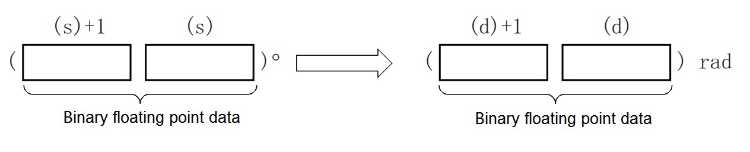
Degree unit → radian unit
The conversion is performed as follows.
Radian unit = degree unit*π/180
• The related devices are as follows.
| Devices | Name | Content | |
| Condition | Operation | ||
| SM153 | Zero | The operation result is zero | The zero flag (SM153) turns ON. |
| SM152 | Borrow | The absolute value of operation result <2-126 | The value of (d) becomes the minimum value of a 32-bit real number (2-126), and the borrow flag (SM152) turns on. |
Error code
| Error code | Content |
| 4085H | The write address in (s) exceeds the device range |
| 4086H | The write address in (d) exceeds the device range |
| 4084H | When the content of the device specified by (s) is an irregular number, a non-number and ±∞ |
Example

The result is 1.047197

DEADD/Single precision real number addition operation
DEADD(P)
Add the binary floating point data specified in (s1) and the binary floating point data specified in (s2), and store the result in the device specified in (d).
-[DEADD (s1 ) (s2) (d)]
Content, range and data type
| Parameter | Content | Range | Data type | Data type (label) |
| (s1) | The added data or the device start number that stores the added data | 0, 2-126 ≤|(s)|< 2 128 | Single precision real number | ANYREAL_32 |
| (s2) | Addition data or the device start number that stores the addition data | 0, 2-126 ≤|(s)|< 2128 | Single precision real number | ANYREAL_32 |
| (d) | the device start number that stores the operation result | - | Single precision real number | ANYREAL_32 |
Device used
| Instruction | Parameter | Devices | Offset modification | Pulse extension | |||||||||
| T | C | D | R | SD | LC | HSC | K | H | E | [D] | XXP | ||
| DEADD | Parameter 1 | ● | ● | ● | ● | ● | ● | ● | ● | ● | ● | ● | ● |
| Parameter 2 | ● | ● | ● | ● | ● | ● | ● | ● | ● | ● | ● | ● | |
| Parameter 3 | ● | ● | ● | ● | ● | ● | ● | ● | ● | ||||
Features
Add the binary floating point data specified in (s1) and the binary floating point data specified in (s2), and store the result of the addition in the device specified in (d).

When constants (K, H) to (s1), (s2) are specified, the value is automatically converted to a binary floating point data.

• The related devices are as follows.
| Devices | Name | Content | |
| Condition | Operation | ||
| SM153 | Zero | The operation result is zero | The zero flag (SM153) turns ON. |
| SM152 | Borrow | The absolute value of operation result <2-126 | The value of (d) becomes the minimum value of a 32-bit real number (2-126), and the borrow flag (SM152) turns on. |
| SM151 | Carry | The absolute value of operation result> 2128 | The value of (d) becomes the maximum value of 32-bit real numbers (2128), and the carry flag (SM151) turns on. |
Error code
| Error code | Content |
| 4085H | The write address in (s1) and (s2) exceed the device range |
| 4086H | The write address in (d) exceeds the device range |
| 4084H | When the content of the device specified by (s1) and (s2) is an irregular number, a non-number and ±∞ |
Example
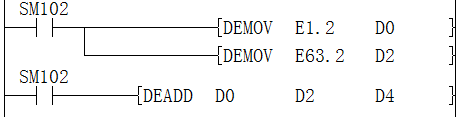
The result is 1.2 + 63.2 = 64.4

DESUB/Single precision real number subtraction operation
DESUB(P)
Subtract the binary floating point data specified in (s1) and the binary floating point data specified in (s2), and store the result in the device specified in (d).
-[DESUB (s1) (s2) (d)]
Content, range and data type
| Parameter | Content | Range | Data type | Data type (label) |
| (s1) | The subtracted data or the device start number that stores the subtracted data | 0, 2 -126 ≤|(s)|< 2 128 | Single precision real number | ANYREAL_32 |
| (s2) | subtract data or the device start number that stores the subtracted data | 0, 2 -126 ≤|(s)|< 2 128 | Single precision real number | ANYREAL_32 |
| (d) | the device start number that stores the operation result | - | Single precision real number | ANYREAL_32 |
Device used
| Instruction | Parameter | Devices | Offset modification | Pulse extension | |||||||||
| T | C | D | R | SD | LC | HSC | K | H | E | [D] | XXP | ||
| DESUB | Parameter 1 | ● | ● | ● | ● | ● | ● | ● | ● | ● | ● | ● | ● |
| Parameter 2 | ● | ● | ● | ● | ● | ● | ● | ● | ● | ● | ● | ● | |
| Parameter 3 | ● | ● | ● | ● | ● | ● | ● | ● | ● | ||||
Features
• Subtract the binary floating point data specified in (s1) and the binary floating point data specified in (s2), and store the subtraction result in the device specified in (d).

When constants (K, H) to (s1), (s2) are specified, the value is automatically converted to a binary floating point data.

• The related devices are as follows.
| Devices | Name | Content | |
| Condition | Operation | ||
| SM153 | Zero | The operation result is zero | The zero flag (SM153) turns ON. |
| SM152 | Borrow | The absolute value of operation result <2-126 | The value of (d) becomes the minimum value of a 32-bit real number (2-126), and the borrow flag (SM152) turns on. |
| SM151 | Carry | The absolute value of operation result> 2128 | The value of (d) becomes the maximum value of 32-bit real numbers (2128), and the carry flag (SM151) turns on. |
Error code
| Error code | Content |
| 4085H | The write address in (s1) and (s2) exceeds the device range |
| 4086H | The write address in (d) exceeds the device range |
| 4084H | When the content of the device specified by (s1) and (s2) is an irregular number, a non-number and ±∞ |
Example
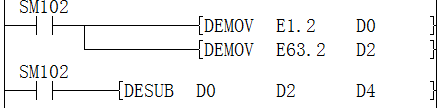
The calculation result is 1.2-63.2 = -62

DEMUL/Single precision real number multiplication operation
DEMUL(P)
Multiply the binary floating point data specified in (s1) and the binary floating point data specified in (s2), and store the result in the device specified in (d).
-[DEMUL (s1) (s2) (d)]
Content, range and data type
| Parameter | Content | Range | Data type | Data type (label) |
| (s1) | The multiplication data or the device start number that stores the multiplication data | 0, 2-126 ≤|(s)|< 2128 | Single precision real number | ANYREAL_32 |
| (s2) | Multiplication operation data or the device start number that stores the multiplication data | 0, 2-126 ≤|(s)|< 2 128 | Single precision real number | ANYREAL_32 |
| (d) | the device start number that stores the operation result | - | Single precision real number | ANYREAL_32 |
Device used
| Instruction | Parameter | Devices | Offset modification | Pulse extension | |||||||||
| T | C | D | R | SD | LC | HSC | K | H | E | [D] | XXP | ||
| DEMUL | Parameter 1 | ● | ● | ● | ● | ● | ● | ● | ● | ● | ● | ● | ● |
| Parameter 2 | ● | ● | ● | ● | ● | ● | ● | ● | ● | ● | ● | ● | |
| Parameter 3 | ● | ● | ● | ● | ● | ● | ● | ● | ● | ||||
Features
Multiply the binary floating point data specified in (s1) and the binary floating point data specified in (s2), and store the multiplication result in the device specified in (d).

When constants (K, H) to (s1), (s2) are specified, the value is automatically converted to a binary floating point data.

• The related devices are as follows.
| Devices | Name | Content | |
| Condition | Operation | ||
| SM153 | Zero | The operation result is zero | The zero flag (SM153) turns ON. |
| SM152 | Borrow | The absolute value of operation result <2-126 | The value of (d) becomes the minimum value of a 32-bit real number (2-126), and the borrow flag (SM152) turns on. |
| SM151 | Carry | The absolute value of operation result> 2128 | The value of (d) becomes the maximum value of 32-bit real numbers (2128), and the carry flag (SM151) turns on. |
Error code
| Error code | Content |
| 4085H | The write address in (s1) and (s2) exceeds the device range |
| 4086H | The write address in (d) exceeds the device range |
| 4084H | When the content of the device specified by (s1) and (s2) is an irregular number, a non-number and ±∞ |
Example
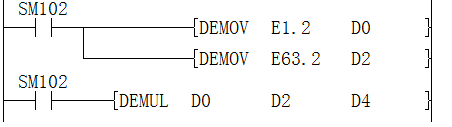
The calculated result: 1.2*63.2 = 75.84

DEDIV/Single precision real number division operation
DEDIV(P)
Divide the binary floating point data specified in (s1) and the binary floating point data specified in (s2), and store the result in the device specified in (d).
-[DEDIV (s1) (s2) (d)]
Content, range and data type
| Parameter | Content | Range | Data type | Data type (label) |
| (s1) | The divided data or the device start number that stores the devided data | 0, 2 -126 ≤|(s)|< 2 128 | Single precision real number | ANYREAL_32 |
| (s2) | Division operation data or the device start number that stores the division operation data | 0, 2 -126 ≤|(s)|< 2 128 | Single precision real number | ANYREAL_32 |
| (d) | the device start number that stores the operation result | - | Single precision real number | ANYREAL_32 |
Device used
| Instruction | Parameter | Devices | Offset modification | Pulse extension | |||||||||
| T | C | D | R | SD | LC | HSC | K | H | E | [D] | XXP | ||
| DEDIV | Parameter 1 | ● | ● | ● | ● | ● | ● | ● | ● | ● | ● | ● | ● |
| Parameter 2 | ● | ● | ● | ● | ● | ● | ● | ● | ● | ● | ● | ● | |
| Parameter 3 | ● | ● | ● | ● | ● | ● | ● | ● | ● | ||||
Features
Divide the binary floating point data specified in (s1) and the binary floating point data specified in (s2), and store the result of the division in the device specified in (d).

When constants (K, H) to (s1), (s2) are specified, the value is automatically converted to a binary floating point data.

• The related devices are as follows.
| Devices | Name | Content | |
| Condition | Operating | ||
| SM153 | Zero | The operation result is zero | The zero flag (SM153) turns ON. |
| SM152 | Borrow | The absolute value of operation result <2-126 | The value of (d) becomes the minimum value of a 32-bit real number (2-126), and the borrow flag (SM152) turns on. |
| SM151 | Carry | The absolute value of operation result> 2128 | The value of (d) becomes the maximum value of 32-bit real numbers (2128), and the carry flag (SM151) turns on. |
Error code
| Error code | Content |
| 4085H | The write address in (s1) and (s2) exceeds the device range |
| 4086H | The write address in (d) exceeds the device range |
| 4084H | When the content of the device specified by (s1) and (s2) is an irregular number, a non-number and ±∞ |
| 4080H | (s2) value is 0 |
Example
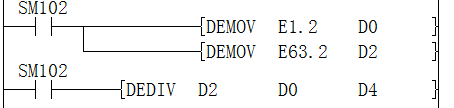
Get the calculation result: 63.2 / 1.2 = 52.66666667

DEMOD/Single precision real number remainder operation
DEMOD(P)
Perform division operation on the single-precision real number specified in (s1) and the single-precision real number specified in (s2), and store the remainder operation result in the device specified in (d).
PLC Editor2 version that supports this instruction: 2.3.1 and above
-[DEMOD (s1) (s2) (d)]
Content, range and data type
| Parameter | Content | Range | Data type | Data type (label) |
| (s1) | The divided data or the device start number that stores the devided data | 0, 2 -126 ≤|(s)|< 2 128 | Single precision real number | ANYREAL_32 |
| (s2) | Remainder operation data or the device start number that stores the remainder operation data | 0, 2 -126 ≤|(s)|< 2 128 | Single precision real number | ANYREAL_32 |
| (d) | The start number of the device that stores the result of the remainder operation | - | Single precision real number | ANYREAL_32 |
Device used
| Instruction | Parameter | Devices | Offset modification | Pulse extension | |||||||||||||||||||||||
| X | Y | M | S | SM | T(bit) | C(bit) | LC(bit) | HSC(bit) | D.b | KnX | KnY | KnM | KnS | T | C | D | R | SD | LC | HSC | K | H | E | [D] | XXP | ||
| DEMOD | Parameter 1 | ● | ● | ● | ● | ● | |||||||||||||||||||||
| Parameter 2 | ● | ● | ● | ● | ● | ||||||||||||||||||||||
| Parameter 3 | ● | ● | ● | ● | |||||||||||||||||||||||
Features
Perform division operation on the single-precision real number specified in (s1) and the single-precision real number specified in (s2), and store the remainder operation result in the device specified in (d).

Error code
| Error code | Content |
| 4080H | The input divisor in (s2) is 0 |
| 4081H | Computational data overflow in (d) |
| 4084H | When the content of the device specified by (s1) and (s2) is an irregular number, a non-number and ±∞ |
| 4085H | The write address in (s1) and (s2) exceeds the device range |
| 4086H | The write address in (d) exceeds the device range |
Example

M21 is set to ON, resulting in the calculation: 10 % 3 = 1.000000E+00
DEMOV/Single precision real data transmission
DEMOV(P)
Transfer the binary floating point data data stored in the device specified in (s) to the device specified in (d).
-[DEMOV (s) (d)]
Content, range and data type
| Parameter | Content | Range | Data type | Data type (label) |
| (s) | The transmitted data or the device that stores the transmitted data | 0, 2 -126 ≤|(s)|< 2 128 | Single precision real number | ANYREAL_32 |
| (d) | The device number that stores the transmit destination data | - | Single precision real number | ANYREAL_32 |
Device used
| Instruction | Parameter | Devices | Offset modification | Pulse extension | |||||||
| T | C | D | R | SD | LC | HSC | E | [D] | XXP | ||
| DEMOV | Parameter 1 | ● | ● | ● | ● | ● | ● | ● | ● | ● | ● |
| Parameter 2 | ● | ● | ● | ● | ● | ● | ● | ● | ● | ||
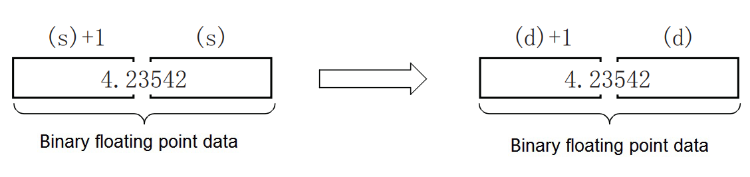
Features
Transfer the binary floating point data data stored in the device specified in (s) to the device specified in (d).
Error code
| Error code | Content |
| 4085H | (s) read address exceeds the device range |
| 4086H | (d) write address exceeds the device range |
Example

Assign 3.265 to R10

DEBCD/Binary floating point → decimal floating point conversion
DEBCD(P)
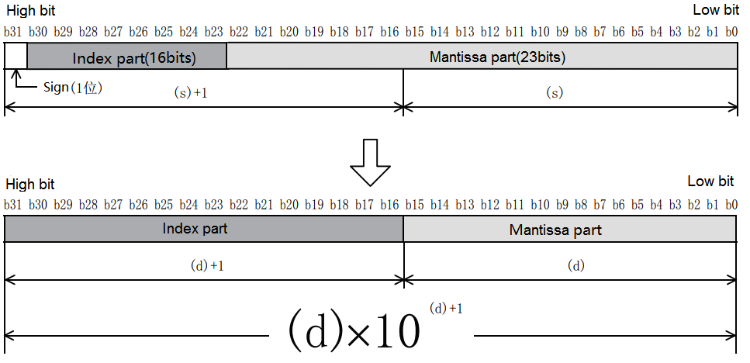
After converting the binary floating point specified in (s) into a decimal floating point, it is stored in the device specified in (d).
-[DEBCD (s) (d)]
Content, range and data type
| Parameter | Content | Range | Data type | Data type (label) |
| (s) | The device number that stores the binary floating point data | 0, 2 -126 ≤|(s)|< 2 128 | Single precision real number | ANYREAL_32 |
| (d) | The device number that stores the converted decimal floating point data | - | Real number | ANY32 |
Device used
| Instruction | Parameter | Devices | Offset modification | Pulse extension | |||||||
| T | C | D | R | SD | LC | HSC | E | [D] | XXP | ||
| DEBCD | Parameter 1 | ● | ● | ● | ● | ● | ● | ● | ● | ● | ● |
| Parameter 2 | ● | ● | ● | ● | ● | ● | ● | ● | ● | ||
Features
After converting the binary floating point specified in (s) into a decimal floating point, it is stored in the device specified in (d).
Error code
| Error code | Content |
| 4085H | The write address in (s) exceeds the device range |
| 4086H | The write address in (d) exceeds the device range |
| 4084H | When the content of the device specified by (s) is an irregular number, a non-number and ±∞ |
Example

Get the result: 5600 ×10 -5

DEBIN/Decimal floating point → binary floating point conversion
DEBIN(P)
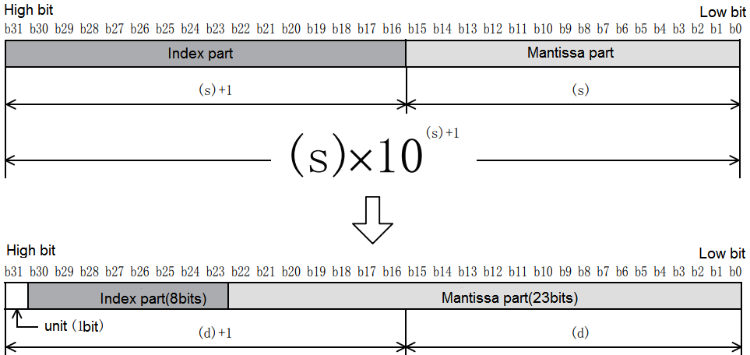
Convert the decimal floating point specified in (s) to binary floating point and store it in the device specified in (d).
-[DEBIN (s) (d)]
Content, range and data type
| Parameter | Content | Range | Data type | Data type (label) |
| (s) | The device number that stores the decimal floating point data | - | Real | ANY32 |
| (d) | The device number that stores the converted binary floating point data | - | Single precision real number | ANYREAL_32 |
Device used
| Instruction | Parameter | Devices | Offset modification | Pulse extension | ||||||
| T | C | D | R | SD | LC | HSC | [D] | XXP | ||
| DEBIN | Parameter 1 | ● | ● | ● | ● | ● | ● | ● | ● | ● |
| Parameter 2 | ● | ● | ● | ● | ● | ● | ● | ● | ● | |
Features
Convert the decimal floating point specified in (s) to binary floating point and store it in the device specified in (d).
• The related devices are as follows.
| Devices | Name | Content | |
| Condition | Operation | ||
| SM153 | Zero | The operation result is zero | The zero flag (SM153) turns ON. |
| SM152 | Borrow | The absolute value of operation result <2-126 | The value of (d) becomes the minimum value of a 32-bit real number (2-126), and the borrow flag (SM152) turns on. |
| SM151 | Carry | The absolute value of operation result> 2128 | The value of (d) becomes the maximum value of 32-bit real numbers (2128), and the carry flag (SM151) turns on. |
Error code
| Error code | Content |
| 4085H | (s) read address exceeds the device range |
| 4086H | (d) write address exceeds the device range |
Example
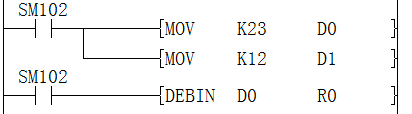
The result after conversion:

DENEG/Single precision real number sign inversion
DENEG(P)
After inverting the sign of the single precision real number of the device specified in (d), it is stored in the device specified in (d).
-[DEBEG (d)]
Content, range and data type
| Parameter | Content | Range | Data type | Data type (label) |
| (d) | The device start number that stores the sign-inverted binary floating point data | - | Single precision real number | ANYREAL_32 |
Device used
| Instruction | Parameter | Devices | Offset modification | Pulse extension | ||||||
| T | C | D | R | SD | LC | HSC | [D] | XXP | ||
| DENEG | Parameter 1 | ● | ● | ● | ● | ● | ● | ● | ● | ● |
Features
The sign of the binary floating point data of the device specified in (d) is inverted and stored in the device specified in (d).
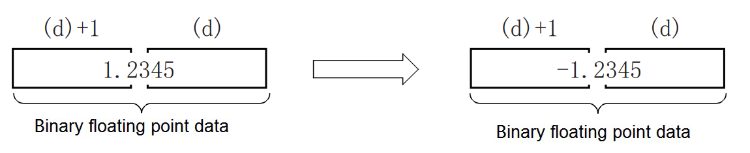
Used when inverting positive and negative signs.
Error code
| Error code | Content |
| 4086H | The write address in (d) exceeds the device range |
Example
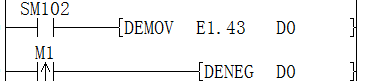
It becomes -1.43 after conversion

DECMP/Single precision real number comparison
DECMP(P)
Compare two data (binary floating point data), and output their large, small, and consistent results to the bit device (3 points).
-[DECMP (s1) (s2) (d)]
Content, range and data type
| Parameter | Content | Range | Data type | Data type (label) |
| (s1) | Comparison data or the device number that stores the comparison data | 0, 2 -126 ≤|(s)|< 2 128 | Single precision real number | ANYREAL_32 |
| (s2) | Comparison data or the device number that stores the comparison data | 0, 2 -126 ≤|(s)|< 2 128 | Single precision real number | ANYREAL_32 |
| (d) | The start bit device number that outputs the comparison result (occupies 3 points) | - | Bit | ANYBIT_ARRAY |
Device used
| Instruction | Parameter | Devices | Offset modification | Pulse extension | ||||||||||||||
| Y | M | S | SM | D.b | T | C | D | R | SD | LC | HSC | K | H | E | [D] | XXP | ||
| DECMP | Parameter 1 | ● | ● | ● | ● | ● | ● | ● | ● | ● | ● | ● | ● | |||||
| Parameter 2 | ● | ● | ● | ● | ● | ● | ● | ● | ● | ● | ● | ● | ||||||
| Parameter 3 | ● | ● | ● | ● | ● | ● | ● | |||||||||||
Features
Compare the comparison value (s1) and the comparison source (s2) as a floating point comparison. According to the result of small, consistent, and large, one of (d), (d)+1, (d)+2 turns ON.
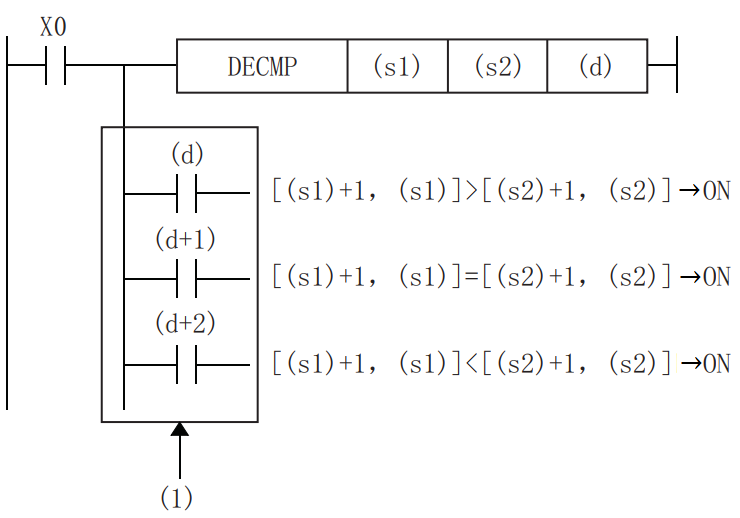
(1): Even if the command input is turned OFF and the DECMP command is not executed, (d) to (d)+2 will keep the state before X0 is turned OFF.
When the constant (K, H) to the device specified in (s1), (s2) is specified, the value BIN→binary floating point data conversion is processed automatically
✎Note: The device specified in (d) occupies 3 points [(d), (d)+1, (d)+2]. Please be careful not to overlap with devices used for other purposes.
Error code
| Error code | Content |
| 4085H | The write address in (s1) or (s2) exceeds the device range |
| 4086H | The write address in (d) exceeds the device range |
| 4084H | When the content of the device specified by (s) or (s2) is an irregular number, a non-number and ±∞ |
Example
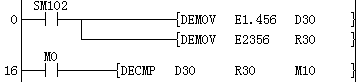
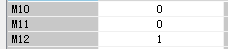
Since the floating point number in R30 is greater than the floating point number in D30, M12 turns ON.
DEZCP/Binary floating point bandwidth comparison
DEZCP(P)
Compare the comparison range and data (binary floating point) of high and low 2 points, and output the result of its large, small, and bandwidth to the bit device (3 points).
-[DEZCP (s1) (s2) (s3) (d)]
Content, range and data type
| Parameter | Content | Range | Data type | Data type (label) |
| (s1) | Comparison data or the device number that stores the comparison data | 0, 2 -126 ≤|(s)|< 2 128 | Single precision real number | ANYREAL_32 |
| (s2) | Comparison data or the device number that stores the comparison data | 0, 2 -126 ≤|(s)|< 2 128 | Single precision real number | ANYREAL_32 |
| (s3) | Comparison data or the device number that stores the comparison data | 0, 2 -126 ≤|(s)|< 2 128 | Single precision real number | ANYREAL_32 |
| (d) | The start bit device number that outputs the comparison result (occupies 3 points) | - | Bit | ANYBIT_ARRAY |
Device used
| Instruction | Parameter | Devices | Offset modification | Pulse extension | ||||||||||||||
| Y | M | S | SM | D.b | T | C | D | R | SD | LC | HSC | K | H | E | [D] | XXP | ||
| DEZCP | Parameter 1 | ● | ● | ● | ● | ● | ● | ● | ● | ● | ● | ● | ● | |||||
| Parameter 2 | ● | ● | ● | ● | ● | ● | ● | ● | ● | ● | ● | ● | ||||||
| Parameter 3 | ● | ● | ● | ● | ● | ● | ● | ● | ● | ● | ● | ● | ||||||
| Parameter 4 | ● | ● | ● | ● | ● | ● | ● | |||||||||||
Features
Compare the comparison value (s1), (s2) and the comparison source (s3) as a floating point comparison, according to its small, range, and large result, one of (d), (d)+1, (d)+2 The bit turns ON.
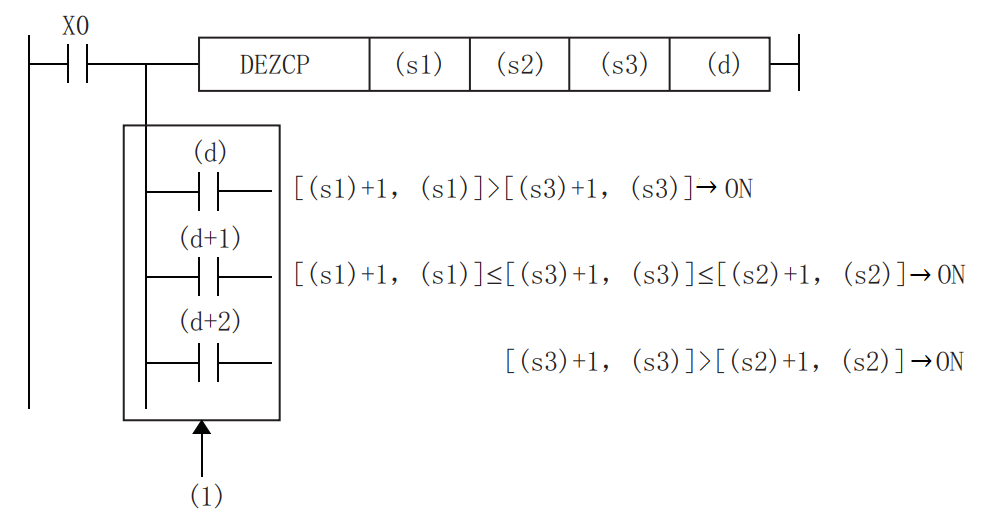
(1): Even if the instruction input is turned OFF and DEZCP instruction is not executed, (d) to (d)+2 will keep the state before X0 is turned OFF.
When the constant (K, H) to the device specified in (s1), (s2), (s3) is specified, the value is automatically converted from BIN to binary floating point for processing.
Please set the size relationship of the comparison data as [(s1)+1,(s1)]≤[(s2)+1,(s2)]. In the case of [(s1)+1,(s1)]>[(s2)+1,(s2)], it is regarded as the value of [(s2)+1,(s2)] and [(s1)+1, (s1)] Same for comparison.
Error code
| Error code | Content |
| 4085H | The write address in (s1),(s2) and (s3) exceeds the device range |
| 4086H | The write address in (d) exceeds the device range |
| 4084H | When the content of the device specified by (s1), (s2) and (s3) is an irregular number, a non-number and ±∞ |
Example
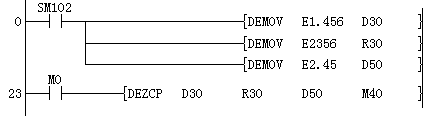
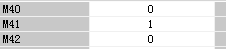
Since 2.45 is greater than 1.456 and 2.45 is less than 2356, M41 is set to ON
DESQR/Single precision real square root
DESQR(P)
After the square root of the value specified in (s) is calculated, the calculation result is stored in the device specified in (d).
-[DESQR (s) (d)]
Content, range and data type
| Parameter | Content | Range | Data type | Data type (label) |
| (s) | The data for square root operation or the device start number that stores the data | 0, 2 -126 ≤|(s)|< 2 128 | Single precision real number | ANYREAL_32 |
| (d) | The device start number stores operation result | - | Single precision real number | ANYREAL_32 |
Device used
| Instruction | Parameter | Devices | Offset modification | Pulse extension | |||||||||
| T | C | D | R | SD | LC | HSC | K | H | E | [D] | XXP | ||
| DESQR | Parameter 1 | ● | ● | ● | ● | ● | ● | ● | ● | ● | ● | ● | ● |
| Parameter 2 | ● | ● | ● | ● | ● | ● | ● | ● | ● | ||||
Features
• After the square root of the value specified in (s) is calculated, the calculation result is stored in the device number specified in (d).
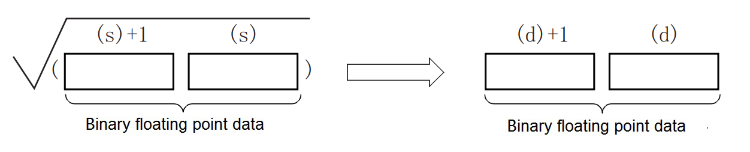
The value specified in (s) can only be set to a positive number. (Cannot perform operations with negative numbers.)
• The related devices are as follows.
| Devices | Name | Content | |
| Condition | Operation | ||
| SM153 | Zero | The operation result is zero | The zero flag (SM153) turns ON. |
Error code
| Error code | Content |
| 4085H | The write address in (s) exceeds the device range |
| 4086H | The write address in (d) exceeds the device range |
| 4084H | When the content of the device specified by (s) is an irregular number, a non-number and ±∞ |
Example

Get the result: D0 is a floating point number 2

DESTR/Single precision real number → string conversion
DESTR(P)
Convert the binary floating point data data stored in the device specified in (s1) into a character string according to the display specification stored after the device number specified in (s2), and store it in the device number specified in (d) or later .
-[DESTR (s1) (s2) (d)]
Content, range and data type
| Parameter | Content | Range | Data type | Data type (label) |
| (s1) | Converted single precision real number data or the device start number that stores the data | 0, 2 -126 ≤|(s)|< 2 128 | Single precision real number | ANYREAL_32 |
| (s2) | Display the specified device start number that stores the converted value. The device specified in (s1) is used as the start, and (s2)+2 is used | - | Signed BIN 16 bit | ANY16_ARRAY (number of elements: 3) |
| (d) | Start number of the device storing the converted character string | - | String | ANYSTRING_SINGLE |
Device used
| Instruction | Parameter | Devices | Offset modification | Pulse extension | |||||||||||
| KnX | KnY | KnM | KnS | T | C | D | R | SD | LC | HSC | E | [D] | XXP | ||
| DESTR | Parameter 1 | ● | ● | ● | ● | ● | ● | ● | ● | ● | ● | ||||
| Parameter 2 | ● | ● | ● | ● | ● | ● | ● | ● | ● | ● | ● | ||||
| Parameter 3 | ● | ● | ● | ● | ● | ● | ● | ● | ● | ● | |||||
Features
Convert the binary floating point data data stored in the device specified in (s1) into a character string according to the display specification stored after the device number specified in (s2), and store it in the device number specified in (d) after. You can also directly specify the real number to (s1).
• The converted data differs according to the display specification specified in (s2).
| Unit | Features |
| (s2) | 0: Decimal point form 1: Exponential form |
| (s2)+1 | All digits (total number of strings). Range: 2 to 24 |
| (s2)+2 | The number of decimal digits. Range: 0 to 7 |
The range in the above table will change the value range according to the conversion form and other information used
Decimal form
If 0 is specified in (s2), it will be in decimal form.
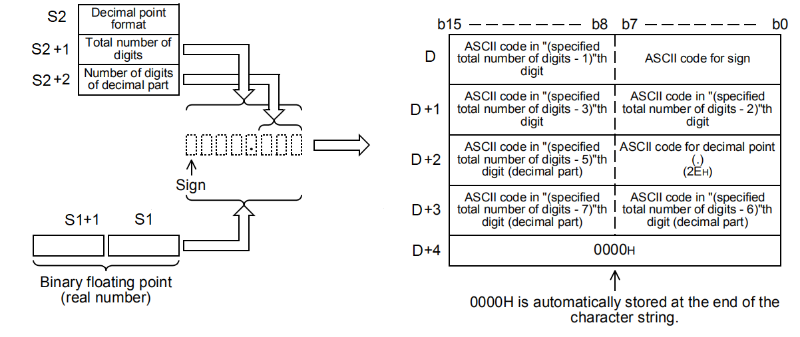
Corresponding digit range in decimal form:
| Unit | Features |
| (s2) | 0: Decimal point form |
| (s2)+1 | All digits (total number of strings). Range: 2 to 24. When (s2)+2 is not 0: digits ≥ (number of decimal places + 3). |
| (s2)+2 | The number of decimal places. Range 0 to 7, When (s2)+2 is not 0: digits ≥ (number of decimal places + 3). |
1.Example: The total number of digits is 8, the number of decimal places is 3, and when -1.235 is specified, (d) will be stored in the following way.
When displaying character strings, display character strings in normal order from left to right for convenience.
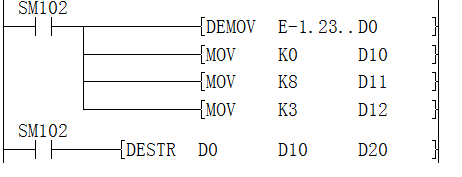
Converted string

The corresponding ASCII code is:

The first one is the sign bit. In the sign, when binary floating point data data is positive, 20H (blank) is stored, and when it is negative, 2DH(-) is stored.
If the actual number of digits is less than all digits during conversion, 20H (blank) will be added between the sign and the first number
If the decimal part of the binary floating point data data cannot be accommodated in the decimal part, the lower decimal part will be rounded off.
2. Example: The total number of digits is 8, the number of decimal places is 2, and when -1.234 is specified, (d) will be stored in the following way.
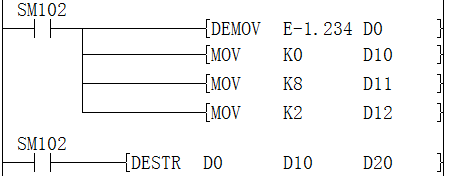
The converted string:

The corresponding ASCII code is:

In the above example: the low byte of D20 stores the negative sign 2DH(-). Then due to insufficient number of digits, the high byte of D20 and D21 are both 20H (blank). Finally, D22 to D23 store numeric characters 1.23
Exponential form
When 1 is specified in (s2), it will be in exponential format.
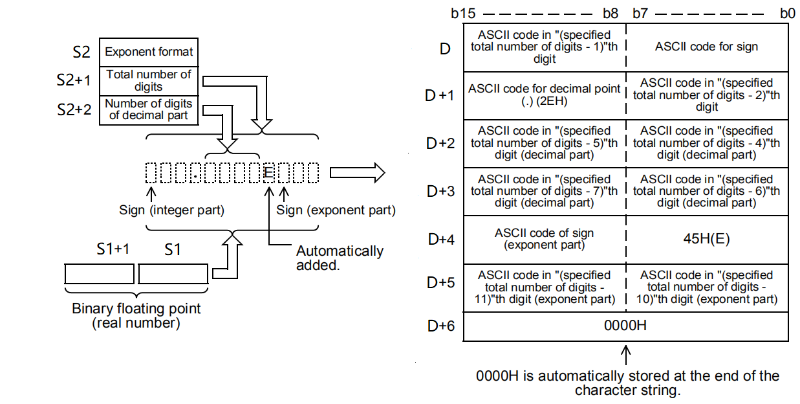
The corresponding digit range in exponential form:
| Unit | Features |
| (s2) | 1: Exponential form |
| (s2)+1 | All digits (total number of strings). Range: 2 to 24. (s2)+2 when non-zero: digits ≥ (number of decimal places + 7) |
| (s2)+2 | The number of decimal places. Range 0 to 7 (s2)+2 when non-zero: digits ≥ (number of decimal places + 7) |
For example 3, all digits are 12, decimal place is 4, and 1234.5 is specified, (d) and later will be stored as follows.
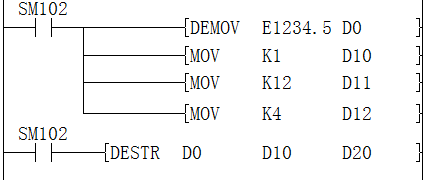
The converted string:

The corresponding ASCII code is:

In the sign of the integer part, when the binary floating point data data is positive, 20H (blank) is stored, and when it is negative, 2DH(-) is stored.
The integer part is fixed to 1 digit. 20H (blank) is stored between the integer part and the Sign.
If the decimal part of the binary floating point data data cannot be accommodated in the decimal part, the lower decimal part will be rounded off.
When the number of decimal places is set to other than 0, 2EH(.) is automatically stored in the number of specified decimal places+1 digit. When the decimal place is 0, 2EH(.) is not stored.
In the sign of the exponent, 2BH(+) is stored when the exponent is positive, and 2DH(-) is stored when it is negative.
The exponent is fixed to 2 digits. When the exponent part is a 1-digit number, 30H(0) is stored between the signs of the exponent part.
00H is automatically stored at the end of the converted character string.
Example 4: All digits are 12, decimal places are 3, and -16346 is specified, (d) will be stored in the following way.
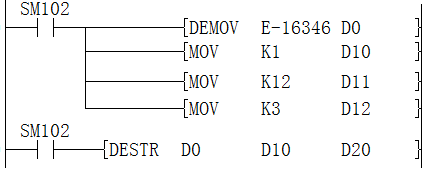
The converted string:

The corresponding ASCII code is:

As in the above example:
The low byte of D20 stores the negative sign 2DH(-).
Then due to insufficient number of digits, the high byte of D20 and the low bit of D21 are both 20H (blank).
16346 becomes the string 1.635E+04, in which the last digit "6" of 16346 is rounded.
The exponent part is 34H(4) with only one bit, then add 30H(0) between the Signs 2DH(-) and 34H(4).
Finally D26 automatically stores 00H
Example 5: All digits are 12, and the number of decimal places is 0. If -16346 is specified, (d) will be stored as follows.
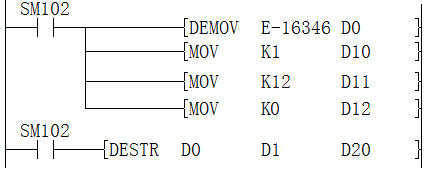
The converted string:

The corresponding ASCII code is:

This example mainly shows that if the decimal place is set to 0, the decimal point 2EH(.) will be automatically omitted.
Error code
| Error code | Content |
| 4085H | The read address of (s1) and (s2) exceeds the device range |
| 4086H | The write address of (d) exceeds the device range |
| 4084H | When the content of the specified device (s1) and (s2) is an irregular number, a non-number, or ±∞ |
| When the format specified in (s2) is other than 0 or 1 | |
| When all the digits specified in (s1) +1 exceeds the value of 24 | |
| When the number of decimal places specified in (s2) +2 exceeds the range of 0 to 7 | |
In the decimal form, when (s2) is 0.
| |
In the exponential form, when (s2) is 0.
|
DEVAL/String → single precision real number conversion
DEVAL(P)
The character string stored in the device number specified in (s) and later is converted to a binary floating point data, and then stored in the device specified in (d).
-[DEVAL (s) (d)]
Content, range and data type
| Parameter | Content | Range | Data type | Data type (label) |
| (s) | String data for single precision real number or the device start number that stores the string data | - | String | ANYSTRING_SINGLE |
| (d) | The device start number that stores the converted single precision real number | - | Single precision real number | ANYREAL_32 |
Device used
| Instruction | Parameter | Devices | Offset modification | Pulse extension | ||||||||||
| KnX | KnY | KnM | KnS | T | C | D | R | SD | LC | HSC | [D] | XXP | ||
| DEVAL | Parameter 1 | ● | ● | ● | ● | ● | ● | ● | ● | ● | ● | ● | ||
| Parameter 2 | ● | ● | ● | ● | ● | ● | ● | ● | ● | |||||
Features
The character string stored in the device number specified in (s) and later is converted to a binary floating point data, and then stored in the device specified in (d).
Whether the specified string is in decimal form or exponential form, it can be converted to a binary floating point data.
Up to 24 characters can be set for the string. 20H (blank) and 30H (0) in the character string are also counted as 1 character.
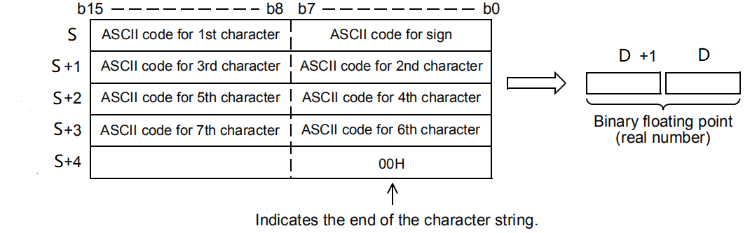
Decimal form
When the character string specified in (s) is in decimal format, the following is the case.
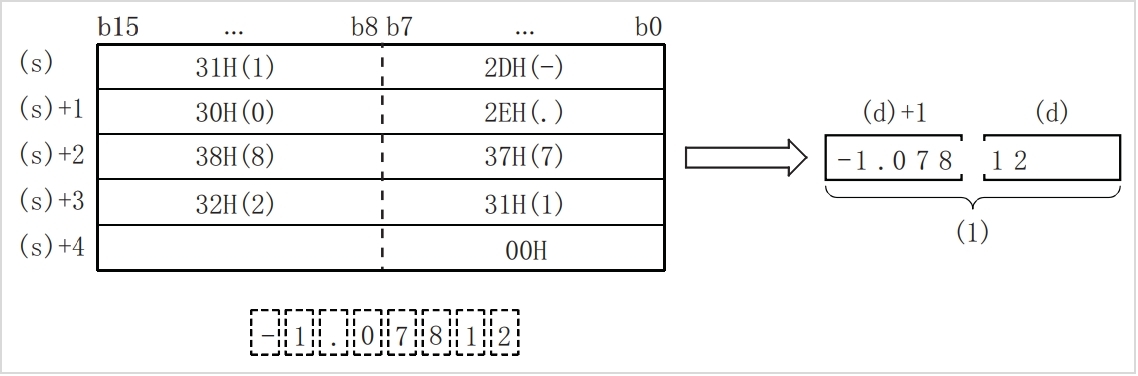
(1): single-precision real number
In the character string specified in (s), for the character string to be converted to a binary floating point data, the 6 digits after the sign, decimal point, and exponent are valid, and the 7th digit and later will be discarded during conversion.
When the sign is specified as 2BH(+) or omitted in the decimal point format, it will be converted as a positive value. In addition, when the sign is specified as 2DH(-), it will be converted as a negative value.
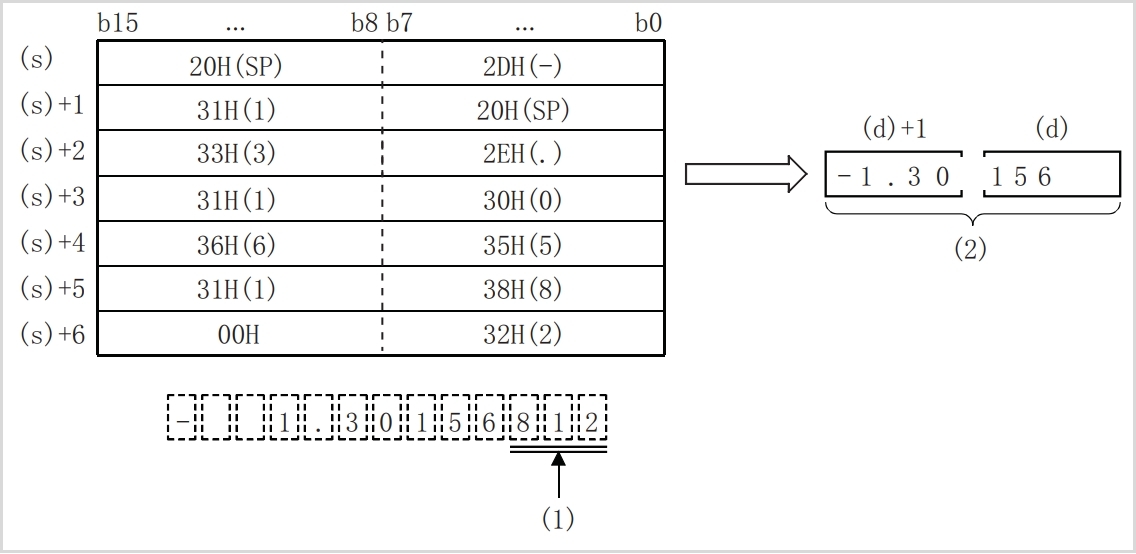
(1): discarded
(2): single-precision real number
If there are 20H (blank) or 30H (0) in the character string specified in (s) other than the first 0, 20H and 30H will be ignored during conversion.
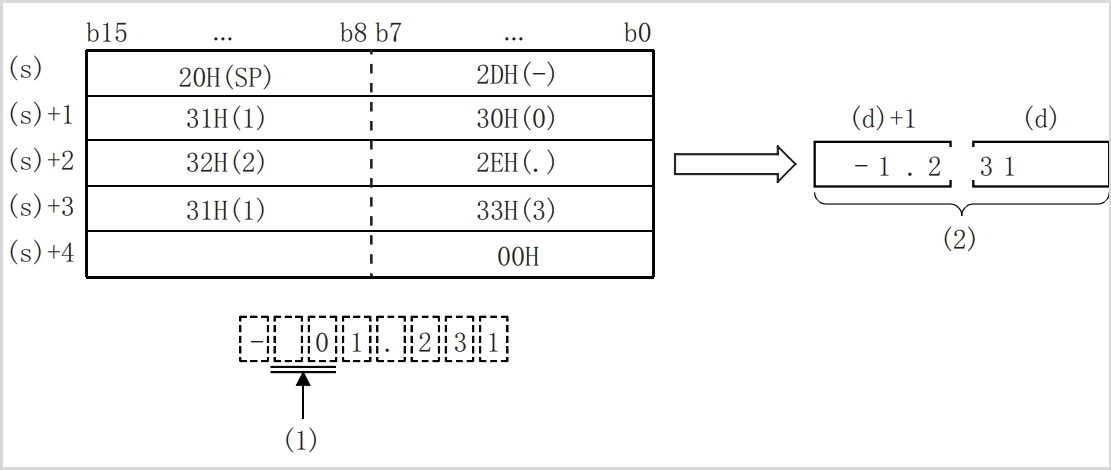
(1): ignore
(2): single-precision real number
In the case of exponential form
When the character string specified in (s) is in exponential form, it is executed as follows.
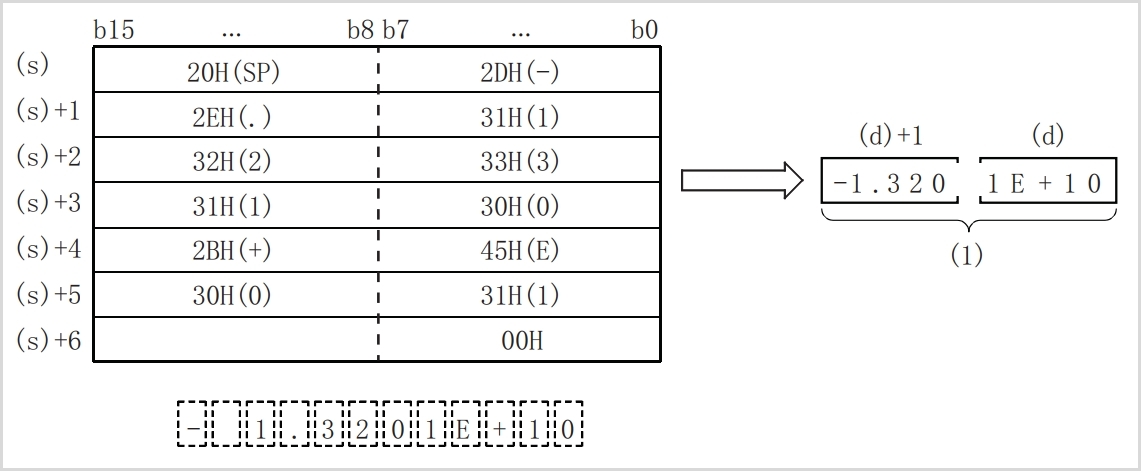
(1): single-precision real number
Among the character strings specified in (s), for the character string to be converted to a binary floating point data, the 6 digits after the sign, decimal point, and exponent are valid, and the 7th digit and later will be discarded during conversion.
If the sign of the exponent part is specified as 2BH(+) or omitted in the exponential form, it will be converted as a positive value. When the sign of the exponent is specified as 2DH(-), it will be converted as a negative value.
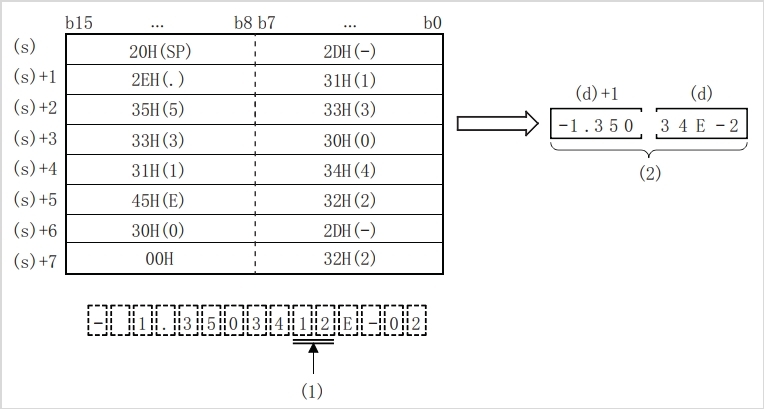
(1): discarded
(2): single-precision real number
If there is 20H (blank) or 30H (0) in the character string specified in (s) other than the first 0, 20H and 30H will be ignored during conversion.
In the exponential character string, if 30H (0) is stored between "E" and the value, 30H will be ignored during conversion.
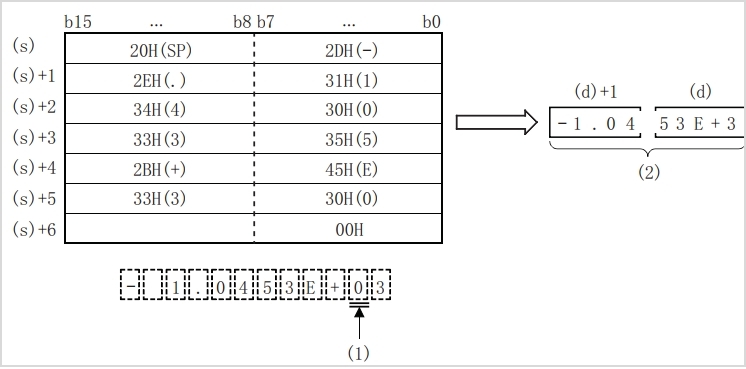
(1): Ignore.
(2): Single precision real number.
The related devices are shown below.
| Devices | Name | Content | |
| Condition | Operating | ||
| SM153 | Zero | The operation result is zero | The zero flag (SM153) turns ON. |
| SM152 | Borrow | The absolute value of operation result <2-126 | The value of (d) becomes the minimum value of a 32-bit real number (2-126 ), and the borrow flag (SM152) turns on. |
| SM151 | Carry | The absolute value of operation result> 2128 | The value of (d) becomes the maximum value of 32-bit real numbers (2128 ), and the carry flag (SM151) turns on. |
Error code
| Error code | Content |
|---|---|
| 4085H | The read address of (s) exceeds the device range |
| 4086H | The write address of (d) exceeds the device range |
| 408AH | The string is not read by (s), or the string length exceeds 24 |
| 408BH | When (s) reading a character string, the maximum range of the device is read, but 00H is not found and the end |
| 4084H | When there are characters other than 2BH (+), 2DH (-), 20H (space), 2EH (.), 45H (E), 65H(e), and 30 H(0) to 39H (9) in the string specified in (s) |
| When there are two or more 2EH(.) characters in the character string specified in (s). | |
| When there are characters other than 45H(E), 2BH(+), 2DH(-), and 30 H(0) to 39H (9) in the exponent part specified in (s), or if there are multiple exponent parts, or exponent In some cases, 2BH(+) or 2DH(-) occurred twice or more. | |
| 2BH(+) or 2DH(-) appears twice or more before the first digit of the string specified in (s). |
Example


The stored character string of D0 is: 5.2467E+12
The resulting floating point number is: 5.2467E+12

DEXP/Single precision real number exponential operation
DEXP(P)
After performing the exponential calculation of the value specified in (s), the calculation result is stored in the device specified in (d).
-[DEXP (s) (d)]
Content, range and data type
| Parameter | Content | Range | Data type | Data type (label) |
| (s) | Data for exponential calculation or the device start number that stores the data | 0, 2 -126 ≤|(s)|< 2 128 | Single precision real number | ANYREAL_32 |
| (d) | The device start number that stores the operation result | - | Single precision real number | ANYREAL_32 |
Device used
| Instruction | Parameter | Devices | Offset modification | Pulse extension | |||||||
| T | C | D | R | SD | LC | HSC | E | [D] | XXP | ||
| DEXP | Parameter 1 | ● | ● | ● | ● | ● | ● | ● | ● | ● | ● |
| Parameter 2 | ● | ● | ● | ● | ● | ● | ● | ● | ● | ||
Features
After performing the exponential calculation of the value specified in (s), the calculation result is stored in the device number specified in (d).

In exponential calculation, the base (e) is calculated as "2.71828".
The related devices are shown below.
| Devices | Name | Content | |
| Condition | Operating | ||
| SM153 | Zero | The operation result is zero | The zero flag (SM153) turns ON. |
| SM152 | Borrow | The absolute value of operation result <2-126 | The value of (d) becomes the minimum value of a 32-bit real number (2-126 ), and the borrow flag (SM152) turns on. |
| SM151 | Carry | The absolute value of operation result> 2128 | The value of (d) becomes the maximum value of 32-bit real numbers (2128 ), and the carry flag (SM151) turns on. |
Error code
| Error code | Content |
| 4085H | The write address in (s) exceeds the device range |
| 4086H | The write address in (d) exceeds the device range |
| 4084H | When the content of the device specified by (s) is an irregular number, a non-number and ±∞ |
Example

Calculate the result:

INT/Single precision real number → signed BIN 16-bit data
INT(P)
Convert the specified single precision real number into signed BIN 16-bit data.
-[INT (s) (d)]
Content, range and data type
| Parameter | Content | Range | Data type | Data type (label) |
| (s) | Single precision real number or the start device storing single precision real number | -32768 to 32767 | Single precision real number | ANYREAL_32 |
| (d) | Signed device for storing BIN data | - | BIN16 bit | ANY16_S |
Device used
| Instruction | Parameter | Devices | Offset modification | Pulse extension | ||||||
| T | C | D | R | SD | LC | HSC | [D] | XXP | ||
| INT | Parameter 1 | ● | ● | ● | ● | ● | ● | ● | ● | ● |
| Parameter 2 | ● | ● | ● | ● | ● | ● | ● | |||
Features
• Convert the single precision real number specified in (s) into signed BIN 16-bit data and store it in the device specified in (d).
• The converted data will be rounded to the first digit below the decimal point of the single precision real number specified in (s).
• When setting the input value with the engineering tool, rounding errors may occur.
• The related devices are as follows.
| Devices | Name | Content | |
| Condition | Operation | ||
| SM153 | Zero | The operation result is zero | The zero flag (SM153) turns ON. |
| SM152 | Borrow | Decimal places are rounded off when converting | During conversion ((s) – (d))> (2 -126) ,borrow (SM152) turns ON |
| SM151 | Carry | Conversion result is out of range | The value of (s) is out of the range -32768 to 32767 or the value of (s) is less than the minimum value of 32-bit real numbers (2 -126), and the carry flag (SM151) turns on. |
Error code
| Error code | Content |
| 4085H | The write address in (s) exceeds the device range |
| 4086H | The write address in (d) exceeds the device range |
| 4084H | When the content of the device specified by (s) is an irregular number, a non-number and ±∞ |
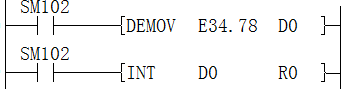
Get the conversion result:

And the borrow means turn ON
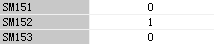
DINT/Single precision real number→ signed BIN 32-bit data
DINT(P)
Convert the specified single precision real number into signed BIN 32-bit data.
-[DINT (s) (d)]
Content, range and data type
| Parameter | Content | Range | Data type | Data type (label) |
| (s) | Single precision real number or the start device storing single precision real number | -2147483648 to 2147483647 | Single precision real number | ANYREAL_32 |
| (d) | The start device storing BIN data | - | Signed BIN 32 bit | ANY32_S |
Device used
| Instruction | Parameter | Devices | Offset modification | Pulse extension | ||||||
| T | C | D | R | SD | LC | HSC | [D] | XXP | ||
| DINT | Parameter 1 | ● | ● | ● | ● | ● | ● | ● | ● | ● |
| Parameter 2 | ● | ● | ● | ● | ● | ● | ● | ● | ● | |
Features
• Convert the binary floating point data specified in (s) into signed BIN 32-bit data and store it in the device specified in (d).
• The converted data will be rounded to the first digit below the decimal point of the binary floating point data specified in (s).
• When setting the input value with the engineering tool, rounding errors may occur.
• The related devices are as follows.
| Devices | Name | Content | |
| Condition | Operating | ||
| SM153 | Zero | The operation result is zero | The zero flag (SM153) turns ON. |
| SM152 | Borrow | The absolute value of operation result <2-126 | The value of (d) becomes the minimum value of a 32-bit real number (2-126 ), and the borrow flag (SM152) turns on. |
| SM151 | Carry | The absolute value of operation result> 2128 | The value of (d) becomes the maximum value of 32-bit real numbers (2128 ), and the carry flag (SM151) turns on. |
Error code
| Error code | Content |
| 4085H | The write address in (s) exceeds the device range |
| 4086H | The write address in (d) exceeds the device range |
| 4084H | When the content of the device specified by (s) is an irregular number, a non-number and ±∞ |
Example
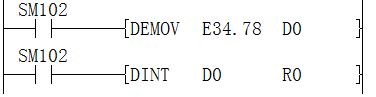
Get the conversion result:

And the borrow means turn ON
DLOG10/Single precision real number common logarithmic operation
DLOG10(P)
Calculate the common logarithm (base 10 logarithm) of the value specified in (s), and store the result of the operation in the device specified in (d).
-[DLOG10 (s) (d)]
Content, range and data type
| Parameter | Content | Range | Data type | Data type (label) |
| (s) | Data for common logarithmic operations or the device start number storing the data | 0, 2-126 ≤|(s)|< 2128 | Single precision real number | ANYREAL_32 |
| (d) | The device start number storing operation result | - | Single precision real number | ANYREAL_32 |
Device used
| Instruction | Parameter | Devices | Offset modification | Pulse extension | |||||||
| T | C | D | R | SD | LC | HSC | E | [D] | XXP | ||
| DLOG10 | Parameter 1 | ● | ● | ● | ● | ● | ● | ● | ● | ● | ● |
| Parameter 2 | ● | ● | ● | ● | ● | ● | ● | ● | ● | ||
Features
Calculate the common logarithm (base 10 logarithm) of the value specified in (s), and store the result of the calculation in the device number specified in (d).

The value specified in (s) can only be set to a positive number. (Cannot perform operations with negative numbers.)
• The related devices are as follows.
| Devices | Name | Content | |
| Condition | Operating | ||
| SM153 | Zero | The operation result is zero | The zero flag (SM153) turns ON. |
| SM152 | Borrow | The absolute value of operation result <2-126 | The value of (d) becomes the minimum value of a 32-bit real number (2-126 ), and the borrow flag (SM152) turns on. |
| SM151 | Carry | The absolute value of operation result> 2128 | The value of (d) becomes the maximum value of 32-bit real numbers (2128 ), and the carry flag (SM151) turns on. |
Error code
| Error code | Content |
| 4085H | The write address in (s) exceeds the device range |
| 4086H | The write address in (d) exceeds the device range |
| 4084H | When the content of the device specified by (s) is an irregular number, a non-number and ±∞ |
Example

Get calculation results

DLOGE/Single precision real number natural logarithm operation
DLOGE(P)
After calculating the logarithm when the natural logarithm e of the value specified in (s) is the base, store the calculation result in the device specified in (d).
-[DLOGE (s) (d)]
Content, range and data type
| Parameter | Content | Range | Data type | Data type (label) |
| (s) | Data for logarithm operation or the device start number storing the data | 0, 2-126 ≤|(s)|< 2128 | Single precision real number | ANYREAL_32 |
| (d) | the device start number storing operation result | - | Single precision real number | ANYREAL_32 |
Device used
| Instruction | Parameter | Devices | Offset modification | Pulse extension | |||||||
| T | C | D | R | SD | LC | HSC | E | [D] | XXP | ||
| DLOGE | Parameter 1 | ● | ● | ● | ● | ● | ● | ● | ● | ● | ● |
| Parameter 2 | ● | ● | ● | ● | ● | ● | ● | ● | ● | ||
Features
• After calculating the logarithm when the natural logarithm e of the value specified in (s) is the base, store the result of the calculation in the device number specified in (d).

• The value specified in (s) can only be set to a positive number. (Cannot perform operations with negative numbers.)
• The related devices are as follows.
| Devices | Name | Content | |
| Condition | Operating | ||
| SM153 | Zero | The operation result is zero | The zero flag (SM153) turns ON. |
| SM152 | Borrow | The absolute value of operation result <2-126 | The value of (d) becomes the minimum value of a 32-bit real number (2-126 ), and the borrow flag (SM152) turns on. |
| SM151 | Carry | The absolute value of operation result> 2128 | The value of (d) becomes the maximum value of 32-bit real numbers (2128 ), and the carry flag (SM151) turns on. |
Error code
| Error code | Content |
| 4085H | The write address in (s) exceeds the device range |
| 4086H | The write address in (d) exceeds the device range |
| 4084H | When the content of the device specified by (s) is an irregular number, a non-number and ±∞ |
Example

The result is as below:
