

1.Third-party account
On the V-NET 2.0 platform, API functions require integration with third-party accounts.
1.1 Create a third-party account
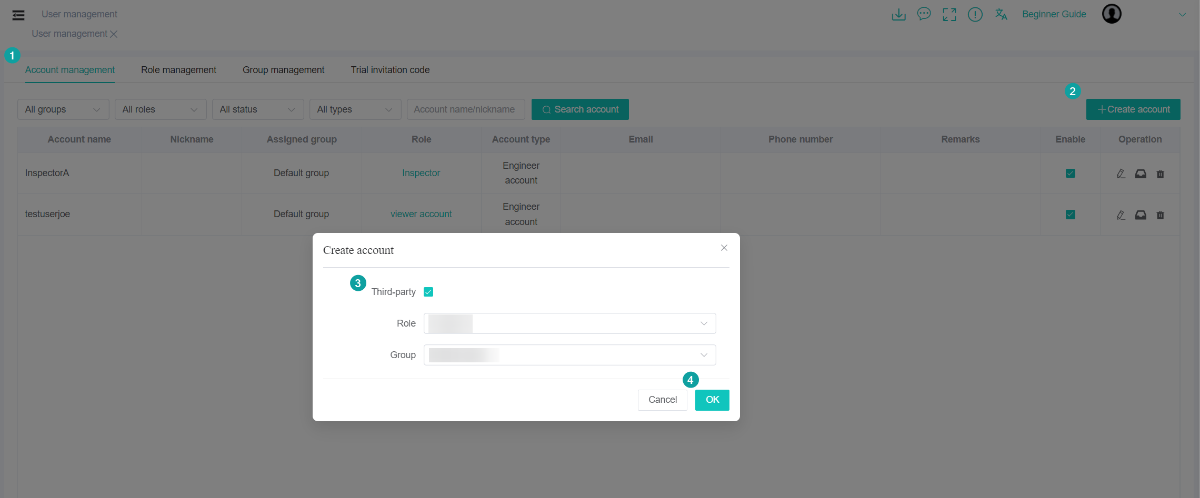
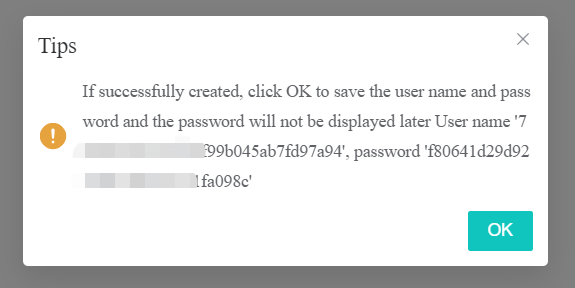
1.2 Assign device to third-party account
1.choose the third-party account
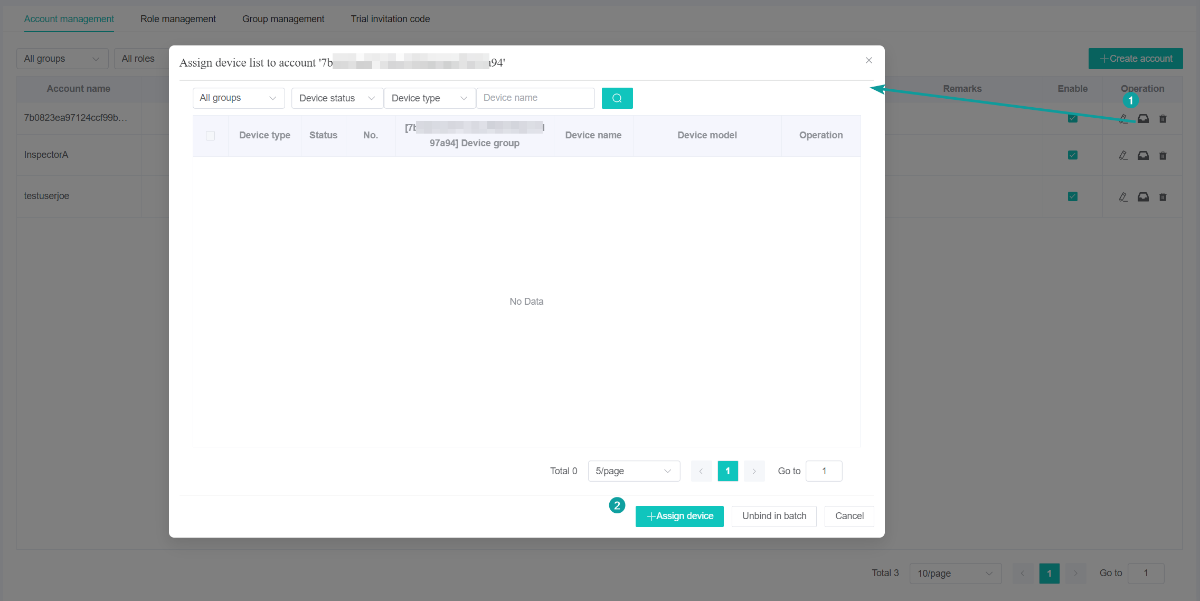
2.select a device to bind
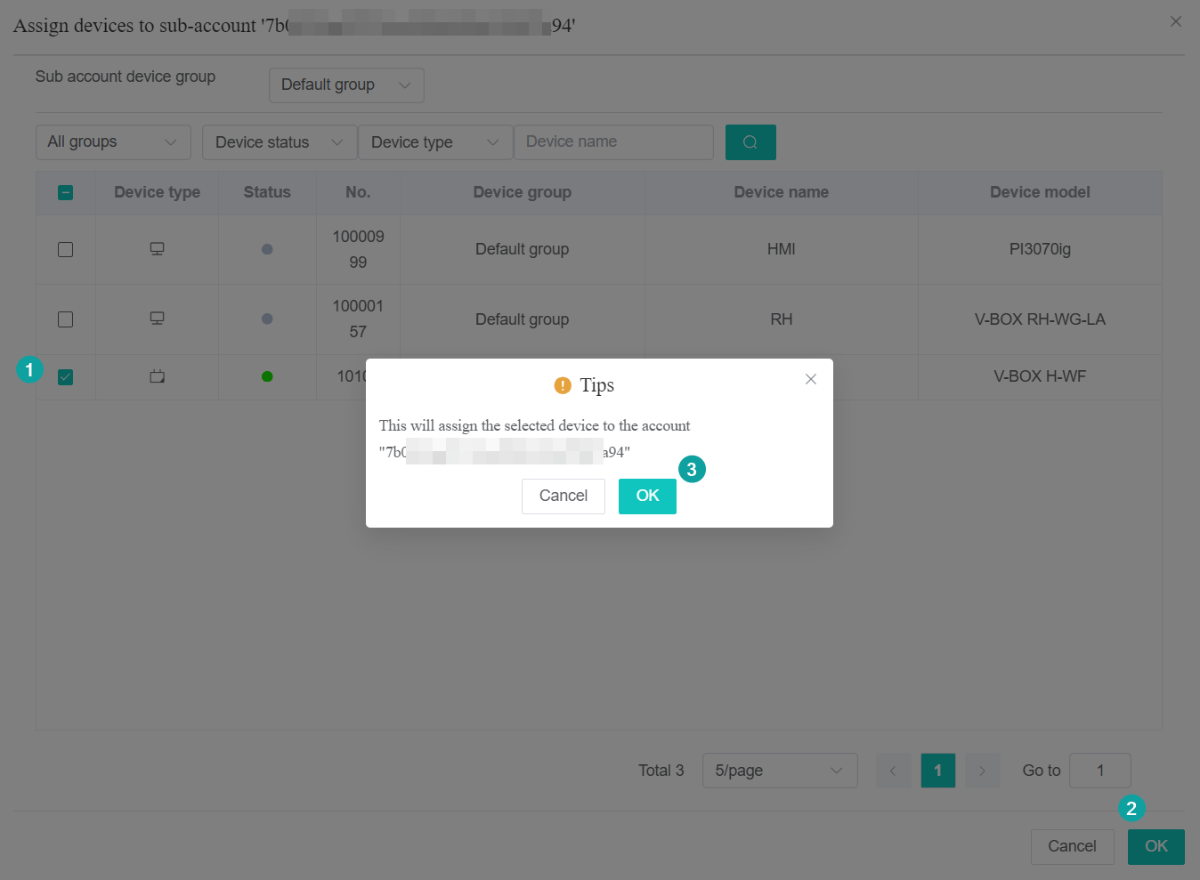
3.Binded successfully
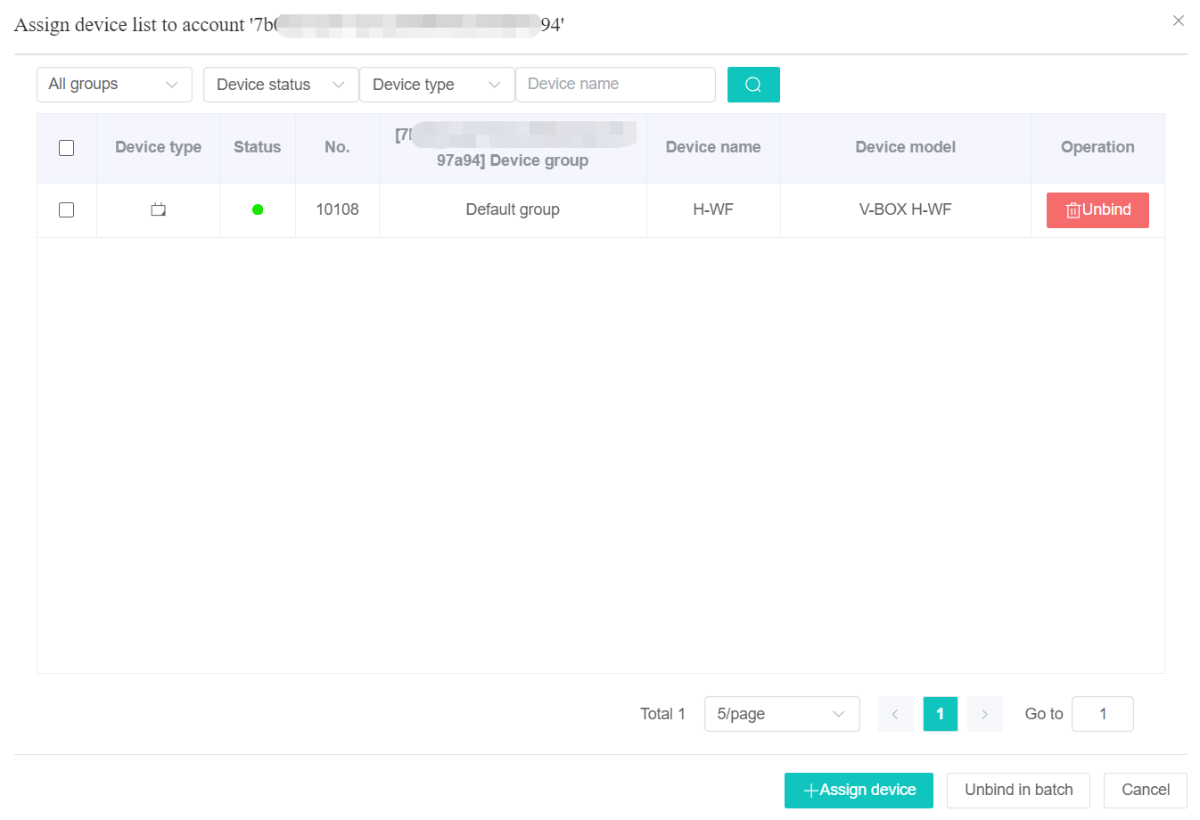
2.Operational process
2.1 Basic information
Request url: https://api.asean.v-iec.com/m16/{acturl}
Protocol: https
Interface Parameter Description:
Global Parameters (HTTP Headers)
The following acturls need to have global parameters (The global parameter client is put into the JSON format and placed in the common parameters of the Headers)
| Parameter | Description |
|---|---|
| sid | session ID (Obtained after login, and is used for all acturls after login) |
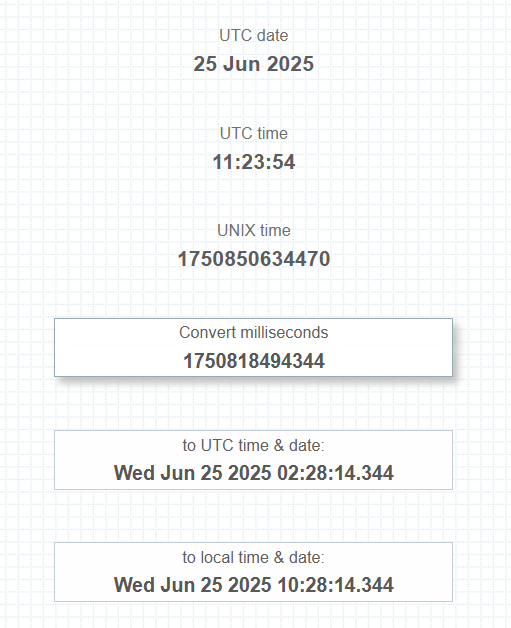
| ts | Millisecond-level timestamp;( e.g. ,1750818494344) |
| sign | How to get sign: Concatenate all parameters, including the header parameters above and the individual business parameters of each interface, in the format key=value, separated by & symbols. For example, for the login interface, the concatenated result would be: Here, alias and password are the business parameters specific to the login interface, while the others are header parameters (Note: The sid parameter is excluded for the login interface but must be included for other interfaces).
Finally, calculate the MD5 hash of the concatenated string to generate the sign |
The final header parameters are as follows (Note: The login interface does not require 'sid', while other interfaces must include 'sid'. The value of 'ts' must be identical to the 'ts' used in the above sign calculation):
wcommon:{"dap":"","cuid":"123456789","sv":"1.0","mt":"255","lan":"zh","sign":"XXX","pid":"1","ts":1742612007058}
Return the result in JSON format, case-sensitive, for example:
1) Client error responses
2) Successful responses
HTTP response status codes
| Status codes | Description |
|---|---|
| 200 | The request succeeded |
| 400 | Bad Request |
| 403 | Forbidden (invalid Session ID) |
| 503 | Bad Request |
2.2 Recommended tools
1) Current Millis - Provides the current time in milliseconds elapsed since the UNIX epoch (Jan 1, 1970) as well as in other common formats including local / UTC time
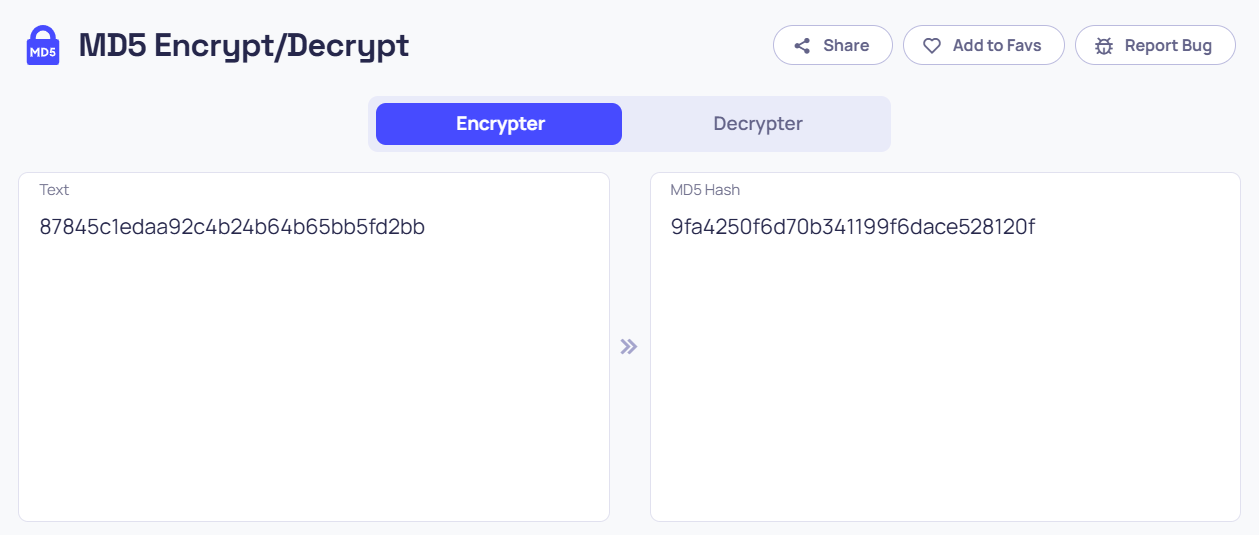
2) MD5 Encryption - Online tool for generating MD5 hashes from strings
3.Third-party API invocation Method
Example parameter and value
alias:3af2a002690b4becbd3d4fbced0d2df3
password:87845c1edaa92c4b24b64b65bb5fd2bb
ts:1750818494344
3.1 Login operation
| acturl | we-data/sign/login | |
| Function | Use username to login | |
| Parameters | Items | Description |
| alias | Username | |
| password | 32-bit password (MD5 encryption) | |
| isRemember | 0(Optional) | |
| Return value | Items | Description |
| utype | User Type: | |
| sid | User session ID (Only available for 12 hours) | |
| ztRole | Cloud SCADA permissions: 1 - Has permission, 0 - No permission | |
| userName | user name | |
| Example | { "utype":5, "ztRole":1, "userName":"0edc4188a48f4bdcb7e89d35c6e7986f", "sid":"c253a6a9635646a98bb46fba22411568" } | |
Operating procedures
Setp1: Set URL: https://api.asean.v-iec.com/m16/we-data/sign/login
Setp2: Set parameters on Params
alias: 3af2a002690b4becbd3d4fbced0d2df3
password: 9fa4250f6d70b341199f6dace528120f(The md5 encryption result of 87845c1edaa92c4b24b64b65bb5fd2bb)

Step3: Get sign
alias=3af2a002690b4becbd3d4fbced0d2df3&cuid=123456789&lan=zh&mt=255&password=9fa4250f6d70b341199f6dace528120f&pid=1&sv=1.0&ts=1750818494344&key=5cee621329f24e5cbdc43daa959ce9a1
Put the whole string above encrypted by MD5, so will get the value of "sign"
"sign":"d3071131ae5c7ab032fca3c623101e89"
Step4: Set wcommon of header
{"dap":"","cuid":"123456789","sv":"1.0","mt":"255","lan":"zh","sign":"d3071131ae5c7ab032fca3c623101e89","pid":"1","ts":1750818494344}

Result
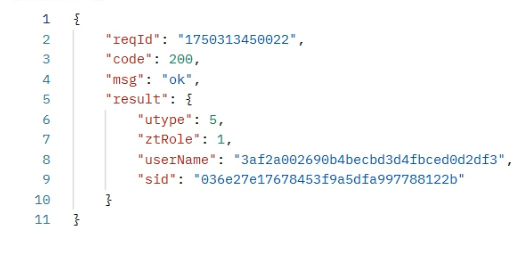
Now, we got the sid for other API invocation
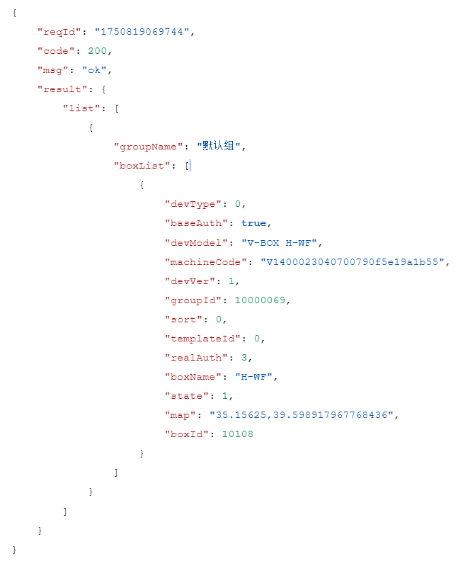
3.2 Get the device list
| acturl | we-data/device/getList | |
| Function | Get the device list | |
| Parameters | Item | Description |
| Return value | Item | Description |
| boxList | Devices supporting WVPN | |
| list | Device List | |
| Example | { "reqId": "1667285652454", "code": 200, "msg": "ok", "result": { "boxList": [ { "code": "U370H1220307220W0001c75b693b2955", "lev_name": "Group", "name": "name1", "f_name": " Group ", "model": "PI3070ig", "boxType": 1, "id": 444860, "state": 1, "f_id": 226038, "type": "1", "lev_id": "226038", "create_date": 1653985793000 }, { "code": "V02001211222999a2d12c52a355", "lev_name": "Default group", "name": " V-BOX ", "f_name": "Default group", "model": "V-BOX S-4G", "boxType": 0, "id": 444848, "state": 0, "f_id": 225922, "type": "1", "lev_id": "225922", "create_date": 1652378606000 } ], "list": [ { "all": 3, "offline": 0, "lev_name": " group", "children": [ { "all": 0, "offline": 0, "lev_name": " group 1, group ", "children": [], "name": " group 1", "f_name": " group ", "online": 0, "id": 225986, "f_id": 226038, "type": "0", "lev_id": "225986,226038", "create_date": 1657010779000 }, { "code": "U370H1220307220W0001c75b693b2955", "lev_name": "group", "name": "aaaaa", "f_name": " group ", "model": "PI3070ig", "boxType": 1, "id": 444860, "state": 1, "f_id": 226038, "type": "1", "lev_id": "226038", "create_date": 1653985793000 } ], "name": "Group", "online": 3, "id": 226038, "f_id": 0, "type": "0", "lev_id": "226038", "create_date": 1659618529000 }, { "all": 1, "offline": 1, "lev_name": "Default group", "children": [ { "all": 0, "offline": 0, "lev_name": "Test 2,Default group", "children": [], "name": " Test 2", "f_name": "Default group", "online": 0, "id": 225987, "f_id": 225922, "type": "0", "lev_id": "225987,225922", "create_date": 1657010789000 }, { "code": "V02001211222999a2d12c52a355", "lev_name": "Default group", "name": "V-BOX", "f_name": "Default group", "model": "V-BOX S-4G", "boxType": 0, "id": 444848, "state": 0, "f_id": 225922, "type": "1", "lev_id": "225922", "create_date": 1652378606000 } ], "name": "Default group", "online": 0, "id": 225922, "f_id": 0, "type": "0", "lev_id": "225922", "create_date": 1653984617000 } ] } } | |
Operating procedures(Dome)
Step1: Set URL:https://api.asean.v-iec.com/m16/we-data/device/getList
Step2: Get sign (Using the sid obtained from calling the login API;demonstrated here as "e95ae840f7f147718d2b7650abe6c05f")
cuid=123456789&lan=zh&machineCode=V1400023040700790f5e19a1b55&mt=255&pid=1&sid=e95ae840f7f147718d2b7650abe6c05f&sv=1.0&ts=1750818494344&key=5cee621329f24e5cbdc43daa959ce9a1
Put the whole string above encrypted by MD5, so will get the value of "sign"
"sign":"f0889257ce45e561959928ba5475fbf1"
Step4: Set wcommon of header
{"dap":"","cuid":"123456789","sv":"1.0","mt":"255","lan":"zh","sign":"f0889257ce45e561959928ba5475fbf1","pid":"1","ts":1750818494344,"sid":"e95ae840f7f147718d2b7650abe6c05f"}

Result
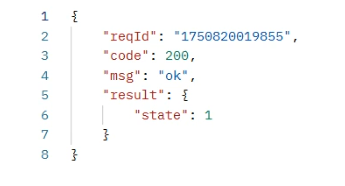
3.3 Get device state
| acturl | we-data/device/getDeviceState | |
| Function | Get device state | |
| Parameters | Item | Description |
| machineCode | Machine Code | |
| Return value | Item | Description |
| state | 0:Offline 1: Online | |
| Example | { "code": 200, "msg": "ok", "result": { "state": 1 } } | |
Operating procedures(Dome)
Step1: Set URL:https://api.asean.v-iec.com/m16/we-data/device/getDeviceState
Step2: Set parameters on Params
"machineCode": "V1400023040700790f5e19a1b55"

Step3: Get sign
cuid=123456789&lan=zh&machineCode=V1400023040700790f5e19a1b55&mt=255&pid=1&sid=e95ae840f7f147718d2b7650abe6c05f&sv=1.0&ts=1750818494344&key=5cee621329f24e5cbdc43daa959ce9a1
Put the whole string above encrypted by MD5, so will get the value of "sign"
"sign":"f0889257ce45e561959928ba5475fbf1"
Step4: Set wcommon of header
{"dap":"","cuid":"123456789","sv":"1.0","mt":"255","lan":"zh","sign":"f0889257ce45e561959928ba5475fbf1","pid":"1","ts":1750818494344,"sid":"e95ae840f7f147718d2b7650abe6c05f"}
Result
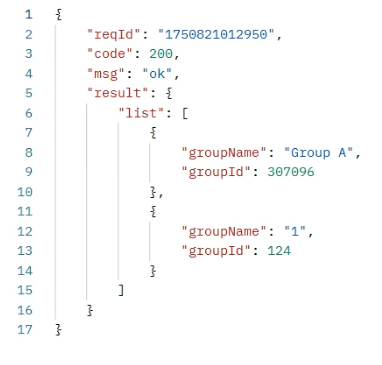
3.4 Get real-time tag list
| acturl | we-data/actGroup | ||
| Function | Get real-time tag list | ||
| Parameters | Item | Description | |
| boxId | V-box ID | ||
| Return value | Item | Description | |
| list | Group list | ||
| groupId | Group Id | ||
| groupName | Group Name | ||
| Example | { "code": 200, "msg": "ok", "result": { "list": [ { "groupId": 1, "groupName": "group 1" }, { "groupId": 2, "groupName": "group 2" } ] } } | ||
Operating procedures(Dome)
Step1: Set URL:https://api.asean.v-iec.com/m16/we-data/actGroup
Step2: Set parameters on Params
"boxId": "10108"

Step3: Get sign
boxId=10108&cuid=123456789&lan=zh&mt=255&pid=1&sid=e95ae840f7f147718d2b7650abe6c05f&sv=1.0&ts=1750818494344&key=5cee621329f24e5cbdc43daa959ce9a1
Put the whole string above encrypted by MD5, so will get the value of "sign"
"sign":"9e933e16e03f2821a58aa9694de49969"
Step4: Set wcommon of header
{"dap":"","cuid":"123456789","sv":"1.0","mt":"255","lan":"zh","sign":"9e933e16e03f2821a58aa9694de49969","pid":"1","ts":1750818494344,"sid":"e95ae840f7f147718d2b7650abe6c05f"}

Result
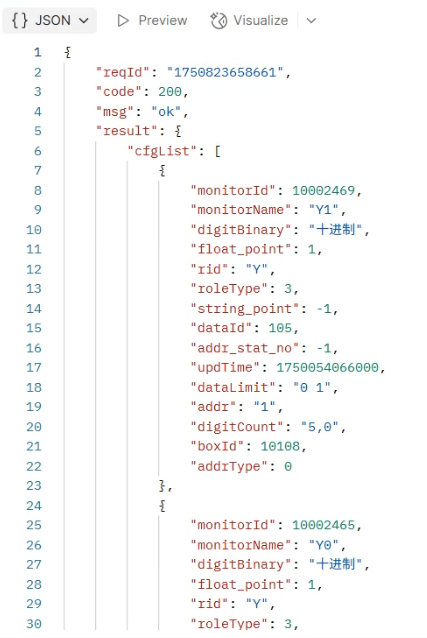
3.5 Get real-time tag configuration
| acturl | /we-data/realcfgs | ||
| Function | Get real-time tag configuration | ||
| Parameters | Item | Description | |
| boxId | V-box ID (Required) | ||
| groupId | Group ID (Required) | ||
| pageSize | Number of items per page (defaults to 10 if not specified) | ||
| pageIndex | Page number, starting from 1 | ||
| devtype | 0: V-Box ,1: HMI (Required) | ||
| Return value | Item | Description | |
| cfgList | Configuration list | ||
| monitorId | Monitor ID | ||
| monitorName | Monitor Name | ||
| updTime | Last Update Time | ||
| dataId | Data Type: 100 - 16-bit Binary 101 - 16-bit Octal ... (Refer to Appendix 1) | ||
| addr | Address | ||
| addrType | 0:bit address 1:byte address 2:word address 3:double word | ||
| digitCount | integer digits, decimal digits | ||
| digitBinary | carry system | ||
| dataLimit | Data Range | ||
| rid | Register Address | ||
| roleType | Access Permission: 1 - Read Only 2 - Write Only 3 - Read/Write | ||
| totalPage | Total Pages | ||
| totalRecord | Total Records | ||
| currentPage | Current Page | ||
| Example | { "code":200, "msg":"ok", "reqId":"1595385125344", "result": { "cfgList": [ { "monitorId":544225, "dataId":105, "monitorName":"00", "updTime":1589506814000, "dataLimit":"0 99999", "digitBinary":" decimal", "addr":"0", "rid":"0", "roleType":3, "digitCount":"", "addrType":0 }, { "monitorId":544224, "dataId":105, "monitorName":"40", "updTime":1589507516000, "dataLimit":"0 99999", "digitBinary":" decimal", "addr":"0", "rid":"4", "roleType":3, "digitCount":"5, 0", "addrType":2 } ], "totalPage":1, "totalRecord":2, "currentPage":1 } } | ||
Operating procedures(Dome)
Step1: Set URL:https://api.asean.v-iec.com/m16//we-data/realcfgs
Step2: Set parameters on Params
"boxId": "10108"
"groupId": "307096"
"devtype": "0"

Step3: Get sign
boxId=10108&cuid=123456789&devtype=0&groupId=307096&lan=zh&mt=255&pid=1&sid=e95ae840f7f147718d2b7650abe6c05f&sv=1.0&ts=1750818494344&key=5cee621329f24e5cbdc43daa959ce9a1
Put the whole string above encrypted by MD5, so will get the value of "sign"
"sign":"60fafbd0d795036e2ae09b4053c65671"
Step4: Set wcommon of header
{"dap":"","cuid":"123456789","sv":"1.0","mt":"255","lan":"zh","sign":"60fafbd0d795036e2ae09b4053c65671","pid":"1","ts":1750818494344,"sid":"e95ae840f7f147718d2b7650abe6c05f"}

Result
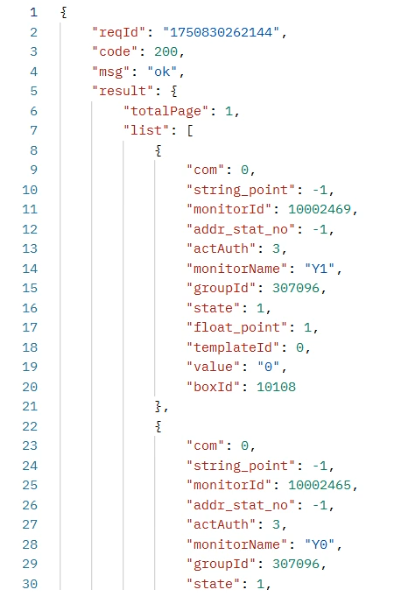
3.6 Get Real-time data list
| acturl | we-data/realdata | ||
| Function | Get Real-time data list | ||
| Parameters | Item | Description | |
| boxId | V-box ID (Required) | ||
| groupId | Group ID (Required) | ||
| pageSize | The number of each page, default 10 | ||
| pageIndex | Pages, starting from 1 | ||
| devtype | Device type (0:box,1:hmi) (Required) | ||
| Return value | Item | Description | |
| list | Real-time data list | ||
| com | Com port ID | ||
| monitorId | Monitor ID | ||
| monitorName | Monitor Name | ||
| state | State | ||
| value | Value | ||
| groupId | Group ID | ||
| totalPage | Total Pages | ||
| totalRecord | Total Records | ||
| currentPage | Current Page | ||
| Example | { }, | ||
Operating procedures(Dome)
Step1: Set URL:https://api.asean.v-iec.com/m16/we-data/realdata
Step2: Set parameters on Params
"boxId": "10108"
"groupId": "307096"
"devtype": "0"

Step3: Get sign
boxId=10108&cuid=123456789&devtype=0&groupId=307096&lan=zh&mt=255&pid=1&sid=1750818494344&sv=1.0&ts=1750818494344&key=5cee621329f24e5cbdc43daa959ce9a1
Put the whole string above encrypted by MD5, so will get the value of "sign"
"sign":"aa65f3d58da6dff1da04dc2f9babd931"
Step4: Set wcommon of header
{"dap":"","cuid":"123456789","sv":"1.0","mt":"255","lan":"zh","sign":"aa65f3d58da6dff1da04dc2f9babd931","pid":"1","ts":1750818494344,"sid":"e95ae840f7f147718d2b7650abe6c05f"}

Result
3.7 Modify the data of real-time tag
| acturl | we-data/updrealdata | ||
| Function | Modify the data of real-time tag | ||
| Parameters | Item | Description | |
| boxId | V-box ID (Required) | ||
| monitorId | Monitor ID | ||
| value | value | ||
| devtype | Device type (0:box,1:hmi) (Required) | ||
| Return value | Item | Description | |
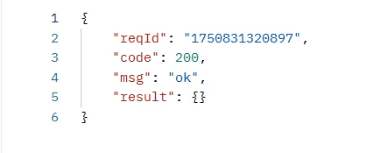
| Example | { "code":200 "msg":"ok", "result":{ } } | ||
Operating procedures(Dome)
Step1: Set URL:https://api.asean.v-iec.com/m16/we-data/updrealdata
Step2: Set parameters on Params
"boxId": "10108"
"monitorId": "10002423"
"value": "33"
"devtype": "0"

Step3: Get sign
boxId=10108&cuid=123456789&devtype=0&lan=zh&monitorId=10002423&mt=255&pid=1&sid=e95ae840f7f147718d2b7650abe6c05f&sv=1.0&ts=1750818494344&value=33&key=5cee621329f24e5cbdc43daa959ce9a1
Put the whole string above encrypted by MD5, so will get the value of "sign"
"sign":"d8cd8c57e3220c8327be1895ed2b3ca8"
Step4: Set wcommon of header
{"dap":"","cuid":"123456789","sv":"1.0","mt":"255","lan":"zh","sign":"d8cd8c57e3220c8327be1895ed2b3ca8","pid":"1","ts":1750818494344,"sid":"e95ae840f7f147718d2b7650abe6c05f"}

Result
3.8 Get Historical tags name list
| acturl | we-data/monitors | ||
| Function | Get a list of historical tags | ||
| Parameters | Item | Description | |
| boxId | V-box ID (Required) | ||
| devtype | Device type (0:box,1:hmi) (Required) | ||
| Return value | Item | Description | |
| list | Tag list | ||
| monitorId | Monitor ID | ||
| monitorName | Monitor Name | ||
| groupId | Group ID | ||
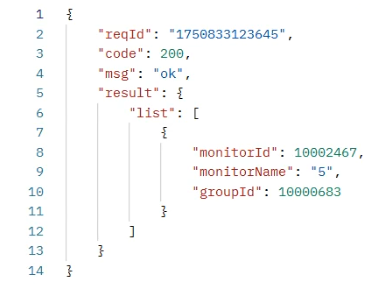
| Example | { "code": 200, "msg": "ok", "result": { "list": [ { "monitorId": 1, "monitorName": "tag 1" "groupId": "00000001" }, { "monitorId": 2, "monitorName": "tag 2" "groupId": "00000002" } ] } } | ||
Operating procedures(Dome)
Step1: Set URL:https://api.asean.v-iec.com/m16/we-data/monitors
Step2: Set parameters on Params
"boxId": "10108"
"devtype": "0"

Step3: Get sign
boxId=10108&cuid=123456789&devtype=0&lan=zh&mt=255&pid=1&sid=e95ae840f7f147718d2b7650abe6c05f&sv=1.0&ts=1750818494344&key=5cee621329f24e5cbdc43daa959ce9a1
Put the whole string above encrypted by MD5, so will get the value of "sign"
"sign":"066fd57475cbb808e1c095205b334e6e"
Step4: Set wcommon of header
{"dap":"","cuid":"123456789","sv":"1.0","mt":"255","lan":"zh","sign":"066fd57475cbb808e1c095205b334e6e","pid":"1","ts":1750818494344,"sid":"e95ae840f7f147718d2b7650abe6c05f"}

Result
3.9 Get Historical tag data list
| acturl | we-data/historydata | ||
| Function | Get historical data | ||
| Parameters | Item | Description | |
| boxId | V-box ID (Required) | ||
| monitorId | tag ID, (Required) | ||
| groupId | Group ID | ||
| monitorBeginTime | Monitoring start time, (Not required) | ||
| monitorEndTime | Monitoring end time, (Not required) | ||
| pageSize | Number of each page, 10 by default | ||
| pageIndex | Number of current page, start from 1 | ||
| Return value | Item | Description | |
| list | Historical data list | ||
| monitorName | Tag Name | ||
| monitorTime | Monitoring Time (timestamp) | ||
| monitorTime_show | Monitoring time (formatted string) | ||
| value | Value | ||
| groupName | Group Name | ||
| groupId | Group ID | ||
| totalPage | Total Pages | ||
| totalRecord | Total Records | ||
| currentPage | Current Page | ||
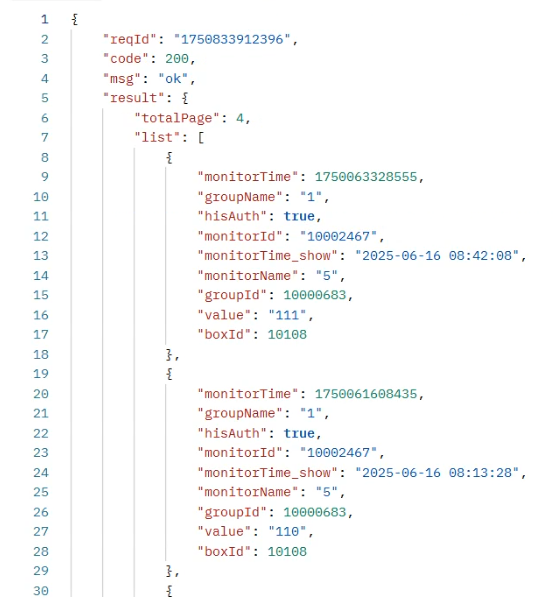
| Example | { "code": 200, "msg": "ok", "result": { "list": [ { "monitorName": "plc1", //Monitor Name "value": 12, //value "monitorTime": "15645122555", //monitoring time "monitorTime_show": "2017-05-25 12:18:30", //monitoring time "groupName": "", // group name "groupId": 1 // group ID }, { "monitorName": "plc2", "value": 13, "monitorTime": "2017-05-25 12:18:30" "monitorTime_show": "2017-05-25 12:18:30", //monitoring time "groupName": "", // group name "groupId": 1 //group ID } ], totalPage:10, totalRecord:500, currentPage:2 } } | ||
Operating procedures(Dome)
Step1: Set URL:https://api.asean.v-iec.com/m16/we-data/historydata
Step2: Set parameters on Params
"boxId": "10108"
"groupId": "10000683"
"monitorId": "10002467"

Step3: Get sign
boxId=10108&cuid=123456789&groupId=10000683&lan=zh&monitorId=10002467&mt=255&pid=1&sid=e95ae840f7f147718d2b7650abe6c05f&sv=1.0&ts=1750818494344&key=5cee621329f24e5cbdc43daa959ce9a1
Put the whole string above encrypted by MD5, so will get the value of "sign"
"sign":"6aabcd106be192898ac8cdc683a27bdf"
Step4: Set wcommon of header
{"dap":"","cuid":"123456789","sv":"1.0","mt":"255","lan":"zh","sign":"6aabcd106be192898ac8cdc683a27bdf","pid":"1","ts":1750818494344,"sid":"e95ae840f7f147718d2b7650abe6c05f"}

Result
3.10 Get Alarm tags data list
| acturl | we-data/alarmdata | ||
| Function | Get alarm data | ||
| Parameters | Item | Description | |
| boxId | V-box ID (Required) | ||
| monitorBeginTime | Monitoring start time, (Not required) | ||
| monitorEndTime | Monitoring end time, (Not required) | ||
| pageSize | Number of each page, 10 by default | ||
| pageIndex | Number of current page, start from 1 | ||
| state | Status 1-unconfirmed, 2-confirm | ||
| alarmType | Alarm events: 1-trigger alarm, 0-disarm | ||
| alarmLevel | Alarm level: 1 general alarm,2 serious alarm,3 particularly serious alarm | ||
| devtype | 0: V-Box ,1: HMI (Required) | ||
| Return value | Item | Description | |
| list | Alarm data list | ||
| monitorId | Monitor ID | ||
| monitorName | Monitor Name | ||
| state | State | ||
| value | Value | ||
| monitorTime | Monitoring time ( timestamp ) | ||
| monitorTime_show | Monitoring time (formatted string) | ||
| alarmType | Alarm Type | ||
| alarmLevel | Alarm Level | ||
| text | Alarm content | ||
| alarm_role | Alarm permissions | ||
| totalPage | Total Pages | ||
| totalRecord | Total Records | ||
| currentPage | Current Page | ||
| Example | { "code": 200, "msg": "ok", "result": { "list": [ { "monitorId": 1, "monitorName": "plc1", "state": 1, "value": 12, "monitorTime": "15215452111", "monitorTime_show": "2017-05-25 12:18:30", "alarmType": "", "alarmLevel": "", "text": "", "alarm_role": "" }, { "monitorId": 1, "monitorName": "plc2", "state": 1, "value": 13, "monitorTime": "621554211225", "monitorTime_show": "2017-05-25 12:18:30", "alarmType": "", "alarmLevel": "", "text": "", "alarm_role": "" } ], totalPage:10, totalRecord:500, currentPage:2 } } | ||
Operating procedures(Dome)
Step1: Set URL:https://api.asean.v-iec.com/m16/we-data/alarmdata
Step2: Set parameters on Params
"boxId": "10108"
"state": "2"
"devtype": "0"

Step3: Get sign
boxId=10108&cuid=123456789&devtype=0&lan=zh&mt=255&pid=1&sid=e95ae840f7f147718d2b7650abe6c05f&state=2&sv=1.0&ts=1750818494344&key=5cee621329f24e5cbdc43daa959ce9a1
Put the whole string above encrypted by MD5, so will get the value of "sign"
"sign":"d689e54257984a9804bc0822df97d1a8"
Step4: Set wcommon of header
{"dap":"","cuid":"123456789","sv":"1.0","mt":"255","lan":"zh","sign":"d689e54257984a9804bc0822df97d1a8","pid":"1","ts":1750818494344,"sid":"e95ae840f7f147718d2b7650abe6c05f"}

Result
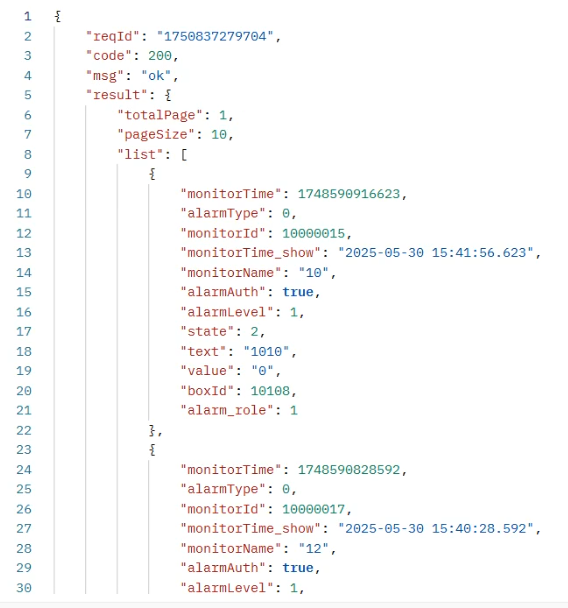
3.11 Notify the device to report real-time data
| acturl | we-data/sendSwitchToDevice | ||
| Function | Notify the device to report real-time data. Since the device now has a real-time data toggle feature, it will only report real-time data when on the real-time data page. Otherwise, it will not report. Therefore, to continuously obtain real-time data, you must first call this interface and then invoke it every 20 seconds to ensure the device keeps reporting real-time data. | ||
| Parameters | Item | Description | |
| boxId | V-box ID (Required,supports batch operations with comma-separated values (maximum 5,000 box IDs per request), e.g., 3012,4021,5036) | ||
| Example | { "code": 200, "msg": "ok", "result": {} } | ||
Operating procedures(Dome)
Step1: Set URL:https://api.asean.v-iec.com//m16/we-data/sendSwitchToDevice
Step2: Set parameters on Params
"boxId": "10108"

Step3: Get sign
boxId=10108&cuid=123456789&groupId=10000683&lan=zh&monitorId=10002467&mt=255&pid=1&sid=e95ae840f7f147718d2b7650abe6c05f&sv=1.0&ts=1750818494344&key=5cee621329f24e5cbdc43daa959ce9a1
Put the whole string above encrypted by MD5, so will get the value of "sign"
"sign":"9e933e16e03f2821a58aa9694de49969"
Step4: Set wcommon of header
{"dap":"","cuid":"123456789","sv":"1.0","mt":"255","lan":"zh","sign":"9e933e16e03f2821a58aa9694de49969","pid":"1","ts":1750818494344,"sid":"e95ae840f7f147718d2b7650abe6c05f"}

Result
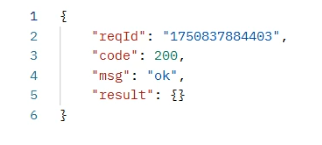
3.12 Confirm the alarm data (V-Box/HMI)
| acturl | we-data/historydata -- (V-BOX) we-data/hmiDataAction/confirmData -- (HMI) | ||
| Function | Confirm the alarm data (V-BOX / HMI) | ||
| Parameters | Item | Description | |
| alarm_cfg_ids | Alarm confirmation ID (Required) | ||
| monitor_times | Monitor time (Required) | ||
| deviceId | Device ID (Required) | ||
| alarm_types (HMI only) | Alarm Type:1: Triggered, 0: Cancelled | ||
| Example | { "code": 200, "msg": "ok", "reqId": "1663749297007", "result": {} } | ||
Operating procedures(Dome for V-BOX)
Step1: Set URL:https://api.asean.v-iec.com/m16/we-data/alarmDataAction/confirmData
Step2: Set parameters on Params
"alarm_cfg_ids": "10000017"
"deviceId": "10108"
"monitor_times": "1748588490783"

Step3: Get sign
alarm_cfg_ids=10000017&cuid=123456789&deviceId=10108&lan=zh&monitor_times=1748588490783&mt=255&pid=1&sid=e95ae840f7f147718d2b7650abe6c05f&sv=1.0&ts=1750818494344&key=5cee621329f24e5cbdc43daa959ce9a1
Put the whole string above encrypted by MD5, so will get the value of "sign"
"sign":"93e7cd5abe03040b16e645d2869706f2"
Step4: Set wcommon of header
{"dap":"","cuid":"123456789","sv":"1.0","mt":"255","lan":"zh","sign":"93e7cd5abe03040b16e645d2869706f2","pid":"1","ts":1750818494344,"sid":"e95ae840f7f147718d2b7650abe6c05f"}

Result
3.12 Get remote monitoring Url
| acturl | we-data/getMonitorUrl | ||
| Function | Get remote monitoring Url | ||
| Parameters | Item | Description | |
| deviceId | Device ID (Required) | ||
| Return value | f_ver | Version | |
| Url | Remote monitoring URL | ||
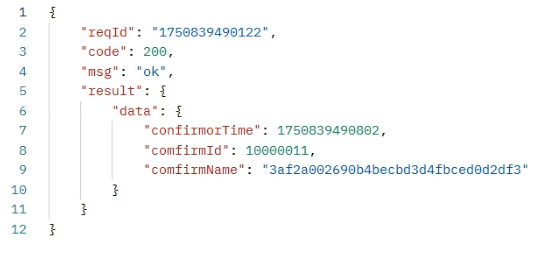
| Example | { "code": 200, "msg": "ok", "reqId": "1663749297007", "result": {“f_ver”:”V_0.5”,“url”:http://245646468...52.hmi.we-con.com.cn:1142/index.html?d=115...&token=42354...} } | ||
Operating procedures(Dome)
Step1: Set URL:https://api.asean.v-iec.com/m16/we-data/getMonitorUrl
Step2: Set parameters on Params
"deviceId": "10000467"

Step3: Get sign
cuid=123456789&deviceId=10000467&lan=zh&mt=255&pid=1&sid=e95ae840f7f147718d2b7650abe6c05f&sv=1.0&ts=1750818494344&key=5cee621329f24e5cbdc43daa959ce9a1
Put the whole string above encrypted by MD5, so will get the value of "sign"
"sign":"dd1324f34dc90683373504f31aaf24cf"
Step4: Set wcommon of header
{"dap":"","cuid":"123456789","sv":"1.0","mt":"255","lan":"zh","sign":"dd1324f34dc90683373504f31aaf24cf","pid":"1","ts":1750818494344,"sid":"e95ae840f7f147718d2b7650abe6c05f"}

Result
